Manage a corporate seminar with Joinways
A seminar in Joinways: reply the same day, book rooms by slot, sell a day-meeting package, handle the purchase order and prepare the BEO.
Updated
A seminar or a day meeting works differently from a wedding. The contact is a professional comparing several venues, lead times are short, and needs are precise: rooms and layouts, timed breaks, lunch, AV. The first venue to send a clear quote often wins.
This guide follows a seminar in Joinways, from inquiry to final invoice. The event holds the company, the contacts, the rooms booked slot by slot, the quote, the BEO and the invoicing. Each step links to the article that details the screens.
What you'll learn
- Reply the same day, with a checked room and a ready quote.
- Book several rooms across the day, each with its layout.
- Sell a day-meeting package as one line, with the right VAT.
- Frame the invoicing: purchase order, billed company, issuing channel.
- Prepare a timed day with the BEO and the client form.
Prerequisites
- The Pro plan or the 30-day trial: quotes, e-signature and invoicing aren't included in the Free plan.
- Your rooms with their "Capacity per layout" ("Theatre", "Classroom", "U-shape"…) and their "Set-up and tear-down": see Create your spaces.
- A day-meeting package in the venue's catalog ("Meetings and conferences" type), with its breaks, lunch and room: see Sell bundled packages.
- The venue's billing profile complete (company name, VAT, bank details): see Billing settings.
- For Kactus, Naboo or Funbooker inquiries: the Chrome extension.
1. Receive the inquiry and size up the company
- Open the inquiry in "Inquiries". Check the "Extracted data": date, number of attendees, budget (excl. or incl. tax, total or per person).
- Look at the badge next to the date: "Available", or "1 conflict" with the details on hover. It takes the requested hours and spaces into account.
- For a platform inquiry, the "Reply on" button followed by the platform's name opens the inquiry on the platform. With the Chrome extension, the page it reads comes back into Joinways.
- Identify the decision-maker (office manager, HR, management) and note the constraints: format, accessibility, parking, accommodation.
On conversion, Joinways looks the company up by name and fills in its record: website, contact details, VAT and company registration numbers. See Automatically enrich companies with AI.
With automatic triage, the Joinways agent prepares each complete new inquiry as a single "Convert and prepare the quote" card: the free room, catalog lines suited to the format and headcount, and the total. For a platform that forbids direct contact, it writes the text to paste on the platform. See Automatic triage of new inquiries.
2. Book the day's rooms
- Click "Convert" (or C). The form opens as an "Option". Check the venue, date and hours, then choose the rooms.
- Click "Convert to event". On the event, "Space layouts" gives each room's layout and number of seats, with a warning when the headcount exceeds it.
- In the "Room schedule" block, add one slot per moment of the day with "Add a slot": the plenary in "Theatre" in the morning, lunch, workshops in the afternoon. Each slot can have its own layout and guest count.
- Over several days, select the days, then turn on "Different hours each day".
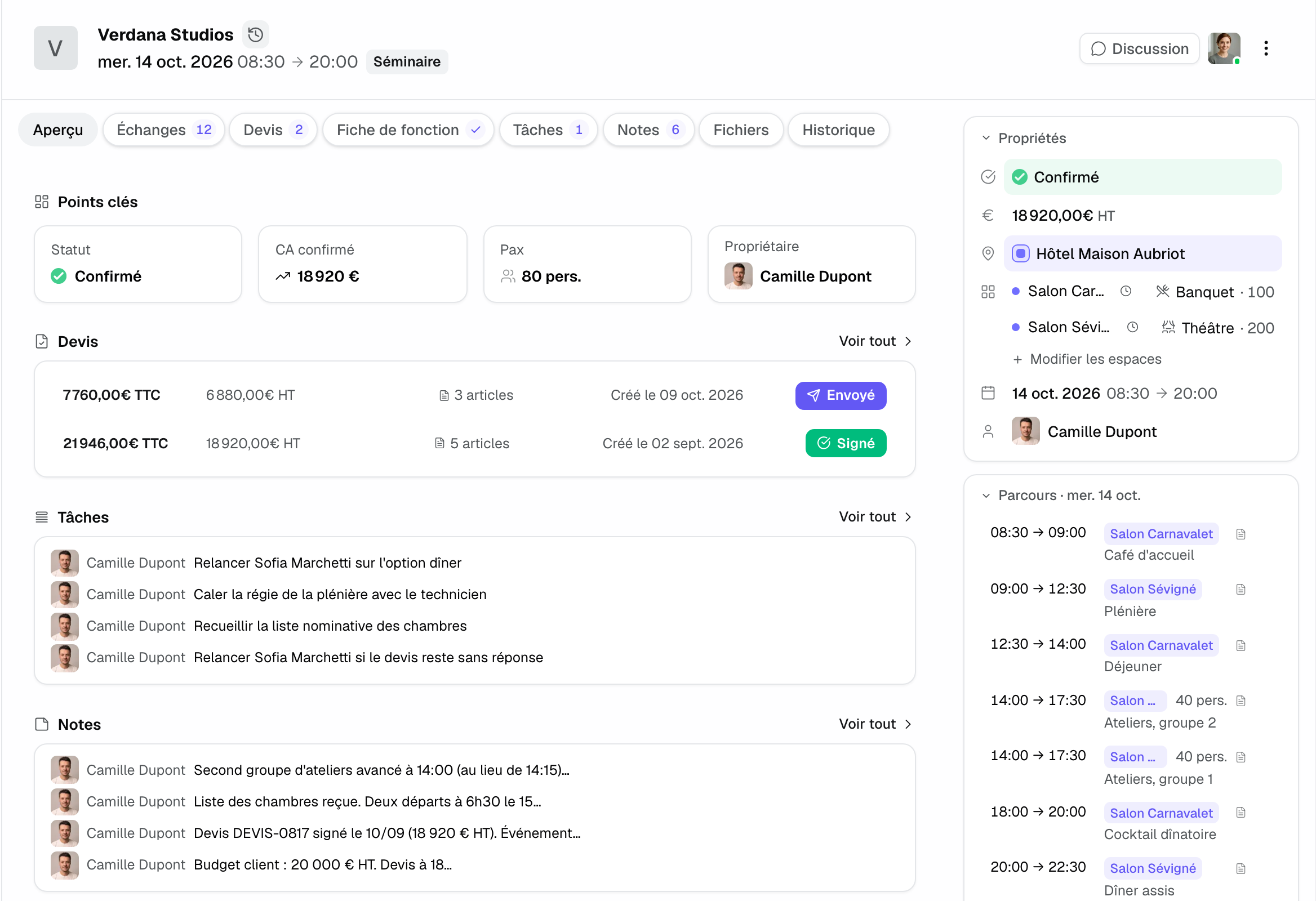
Two slots in the same room that don't overlap aren't in conflict, and the room's set-up and tear-down time is taken into account. See Create and structure an event and Manage availability and avoid double-bookings.
3. Price it with a day-meeting package
- In the "Proposals" tab, click "New proposal". Choose "Empty proposal", or "Generate with AI" with an "Eco", "Standard" or "Premium" "Price tier".
- Add the day-meeting package: it comes in as a single line, with the number of attendees as quantity and the "Package · 3 items" badge. The summary breaks VAT down by rate, for example 10% on catering and 20% on venue hire.
- The client wants a simpler lunch? Click the package badge, adjust the contents and save: the line shows "Edited for this quote", and the catalog doesn't change.
- Add as separate lines what varies from one client to the next: AV equipment, dinner, rooms. Set as "Option" what the client can add themselves.
An item with a "Default room" books its room as soon as it's added, and over several days each line belongs to its day. The client needs internal approval? "Copy the draft link" shows them the quote without counting it as sent; "Mark as sent and copy the link" moves it to "Sent" without an email. See Create a professional quote.
Important: on an event from a platform whose terms require its own quote (Kactus, Funbooker), "To file on" followed by the platform's name replaces "Send". File the quote on the platform, then record the signed quote with "Import a signed quote". See Quotes sent through a booking platform.
4. Get it signed and frame the invoicing
- Ask for the purchase order as soon as the quote is approved and enter it in the quote's "Purchase order number" field: it appears on the PDF and on invoices.
- If another company than the client pays (agency, parent company, platform), set "Bill to": see Address the proposal to a platform, an agency or another company.
- The client signs online with a code received by email. If they sign a PDF, choose "Record a manual signature" and attach the document. Either way, the event moves to "Confirmed".
- Click "Invoice". The first invoice sets the channel: Joinways (PDF with Factur-X), Stripe, Qonto, QuickBooks, or the venue's own software.
See Get a quote signed online, Invoice a signed quote and Invoice in the venue's software.
5. Prepare the BEO
A day meeting runs to a tight timetable. The BEO tells each station what to set up, where and when.
- Open the "BEO" tab. In the "Proposal" view, click "Add all to the BEO": each package item joins its section (catering, technical, layout) and each slot becomes a schedule item, with its room.
- Adjust the schedule: breaks, lunch, end of session. Choose each item's "Layout". "Shift" moves all the times forward or back at once.
- Send the client form from the "Form" view: attendees' arrival and departure, running order, dietary needs, preferred layout. "Carry over all" files the answers in their sections.
- Add your vendors (AV, caterer) under "Vendors" and let them know with "Notify".
- Click "Share": the "Team" link for production, the "Client" link for the organizer, who can approve the BEO. With several rooms, "By room" downloads one PDF per room.
See Prepare a BEO, The BEO client form and Work with vendors.
6. On the day
- The team follows the "Team" link or the PDF; a last-minute change shows on the links straight away, with nothing to resend.
- The headcount changes the day before? Fix the quantity on the BEO. If the price changes, go through an amendment: see Manage amendments to a signed quote.
- On the floor, the mobile app opens the BEO and lets you edit it: see The Joinways mobile app.
7. Wrap up, invoice and win the client back
- Click "Create balance": the invoice carries the purchase order and your legal details. Click "Mark as paid" when payment arrives, or let Stripe, Qonto or QuickBooks record it.
- Write the debrief in the "Notes" tab.
- To propose the next session, create a workflow on the "Event ended" trigger, with a delay. See Workflow examples to copy.
The "Clients" tab in reports shows your loyal clients and the ones to win back: see The Clients tab: loyalty, new clients and win-backs.
Example: a 40-person day meeting
A consulting firm asks for a day meeting for 40 people in three weeks. The inquiry arrives at 10 pm; automatic triage has prepared a "Convert and prepare the quote" card with the Verrière room, the day-meeting package and a projector. At 8 am the next day, the manager confirms, reviews the prepared email with the PDF and sends it.
The office manager gets internal approval, sends the purchase order, which the manager enters on the quote, then signs online. The manager carries the quote into the BEO, sets "Classroom" on the room, and the organizer fills in the client form: arrival at 8:45, two vegetarian meals. After the day, the balance goes out with the purchase order, and a workflow will propose the next session in three months.
Troubleshooting
The company record wasn't filled in
Cause: the company name is ambiguous or the company has little online presence. Solution: correct the name on the record, then fill in the website, address and VAT number by hand.
"Send" is replaced by "To file on" followed by a platform's name
Cause: the platform's terms require the quote to go through it. Solution: file the quote on the platform, then import the signed quote into Joinways with "Import a signed quote".
A conflict shows even though the rooms are different
Cause: the other event has no space chosen and takes the entire venue, or one of the rooms belongs to a booked combination. Solution: set the other event's spaces, or choose a room outside the combination.
Frequently asked questions
Do I need a purchase order to invoice a company?
Joinways doesn't require it, but most purchasing departments do. Enter it in "Purchase order number": it appears on the quote PDF and on invoices.
How do I price a multi-day seminar?
Select the event's days: each quote line belongs to its day and the client reads the quote day by day.
How do I handle a residential seminar?
Add the rooms to the quote. If your hotel software is connected (Mews, Apaleo, Amenitiz, Thaïs), the event's "Accommodation" block shows rooms and rates. See Connect Mews: rooms and rates on your events.
How do I reply fast to a platform inquiry?
With the Chrome extension, open the inquiry on the platform: the extension finds the inquiry in Joinways, completes it and checks availability. See Chrome extension: complete and answer Kactus, Naboo, Funbooker requests from the platform.
See also
Try it on your next inquiries for 30 days, no credit card.