Automatically enrich companies with AI
AI completes your CRM company records (website, phone, address, VAT and registration numbers) to better qualify clients without manual entry.
Updated
When an inquiry comes from a company, having its website, contact details and VAT and registration numbers at hand saves you time, from qualification to invoicing. AI enrichment automatically completes the company records in your Joinways CRM, saving you a manual search for every new contact and giving you, as soon as you open the record, what you need to qualify the client.
The goal isn't to replace your commercial judgement but to save you the few minutes of research you'd do anyway before drafting a quote or proposing an offer. You stay in control of the record: every enriched field can be reviewed, corrected or completed by hand.
In practice, a well-filled record saves you time at every step: faster qualification, better-targeted quotes, more relevant commercial follow-up. That's exactly what enrichment automates for you.
Prerequisites
A company record must exist in the CRM, created manually or automatically from an incoming inquiry. Enrichment relies on public information: it works best when the company has an online presence (website, mentions, directories).
No action needed: enrichment starts on its own when a company is created, by hand, when an inquiry is converted into an event, or when you reject an inquiry while keeping its contacts. In "Settings" > "Workflows", "Built-in" tab, the "Auto company profiles" row is "Always on".
What you'll learn
- Understand which information gets enriched
- Check a company's enrichment in the CRM
- Correct or complete a record by hand when AI didn't find everything
- Use this data to qualify your clients and tailor your offer
What AI completes
Enrichment fills the fields most useful to contact and invoice a company: website, phone, full address (city, postal code, country), VAT number and registration number. The AI starts from the company name, runs a web search and keeps only verifiable data.
- The AI looks the company up on the web from its name, and from its website if already known.
- It fills in the website and phone.
- It completes the address, city, postal code and country.
- It adds the VAT number and registration number when they're public.
These details appear in the company record's side panel and stay editable. Enrichment only fills empty fields: a value entered by your team is never overwritten.
When creating a company, type its name: Joinways suggests matching companies with their logo, then completes the record in the background.
Check a company's enrichment
Checking a record takes a few seconds and ensures you rely on trustworthy data before drafting an offer. Everything happens from the CRM.
- Open the company record in the CRM.
- Check the "Details" panel: website, short description of the business, phone, address, VAT number and registration number.
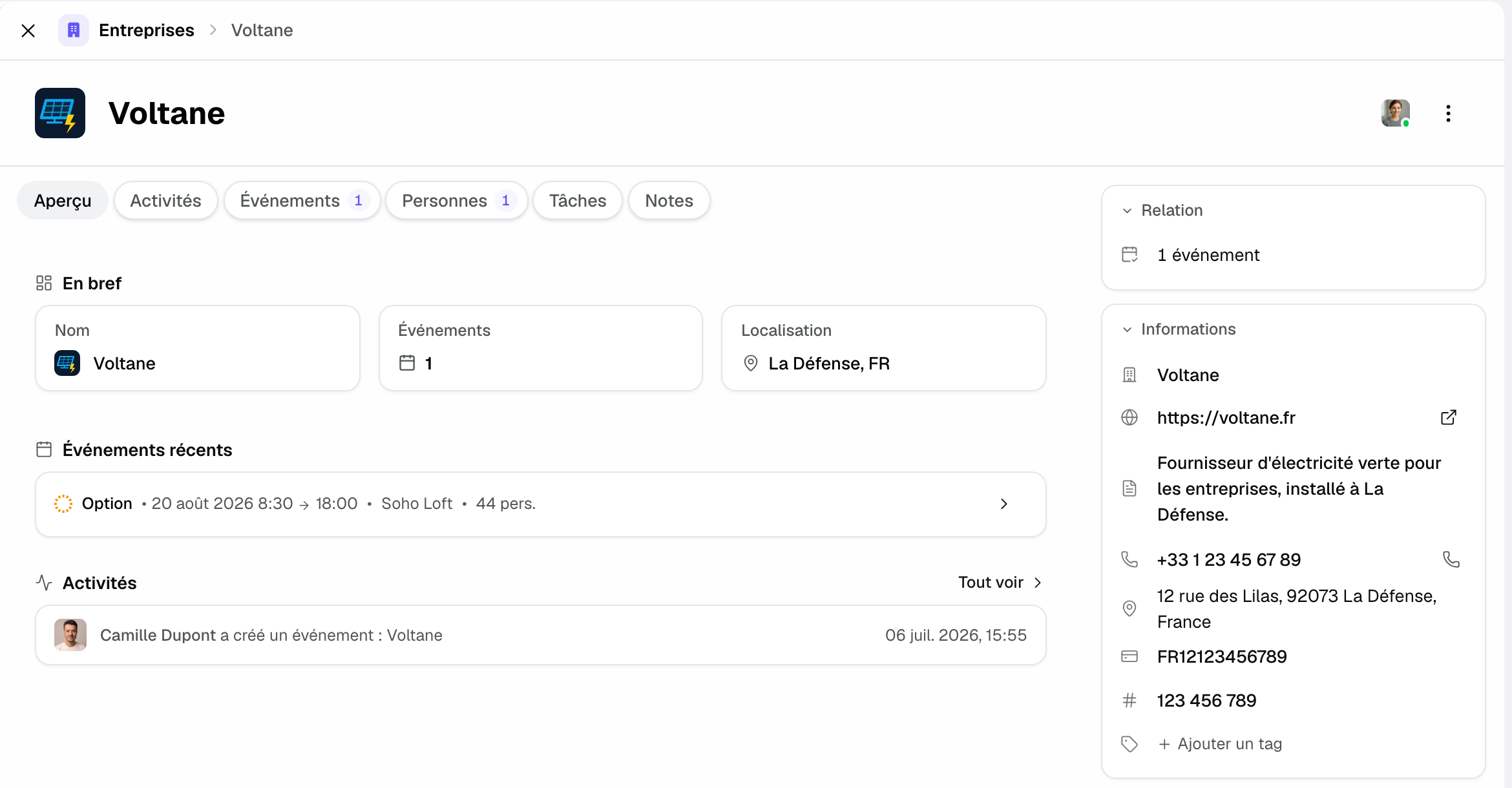
- Correct or complete missing or imprecise information by hand.
Once reviewed, you can use the record with confidence to qualify the inquiry and personalize your reply.
Correct or complete a record
Automatic enrichment doesn't overwrite your work: it proposes values you keep the right to validate. If something looks inaccurate or outdated, edit it directly in the record.
- Spot the field to correct, for example the address of a different branch than your client's.
- Enter the correct value instead.
- Add the information the AI couldn't find.
- Save: the record now reflects your validated data.
The enriched fields in detail
Here are the pieces of information AI enrichment tries to fill on a company record, and what each one gives you to qualify the client.
Phone: the head office number, to reach the company without searching.
Address: head office address, city, postal code and country.
Website: the official address, a starting point to verify the activity and positioning.
VAT number and registration number: useful to invoice a company without asking for its details again.
How it works
Enrichment starts from the company name and, if known, its website. A web search provides results that the AI cross-checks before filling the fields.
- The platform starts from the information already on the record.
- The AI searches the matching public data.
- It fills the fields that are still empty: website, phone, address, VAT, registration number.
- The values appear in the record, ready to be reviewed.
Because the source is public, quality depends on the company's online visibility: a highly present organization is well enriched, a discreet one only partially.
Edge cases
Some records can't be fully enriched, and that's normal. Here are the most common situations.
Small structure or freelancer: little public information, enrichment stays partial; complete it by hand.
Individual: there's no company to enrich, the fields stay empty on purpose.
Namesakes: several companies share the same name; check the proposed website and address.
Outdated data: an address or site may have changed; correct it if you notice a discrepancy.
Good to know: enrichment relies on public information. Always check sensitive data before using it commercially.
Best practices
- Check an unknown company's website before quoting: it often shows what it does and how big it is.
- Complete missing records to keep a reliable CRM.
- Fill in any missing VAT and registration numbers before invoicing.
- Don't hesitate to correct an imprecise value: the record is yours.
Troubleshooting
Problem: a record isn't enriched. Cause: the company has little online presence. Solution: complete the fields by hand with what you know.
Problem: the website or address looks wrong. Cause: a namesake may have been picked. Solution: check the proposed website and correct the fields.
Problem: a detail looks outdated (address, phone). Cause: the public data is old. Solution: correct the field; enrichment won't overwrite it again.
Real-world example
A seminar request comes in from an unknown company. On conversion, the company record fills in: website, head office address, VAT. Sarah opens the website, sees it's a fast-growing young company and adapts her offer, without looking up the details herself.
Another example
A wedding is requested by an individual. There is no company record to enrich, which is expected. Marc qualifies the inquiry from the date, guest count and budget mentioned.
FAQ
A record isn't enriched, is it a bug?
No. AI doesn't always find public information, especially for small businesses or individuals. In that case, complete the record by hand.
Do I have to trigger enrichment myself?
No, it runs on the platform. You only have to review and, if needed, correct the proposed fields.
Can I edit an enriched field?
Yes. Every field stays editable: replace the proposed value and save.
Where does the data come from?
Exclusively from public sources available online. Check sensitive data before commercial use.
Does enrichment work for individuals?
No, there's no company to enrich. The company fields then stay empty.
Why are the website or address sometimes wrong?
Namesake companies can cause confusion. Check the website to remove doubt, then correct.
Does this data influence the AI score?
No. An inquiry's index is computed from the message received, not from the company record.
Qualify a client from the enrichment
Once the record is complete, you save time at every step: the website tells you who the client is, and the address and VAT are ready for the proposal and the invoice.
- Open the website to understand the client's business.
- Check that the address and VAT match the entity that will pay.
- Personalize your first message from what you read.
In seconds, you reply with an already-targeted offer, which raises your chances of converting the inquiry.
Keep a reliable CRM over time
Enrichment gives a starting base, but it's regular review that keeps your CRM quality up. Get into the habit of checking a record when you use it, rather than fixing hundreds of records at once.
- Check the record at the first real contact with the client.
- Correct what has changed since the initial enrichment.
- Keep your validated data as an internal reference.
See also
Try it on your next inquiries for 30 days, no credit card.