Billing settings
Set up each venue's billing profile, contractual conditions and financial options for compliant quotes and invoices.
Updated
Compliant quotes and invoices start with good configuration. By entering your legal details and billing settings just once, you ensure that every document Joinways generates carries the right wording, the right logo and the right numbering, without you having to think about it on each send.
This page explains where those settings live, what each field contains and how they combine to produce quotes and invoices ready to hand to your clients and your accountant alike. The goal is to make compliance a background setting rather than a repeated manual check.
Prerequisites
Before you start, gather the following to move quickly:
- Be an owner or admin of the workspace, or “Owner” of the venue: the “Proposals & invoicing” section is reserved to them.
- Have your official legal details on hand (company name, tax ID, VAT number).
- Have uploaded the workspace logo in “Settings” > “General”: it is the one shown in the header of your documents.
- Know the VAT rates that apply to your activity.
What you'll learn
- Enter your legal details
- Understand automatic numbering
- Set your VAT rates
- Add legal mentions to your documents
- Check the output before sending to a client
Enter your legal details
Your legal details are your company's identity as it appears at the top of every quote and invoice. They are entered once in the venue's billing profile and reused automatically on all documents generated afterwards.
- Open "Settings" > "Venues", pick the venue, then the "Proposals & invoicing" section.
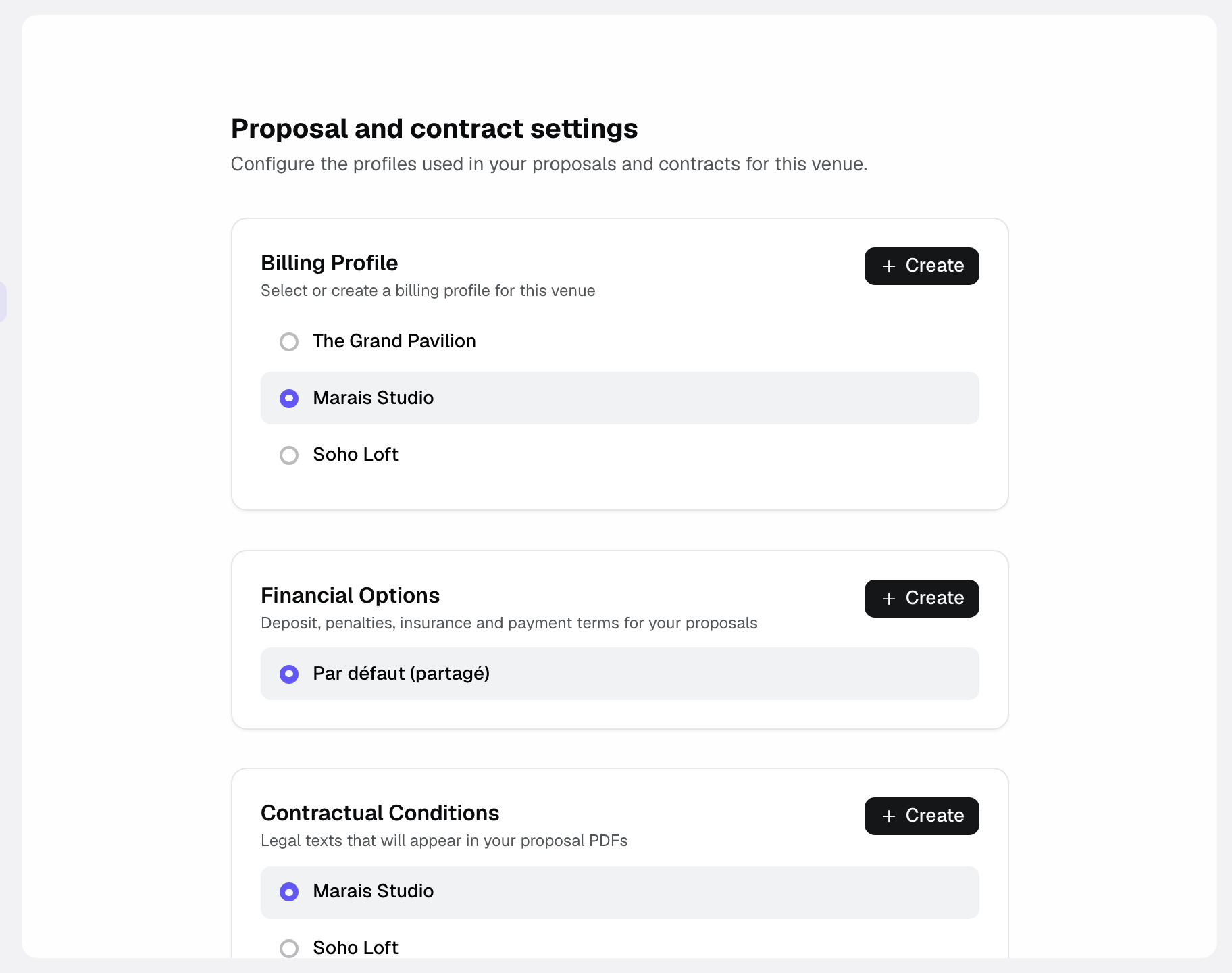
- In the "Billing profile" card, click "Create", then fill in "Company Name", "Corporate Form", "SIRET" and "VAT Number".
- Complete the billing address, phone, contact email, website and your "Banking Information" (bank, IBAN, BIC) so they appear on your documents.
- The logo shown on proposals, invoices and contracts is the workspace logo: upload it in "Settings" > "General".
- Save: the values are now reused on every new quote and invoice.
Understand automatic numbering
Invoice numbering is a legal obligation: it must be continuous, with no gaps or duplicates. Joinways handles this constraint for you, so there is nothing to configure or increment manually.
- Joinways automatically assigns a number to each invoice issued.
- The sequence is continuous, in the FACT-<venue code>-0001 format (INV-… for a venue outside French- and Spanish-speaking countries), with no reset. A voided invoice keeps its number.
- Each venue has its own sequence, independent of the other venues.
- The next number is derived from the last issued one, preventing duplicates.
From a proposal, Joinways issues a deposit invoice then a balance invoice (or a single full invoice), numbered in this sequence. The PDF embeds the Factur-X file (EN 16931 profile). You mark the invoice as paid yourself.
Set your VAT rates
The VAT rate is not set here. Each item in the venue catalog carries its own rate, which is copied onto the proposal lines, where you can change it.
- In "Settings" > "Venues" > [venue] > "Items", set the rate of each item.
- If an item has no rate, Joinways applies the standard rate of the venue country.
- Joinways calculates the VAT amount and gross total from these rates.
Add your legal mentions
Legal mentions are the mandatory or useful texts that accompany your quotes: payment, cancellation or postponement terms, or any other information specific to your activity.
- In the "Contractual Conditions" card, create a profile and fill in "Payment Terms", "Cancellation Terms", "Postponement Terms", "Price Revision Clause", "Force Majeure Clause", "Additional Clauses" or "Custom Legal Text".
- They appear in your proposal PDFs. If, in the "Contract" section, you choose "In a separate contract", they move to a two-page contract generated from the proposal and signed separately.
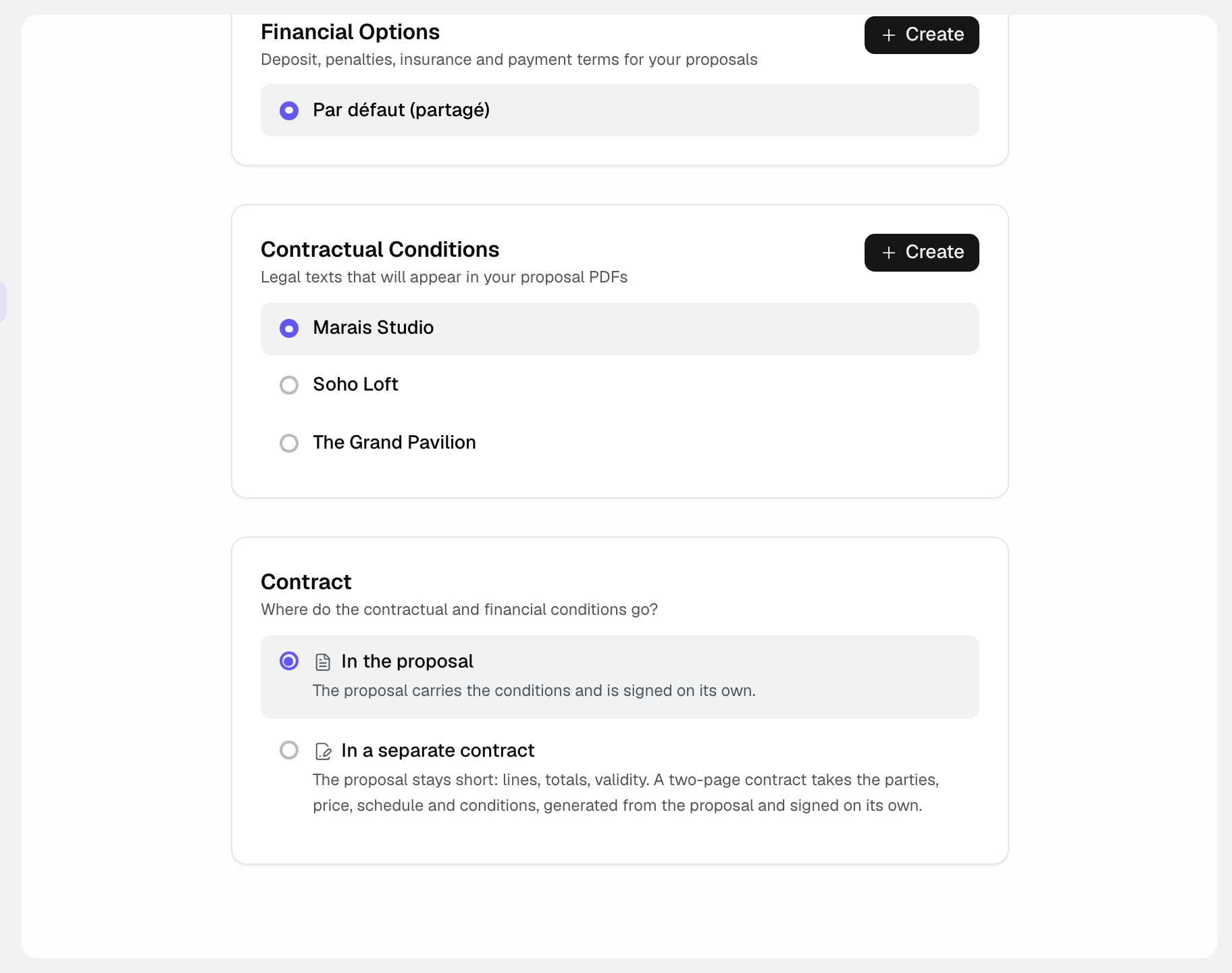
The "Financial Options" card groups the deposit, the security deposit, "Late Payment Penalties", liability insurance, accepted payment methods and the proposal validity period.
Available fields and options
Here is the full set of configurable items, with their meaning:
- "Company Name": the official name of your business shown in the header.
- "SIRET": the legal identifier of your establishment.
- "VAT Number": your intra-community VAT number.
- Address: the postal address shown on your documents.
- Contact details: phone, contact email and website.
- Logo: the workspace logo, set in "Settings" > "General".
- VAT rate: carried by each catalog item, the venue country's standard rate when empty, editable line by line on the proposal.
- Contractual Conditions: payment, cancellation, postponement, price revision, force majeure, custom clauses and legal text, shown on the proposal or the contract.
- Numbering: the continuous FACT-<venue code>-0001 sequence (or INV-…), managed per venue and not editable.
- Per-venue profile: each venue can have its own billing profile, and one profile can serve several venues.
How it works
Once your details are saved, Joinways applies them transparently. You configure nothing else: creating a document automatically triggers the reuse of the right settings.
- You enter the venue's billing profile, contractual conditions and financial options just once.
- On each new quote or invoice, Joinways reuses the header, logo and mentions.
- The invoice number is assigned automatically within the venue's sequence.
- The line VAT rates calculate the gross total with no action on your part.
Edge cases
A few situations deserve particular attention:
- Multiple venues: each venue keeps its own numbering sequence and can have its own billing profile.
- Editing after issuance: numbering already assigned does not reset, to preserve legal continuity.
- Multiple VAT rates: each item carries its own rate, and you can still adjust it line by line on a quote.
Best practices
- Double-check the spelling of your company name and tax ID before the first send.
- Test a quote to validate the rendering of the header, logo and mentions.
- Set the VAT rate of each item from the start to avoid line-by-line corrections.
- Upload a high-resolution logo for a crisp printed output.
- Configure a per-venue profile if your establishments have distinct details.
Troubleshooting
Problem: my logo does not appear on the document. Cause: the workspace has no logo. Solution: upload it in "Settings" > "General", then regenerate the proposal.
Problem: the invoice number is not what I expected. Cause: numbering is automatic and continuous per venue, with no reset. Solution: check the venue in question, as each venue has its own independent sequence.
Problem: the VAT is not what I expected. Cause: the item has no rate and the venue country is missing, or the item rate is wrong. Solution: check the country in the venue's general information and the item rate, or fix the line on the proposal.
Real-world example
An event estate creates its venue's billing profile with its company name, SIRET and VAT number, uploads its logo in the general settings and checks the VAT rate of its items. From the next quote onward, the header shows this information, the logo appears and the gross total is calculated automatically, with no re-entry.
Another example
A group operating two venues configures a distinct billing profile for each. Invoices from the first venue follow their own FACT-XXXX-0001 sequence while those from the second follow theirs, ensuring continuous and independent numbering for each establishment.
FAQ
Can I have billing per venue?
Yes, each venue can have its own billing profile, with its own details and numbering sequence.
Do I have to configure numbering myself?
No. Numbering is automatic, continuous and in the FACT-XXXX-0001 format; there is nothing to set up.
Does numbering reset?
No, the sequence stays continuous with no reset to comply with the legal continuity requirement.
Can I change the VAT rate of a specific line?
Yes. The rate comes from the catalog item, but you can adjust it line by line on a quote.
Where do my legal mentions appear?
In each quote PDF, or in the separate contract if you chose "In a separate contract" in the "Contract" section.
Are my legal details reused automatically?
Yes, once saved, they appear on all new documents without re-entry.
How can I check that everything is correct?
Generate a test quote and review the header, logo, rates and mentions displayed.
Not to be confused with your Joinways subscription
This page sets up the quotes and invoices you issue to your clients. Your own Joinways subscription is managed elsewhere, in the "Subscription" group of the settings.
- "Plans": the Pro plan, billed per venue by its number of spaces, and the "Move to Pro" button.
- "Invoices & payment": your venues and their size, the billing period, your billing details and the Joinways invoices.
Sizes and prices are detailed in the "Plans, pricing and subscription" article.
See also
- Invoice a signed quote
- Manage your venues and catalogs
- Connect Stripe
Bring every event inquiry into one queue.