Prepare a function sheet (BEO)
Turn an event into an operational roadmap: schedule, room setup, staff, services and instructions for your teams.
Updated
The BEO (Banquet Event Order), or function sheet, is the document that aligns all your teams on the day: who does what, where, at what time, for how many people. It's the bridge between sales and execution.
Where the quote describes what was sold and invoiced, the BEO turns that commercial agreement into an operational roadmap. It takes the validated services and orders them in time and space, so the kitchen, the floor, the technical crew and the welcome desk all work from a single shared reference.
Built well, the BEO removes last-minute questions and improvisation: every team knows in advance what to prepare, when, and for how many attendees. It's the tool that moves an event from "confirmed" to "ready to be delivered".
Prerequisites
- A non-archived event. The BEO is available whatever the status, but it is usually prepared once the event is confirmed.
- Ideally a quote on the event: its lines are used to generate the planning and notes. Joinways picks the signed quote first, then the accepted one.
- The key details filled in on the event: dates, venue, attendees (Pax).
What you'll learn
- Prepare an event's BEO, with or without AI
- Fill in the schedule, room setup, staff and services
- Add instructions and on-site contacts
- Share the BEO as a PDF or a public link with your teams and vendors
- Keep the BEO up to date after an amendment
Generate the BEO
The BEO starts from the event. Rather than starting from a blank page, you reuse what was already captured on the sales side: the summary comes from the event, and the schedule and services are filled from the quote. All that's left is to order and refine them for the floor.
- Open the relevant event.
- Click the event's “BEO” tab. A vN badge shows the saved version.
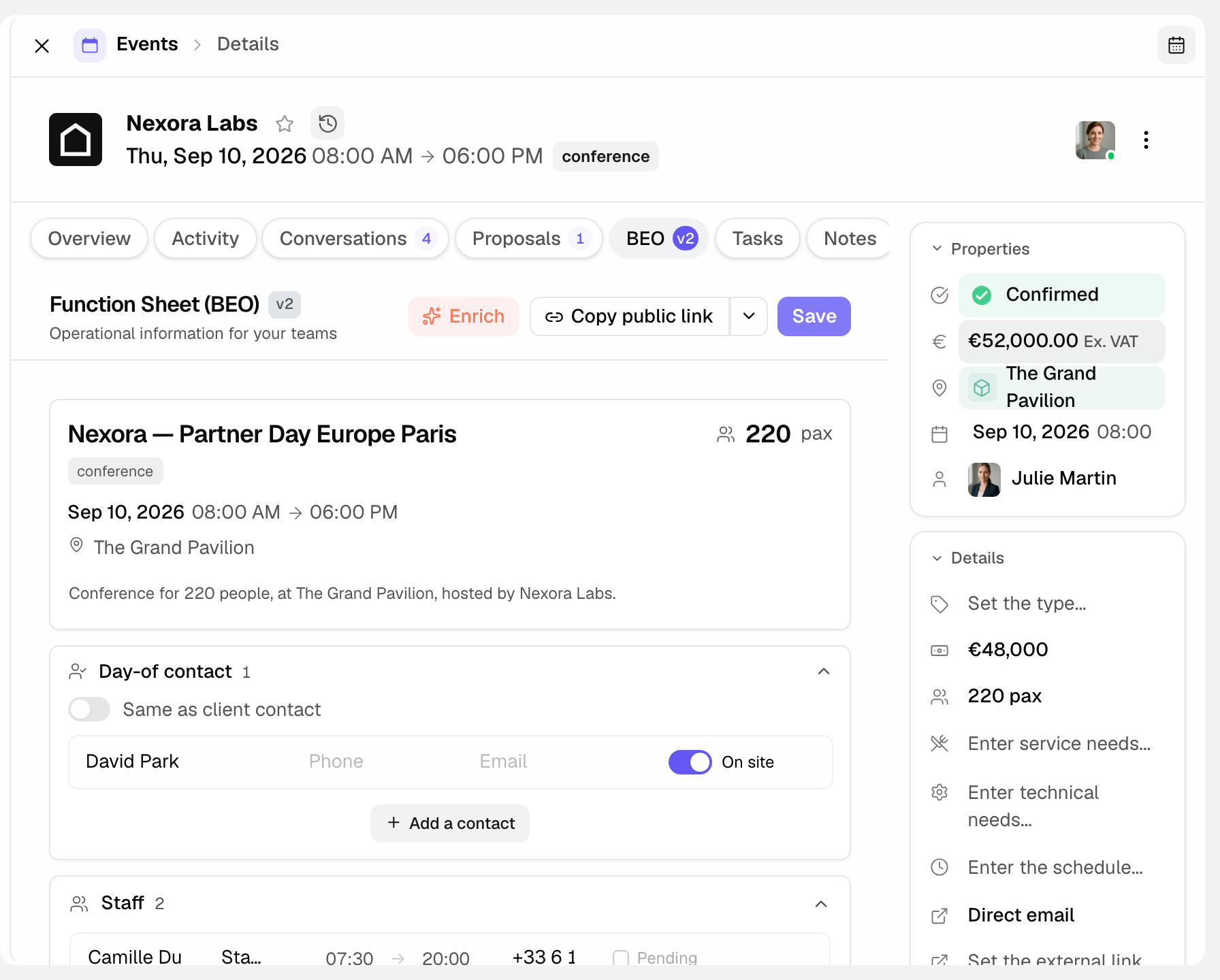
- The summary at the top (title, number, type, dates, venue, attendees) and the client contact are carried over from the event. The schedule starts empty: fill it from the quote, a document or by hand (see below).
Pre-fill with AI
To save time, the AI can fill in the BEO from a quote: it proposes a timed schedule, spreads the services and pre-fills the notes. The event schedule typed in the event details can also be turned into a planning. You keep control of every detail before sharing the sheet.
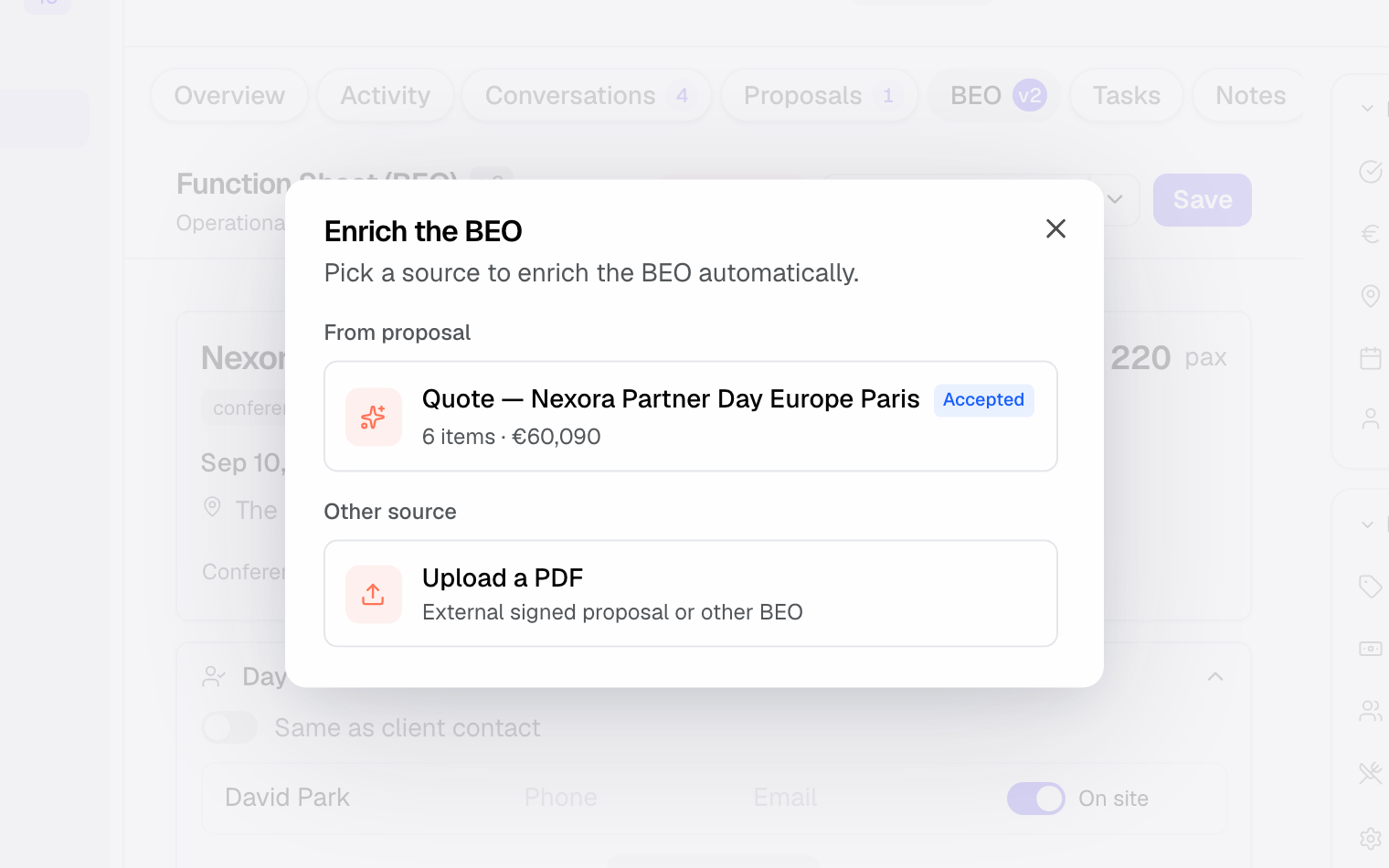
- In the “Schedule” section, click “Generate with AI”, or click “Enrich”, then “From proposal” and pick the quote. If a schedule already exists, choose “Merge (add new items)” or “Replace all”.
- Review each proposed section (schedule, room setup, services, remarks).
- Correct and complete the details only the floor knows before finalizing.
Other sources: “Enrich” also offers “Detected documents (emails and files)”, such as a platform quote, and “Upload a PDF” (external signed quote or another BEO). “Paste a schedule” turns text (email, Word document) into timed lines, and “Quick templates” lay down a day outline in one click.
Carry the proposal over line by line
On the “BEO” tab, the right sidebar has two views: “Proposal” and “Event”. The “Proposal” view shows the validated proposal, day by day and line by line, with quantity, room and times, without prices. No AI is involved: each line is carried over as it appears on the proposal.
- Proposal shown: accepted, signed, invoiced or paid proposals, in their latest version. If there is none, the latest sent proposal appears, flagged “Not validated”.
- Proposed section: each line shows where it will go (“Schedule”, “Catering”, “Staff”, “Technical” or “Activities”). “Change section” picks another one before adding.
- Adding: the + button puts the line in its section. A line linked to space slots gives one schedule line per slot, with its room and times. A staffing line creates “Pending” needs in “Staff”. The other sections get the title, quantity and description, on the line's day when the section is set to “Different per day”.
- “Add all to the BEO” spreads the lines not yet carried over, each one into its section.
- Tracking: the “lines carried over” counter and the “To carry over” / “All” filter show what is left. A line already carried over shows “Already in the BEO”.
- Platform proposals: the panel shows the lines read from the platform's PDF. If they have not been read yet, “Read the detail” starts the reading.
“Open proposal” opens it in a new tab, so your additions are not lost. Save the BEO once the lines are carried over.
Fill in the sections
The heart of the BEO is its sections: they describe the event from an execution angle. Fill them in the order of the run sheet so the document reads the way the day will unfold, from welcome through to the end of service.
- Fill in the “Schedule” hour by hour, from arrival to the end.
- Describe the room configuration in “Room Setup” (U-shape, classroom, banquet, number of chairs, screens…).
- Check the attendee count shown in the summary: it comes from the event, so correct it in the event details if needed.
- Detail the services in “Catering”, “Activities” and “Technical” (the heading adapts to the event type).
- Add contacts in “Day-of contact” (“Same as client contact” by default, “On-site” for those present) and general instructions in “Remarks”: access, deliveries, points to watch.
- List the day-of team in “Staff”: role, call time, end time, phone; a need not yet filled stays “Pending”. For a multi-day event, each section can switch from “Same for every day” to “Different per day”.
Share and execute
Once saved, the BEO becomes the day's reference. The public link always shows the latest saved version; the PDF is a snapshot taken when you generate it.
- Click “Generate PDF” to download the sheet, or copy the public link (“Link” menu) to send it to your teams and vendors.
- Update it if the event changes (an amendment may impact the BEO).
- Click “Freeze BEO” to pin the distributed version: your team is notified, and any later change shows “Modified since freeze”.
The sections of a BEO
A complete BEO is organized around a few key sections. Here is each one and what it describes, so nothing is missing on the day.
- Schedule: hour-by-hour run sheet of the day (arrival, cocktail, dinner, end).
- Room Setup: room configuration (theater, banquet, U-shape…) and equipment in place.
- Day-of contact and Staff: who to reach on site, and the team on duty with its hours.
- Catering, Activities and Technical: menu, drinks, entertainment, equipment and technical needs.
- Remarks: special instructions, access, delivery times, points to watch.
How it works
The BEO is a tab of the event: its operational extension. The summary (dates, venue, attendees) and the client contact come from the event; the schedule and notes are filled from a quote, a document or by hand, and remain editable.
Every save increments the BEO version (v2, v3…). Freezing pins the distributed version: the PDF, the public link and the tab flag “Modified since freeze” if the sheet changes afterwards, and your team is notified.
Freezing also follows the event's spaces: a space slot added, changed or removed after the freeze flags the sheet “Modified since freeze”.
The PDF and the public link list the booked spaces, with the layout chosen for the event and the capacity when set, for example “Salon - Theatre”. The layout is picked on the event page, under “Space layouts”.
Edge cases
If the event changes after the BEO is created (for example through an amendment to the signed quote), the summary follows the event, but the schedule and services do not update on their own. Review the sheet and realign it, if needed with “Enrich”, “From proposal”, then “Merge”.
If the BEO doesn't carry the right services, it was usually generated from another quote than the right one. Click “Enrich”, “From proposal”, pick the right quote, then “Replace all”.
Tip: let the AI fill the BEO from the quote, turn the event schedule into a planning, then adjust the details only the floor knows.
Best practices
- Build the BEO from the up-to-date signed quote, ideally once the event is confirmed.
- Review the BEO after every amendment so it reflects the latest validated version.
- Download and share the PDF with every team involved (kitchen, floor, technical).
- Freeze the BEO before sharing it: you then know which version the team worked from.
- Be explicit about sensitive instructions (allergies, contacts): they prevent mistakes on the day.
- Fill in the timing in real chronological order: a readable run sheet avoids overlaps between teams.
- Double-check the attendees (Pax) right before the event: it's the number the kitchen and seating plan depend on.
Troubleshooting
The BEO doesn't show the right services.
Cause: the BEO was generated from another quote than the right one, or before the quote's latest change.
Solution: click “Enrich”, “From proposal”, pick the up-to-date quote, then “Replace all” (or “Merge” to keep only the additions).
The BEO no longer matches the event after a change.
Cause: an amendment changed the event, but the BEO wasn't revised.
Solution: reopen the BEO, compare it to the latest validated version of the event and fix the impacted sections.
Teams don't have the right version on site.
Cause: an older PDF was shared before the latest update.
Solution: share the public link instead, which is always up to date, or regenerate the PDF and freeze the BEO to mark the distributed version.
Real-world example
For a 60-person seminar, the BEO specifies: coffee welcome at 8:30am, theater setup, buffet lunch at 12:30pm (3 vegetarian, 1 gluten-free), break at 4pm. Teams know exactly what to prepare.
The kitchen prepares the buffet and anticipates the special diets; the floor sets up the theater configuration; the welcome desk knows when to receive participants. A single sheet, read by everyone, is enough to frame the day.
Another example
For a gala dinner of 120 attendees, the BEO lays out a different run: a welcome cocktail at 7pm, a seated banquet dinner at 8:30pm, with a seating plan to respect and a technical vendor for sound and lighting.
Here the attendees (120) and the setup (banquet, seating plan) matter more than timing alone, and the “Technical” section becomes central. The same document adapts to very different events while keeping the same logic.
FAQ
Does the BEO update automatically after an amendment?
Only partly. The summary (dates, venue, attendees) follows the event; the schedule and services do not. Review the BEO after every change and update it, for example with “Enrich”, “From proposal”.
What is the BEO generated from?
The summary comes from the event. The schedule and notes come from a quote (signed first), a document detected in emails or files, an uploaded PDF, pasted text or manual entry.
Can I let the AI fill in the BEO?
Yes: “Generate with AI” fills the schedule and notes from the quote, then you adjust the operational details.
How do I share the BEO with my teams?
Download it with “Generate PDF” or share its public link (“Copy public link”), which always stays up to date.
What exactly does a BEO contain?
An event summary, the day-of contacts, the staff, the timed schedule, the room setup, catering, activities, technical needs and a general remark.
Why doesn't the BEO show the right services?
Most often it was generated from another quote. Run “Enrich”, “From proposal” again with the right quote and choose “Replace all”.
Should I keep the BEO after the event?
It stays in the event's “BEO” tab with its version number. Freeze it before the day to know which version the service was delivered against.
Which teams use the BEO on the day?
Mainly the kitchen, the floor and the technical crew; the PDF or the public link serves as their shared roadmap.
See also
- Prepare a function sheet (BEO) with AI
- Create an event
- Amendments to a signed quote
- Tasks and follow-up
Bring every event inquiry into one queue.