The Clients tab: loyalty, new clients and win-backs
Clients in the period, revenue from repeat clients, return rate, ranking, regulars to win back and where new clients come from.
Updated
A client who holds their offsite with you every spring is worth more than a new inquiry, provided you reach out before they go elsewhere. Without follow-up, these regulars get lost in the contact list.
The "Clients" tab looks at revenue from the clients' side: how many came in the period, what share of revenue comes from repeat clients, how many come back, who the biggest clients are, which regulars have nothing booked, and through which channel new clients arrive.
What you'll learn
- What reports call a client.
- Read the four indicators: clients, revenue from repeat clients, return rate, revenue per client.
- Use the client ranking and open their record.
- Spot regular clients to win back.
- See where new clients come from.
Prerequisites
- Access to reports: "Owner", "Admin", "Member" or "Read-only" role.
- Confirmed events linked to a company or a contact. See Manage companies.
1. What counts as a client
A client is the event's company, or its contact when the event has no company. An event with neither company nor contact is linked to no client; a note shows how many there are in the period.
Events are dated as in the "Confirmed revenue" tab: on the day they take place. A client who "came" in the period has at least one confirmed event in the period. The period can reach into the future.
2. Read the four indicators
Open "Reports" > "Clients" and choose the period and the comparison.

- "Clients": clients who came in the period, including new ones (first event in the period).
- "Revenue from repeat clients": share of identified clients' revenue made by clients who had already come before the period.
- "Return rate": clients who came in the comparison period and came back in the period. A comparison is required; with "No comparison", the card says "Pick a comparison to see it".
- "Revenue per client": the period's revenue divided by the number of clients who came, with the share of the top five clients. Events without an amount count as 0.
A note recalls when your history in Joinways starts: a client who came before that date is not recognised and counts as new. When the period ends after today, a client from the comparison period who has not booked yet is not counted as returning.
3. Check the client ranking
"Top clients" lists the clients who came in the period by revenue excluding tax: "Client", "Events", "Revenue excl. tax" with its share of the total, and "Next event". Below the name, "Client since" gives the month of the first event, or the "New" badge.
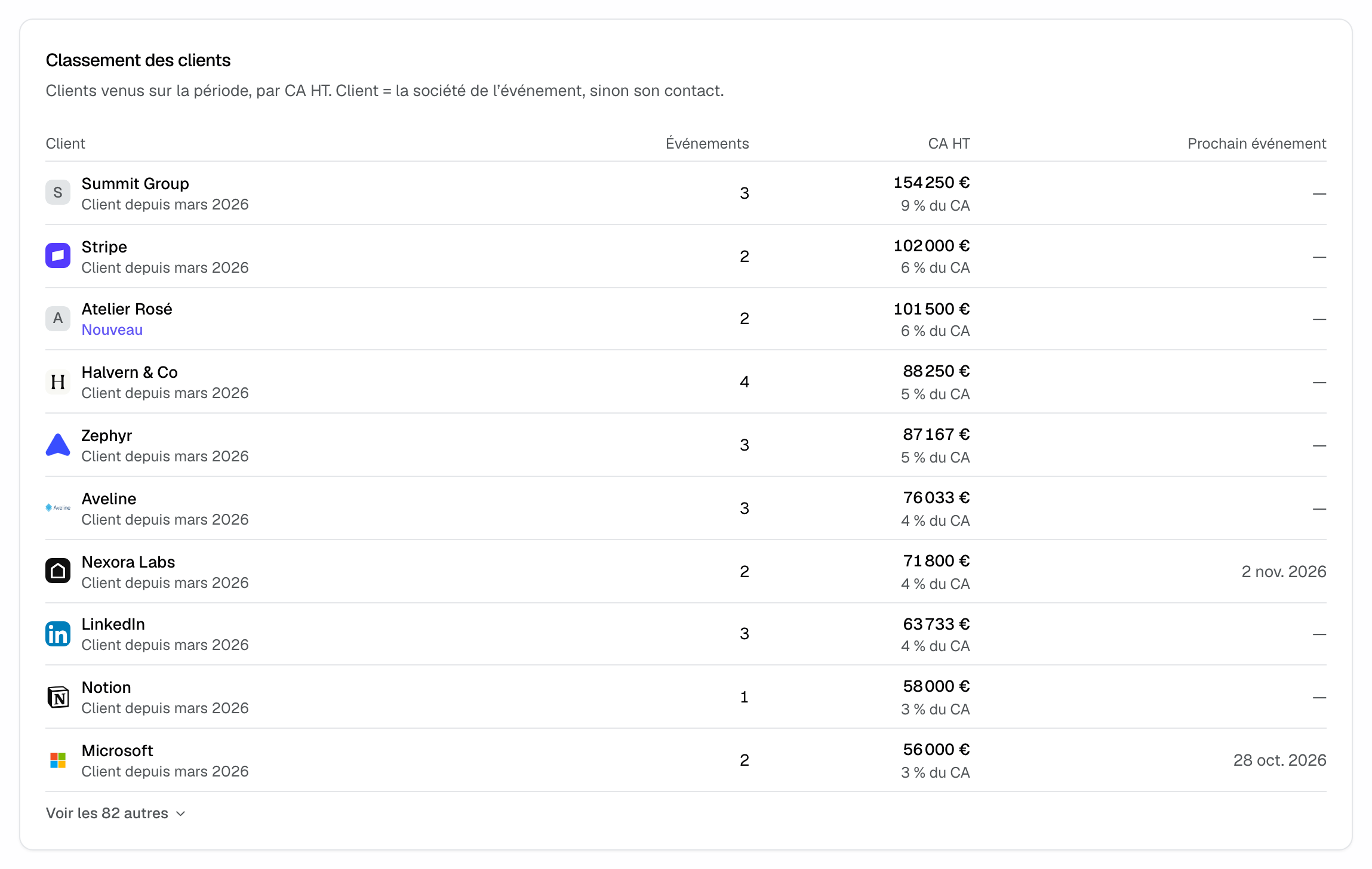
Click a name to open the company or person record. The first ten clients show; "Show N more" expands the rest.
4. Win back regular clients
"Clients to win back" lists clients who came at least twice, with no event booked, whose last event was 6 months to 3 years ago. This list does not depend on the chosen period. It is sorted by lifetime revenue excluding tax, with the number of events and how long ago the "Last event" was.
Tip: a yearly client (offsite, year-end party) appears in this list before their usual date. That is the right time to call or write to them from their record.
5. See where new clients come from
"New clients by source" gives the source of the first event of clients who came for the first time in the period: "Source", "New clients" and "Revenue excl. tax". You see which channel brings clients, not just inquiries.
Example: an estate building loyalty with companies
An estate picks "Last 12 months" compared "vs same period last year". "Revenue from repeat clients" reaches 60%, but "Return rate" is only 35%. In "Clients to win back", three companies that came every spring have nothing booked this year: the sales manager contacts them in January, before they launch their tender.
Troubleshooting
"Return rate" shows a dash
Cause: no comparison is chosen, or the comparison period predates your history in Joinways. Solution: choose "vs same period last year" or "vs previous period" over a period covered by your data.
Nearly all clients are "new"
Cause: your history starts recently, and clients who came before are not recognised. Solution: import your event history with their companies; see Import and export your data.
The same client appears twice
Cause: their events are linked to two different companies, or some to a company and others to a contact only. Solution: link all their events to the same company.
"Export" is not offered
Cause: the "Clients" tab cannot be exported. Solution: use the on-screen ranking, or the companies export.
Frequently asked questions
Does an event without an amount count?
Yes for the number of clients and events, as 0 in revenue.
Does the clients to win back list follow the period?
No. It is always computed from today: last event 6 months to 3 years ago, nothing booked.
Is revenue the same as in "Confirmed revenue"?
Yes. Both tabs read the same confirmed events on the same date, minus those without a client.
Do the venue and source filters apply?
Yes. With a filter, only the events of the selected venues or sources count. For a client, the source is that of each of its events.
See also
Try it on your next inquiries for 30 days, no credit card.