Which industry guide should you follow?
The shared path from inquiry to final invoice, and which guide to follow for a wedding, a corporate seminar or a private party.
Updated
The industry guides walk through one type of event end to end, from the first inquiry to the day after the event. A wedding, a corporate seminar and a private party use the same Joinways tools, but not at the same pace: the contacts, the lead times and the logistics differ.
This page sets out the path the three guides share, then helps you pick the one that matches your most frequent inquiries.
What you'll learn
- The shared path: from inquiry to final invoice.
- Which guide to follow based on the inquiry's profile.
- The settings that adapt Joinways to your type of event.
Prerequisites
- A venue and its spaces in Joinways, with their capacity: see Manage your venues and their spaces.
- Your inquiry address connected to Joinways: see Connect your business email (contact@, info@…).
- An up-to-date catalog on the venue: see Manage your catalog and pricing.
- The Pro plan or the 30-day trial for quotes, e-signature, invoicing and workflows. The Free plan doesn't include them: see Plans, pricing and subscription.
1. The path the three guides share
Every guide follows the same steps. Only the pace and the options change.
- Receive and sort. The inquiry lands in "Inquiries", read by AI: date, guests, budget. An "Available" or "1 conflict" badge checks the date against your schedule. The Joinways agent can prepare each new inquiry before you open it. See Process an incoming inquiry.
- Convert to an event. "Convert" creates the event as an "Option", with the client, the dates and the hours, day by day if needed. See Create and structure an event.
- Price it. The quote draws on the venue's catalog: items, bundled packages, and options the client ticks themselves. See Create a professional quote.
- Get it signed and invoice. The client signs online with a code received by email, and the event moves to "Confirmed". You then invoice the deposit, then the balance. See Get a quote signed online and Invoice a signed quote.
- Prepare the day. The BEO picks up the quote line by line, the client form collects the practical details and vendors confirm from their own link. See Prepare a BEO.
- Track and measure. Event stages show where each booking stands; reports measure your inquiries, sales and activity. See Track progress with event stages and Reports: tabs, filters and exports.
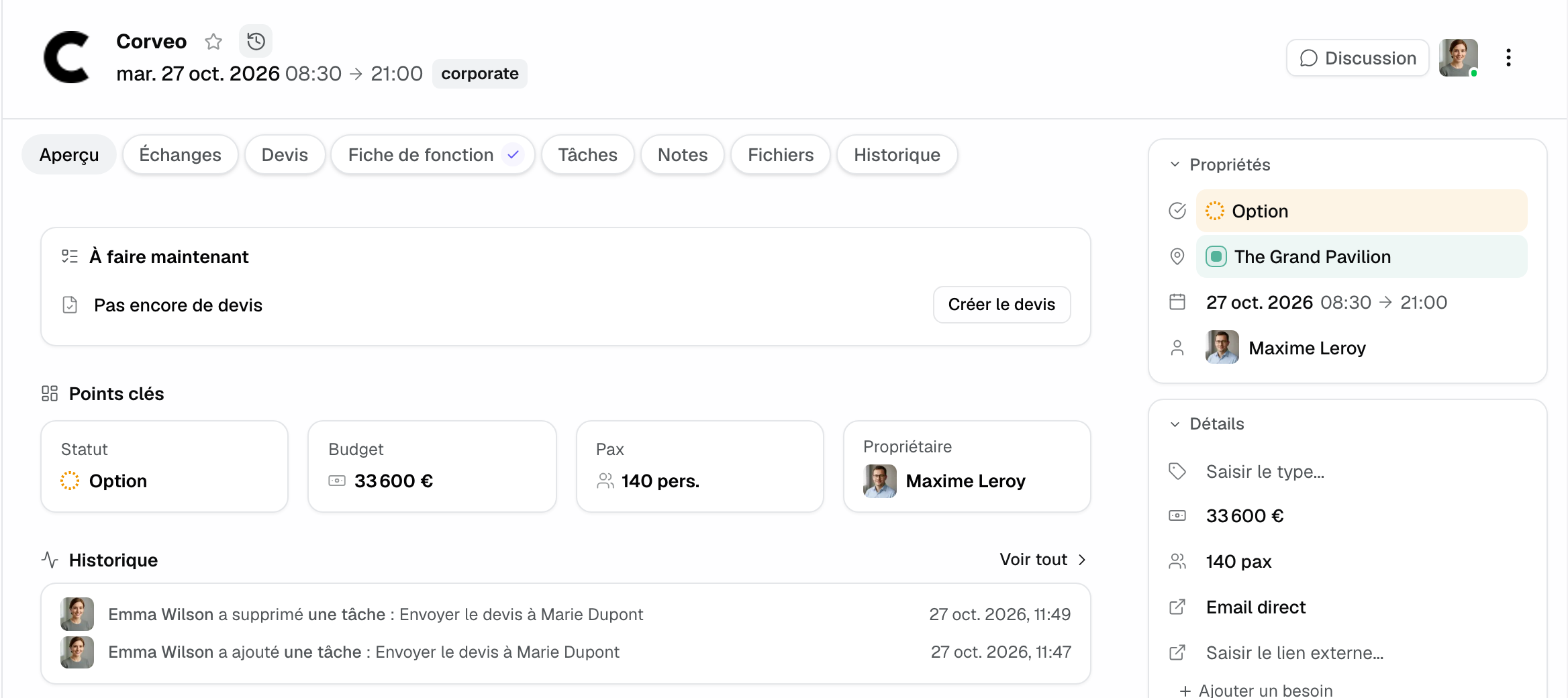
Once converted, everything attaches to the event: conversations, quotes, BEO, tasks, notes, files and history. At the top of the "Overview" tab, the "To do now" block shows the next action: reply to a message, create, send or follow up on the quote, or handle your next task.
2. Pick your guide
Go by the inquiry's profile rather than the event's name.
Wedding: long cycle, private client
The decision takes months, often after a visit. The guide covers the hold on the date and the second hold, the two-day event, the quote with options, the deposit, amendments, the client form and the vendors on the day.
Corporate seminar: business contact, short lead time
The company compares several venues and decides fast. The guide covers the company record, booking rooms by slot, the day-meeting package, the purchase order, platform inquiries and a minute-by-minute BEO.
Private hire or private party: a few hours, heavy logistics
It all happens in one evening, with a single contact. The guide covers hiring the entire venue, the minimum spend, drinks options and the extra hour, the security deposit, the deposit and the evening team.
3. Adapt Joinways to your type of event
- Event stages: in "Settings" > "Event stages", the "Event venue" preset adds "Visit scheduled", "Proposal sent" and "Second hold" under "Option", then "Contract sent", "Deposit received", "BEO approved" and "Done" under "Confirmed".
- Packages: a day meeting or a wedding package sells as one line, each item keeping its VAT rate. See Sell bundled packages.
- Client form: the starter questions follow what the venue hosts. See The BEO client form.
- Workflows: follow-up on an unanswered quote, a reminder before the event, a message after. See Create your first automation workflow.
Example: an estate that hosts weddings and seminars
An estate hosts seminars on weekdays and weddings at weekends. Its manager starts with the Seminar guide, since those are most of her inquiries: a day-meeting package in the catalog and a seminar-oriented client form. For weddings, she then adds the "Second hold" stage and a separate contract. The path stays the same; only the venue settings and the pace change.
Frequently asked questions
Do I need to read all three guides?
No. Start with the one that matches your most frequent inquiries. All three follow the same outline.
My event doesn't fit any of the three guides?
Start from the closest one. A conference or a product launch follows the Seminar guide; a birthday or an after-work party, the Private party guide.
Do the guides replace the detailed articles?
No. They give the overall path and link, at each step, to the article that details the screens and settings.
Can I follow these guides on the Free plan?
Partly. The Free plan includes inquiries with AI extraction, events, the CRM and reports, for one venue with two spaces and 10 inquiries a month. Quotes, e-signature, invoicing and workflows need the Pro plan or the trial.
See also
Try it on your next inquiries for 30 days, no credit card.