Get a quote signed online
Send the signature link, let the client sign in a few clicks: the event confirms itself and your team is notified.
Updated
Online signing closes the gap between sending a quote and holding a booking. The client opens a link, reads the proposal and signs from their phone, with no account to create and nothing to print. It is often the difference between a date confirmed the same evening and one that drifts for a week.
This article covers the whole path: sending the quote for signature, what the client sees, what Joinways does the moment the signature lands, and the two other routes to the same result when a client will not sign online.
Which plan you need
Quotes and e-signature are part of the Pro plan. On Free the quotes module is closed, so there is nothing to sign.
The 30-day trial includes proposals and e-signature, with one limit: three signatures in total for the whole trial. Every recorded signature counts, whether online, manual, imported from a platform or on a contract. Beyond that, the client can no longer sign online: the signature page tells them e-signature is not available. A manual signature is still possible. On Pro, everything is unlimited.
Prerequisites
- A quote that is finished and reviewed: this is the version the client will sign.
- The right contact on the event, with a valid email address.
- Your Gmail or Outlook account connected, if you want to send the quote from Joinways.
The statuses of a quote
A quote moves through a short set of states, and the signature is the tipping point.
- Draft: you build and edit freely. Nothing has left your workspace.
- Sent: the quote is with the client and waiting on them. This is the state a follow-up rule watches.
- Accepted: the client has agreed without a signature being recorded.
- Signed: the agreement is recorded and timestamped. This is what confirms the event.
- Rejected and Cancelled: the quote is out of play. A follow-up rule stops on its own.
An amendment to a signed quote has its own states (Amendment pending, Amendment to sign, then Amendment signed). Once signed, it supersedes the original quote as the contract.
Send a quote for signature
Every proposal has its online signature link, prepared by Joinways when the proposal opens. While it is being prepared, an indicator replaces the actions; if preparation fails, Retry starts it again.
- Open the quote and read it through. Once it is signed, any change goes through an amendment.
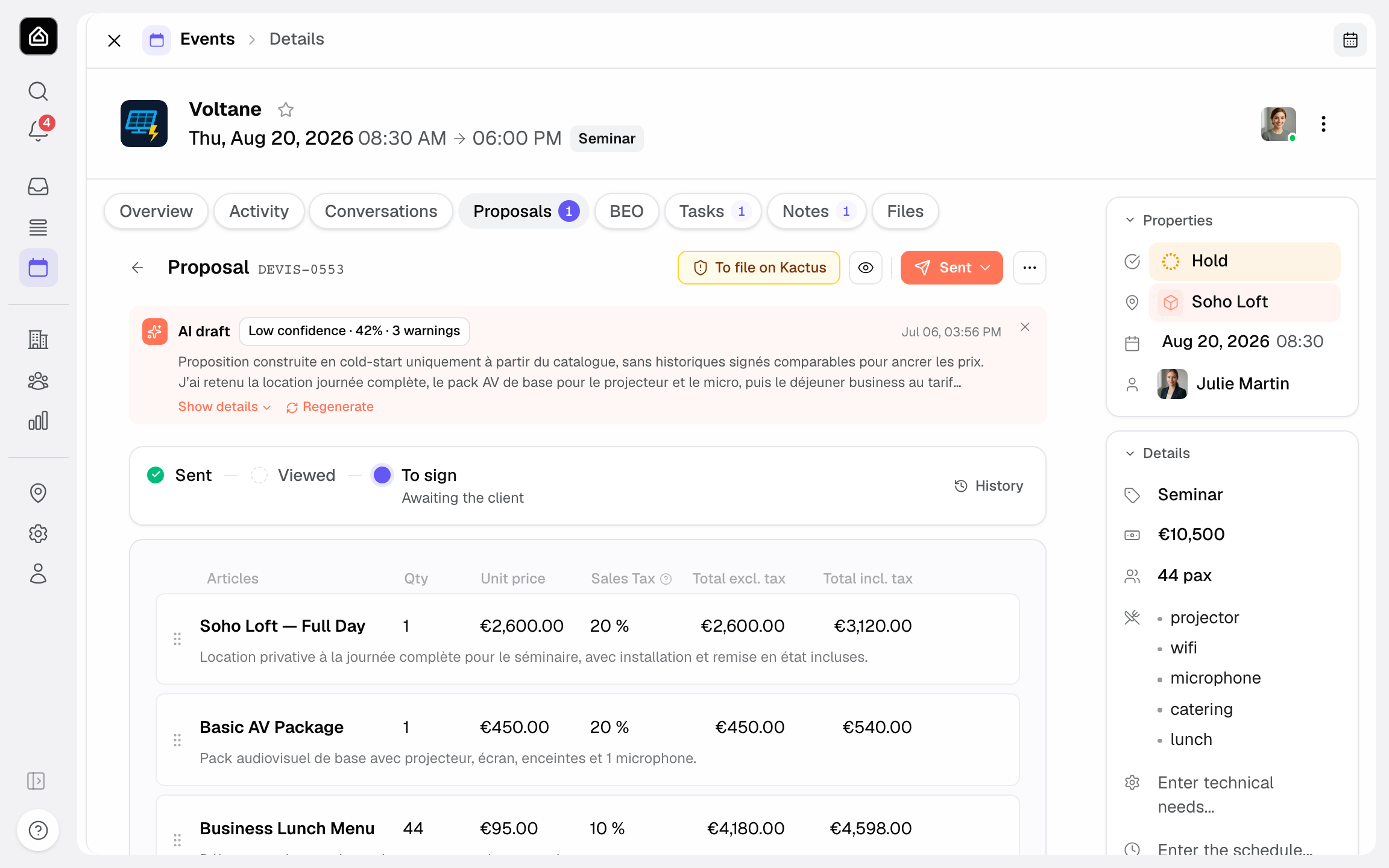
- Click Send to email it from Joinways. The message already contains the signature link, and the send is recorded in the file.
- To share it another way, use Copy the signature link and paste the link into your own message.
- The quote moves to Sent. From there, Resend sends it again if the client has lost the message.
The tracking strip at the top of the proposal moves to Viewed as soon as the client opens the page, with the number of views. If no follow-up is in place, the No automatic follow-up on sent proposals notice offers Enable the day 3 / 7 / 12 sequence.
Sending from Joinways uses the connected mailbox of the person sending, so the client answers the person they already deal with.
Exception: on an event that came from a platform whose terms require the proposal to be filed there (Kactus, Funbooker), Send and the signature links give way to a To file on chip followed by the platform's name. Open the request on the platform: the Joinways extension fills in its proposal form. Send by email anyway remains possible after a confirmation, at your own risk. A proposal filed on the platform shows Signature managed by the platform.
What the client sees
The link opens a page showing the quote as you built it: the services, the options separated from the base total, your branding. The client reads it, then signs on the page, from a phone or a computer. No software, no account.
The page is shown in the client's language when Joinways knows it, so a quote prepared in French reaches an English-speaking client in English, with the amounts unchanged.
What happens the moment it is signed
The signature is not just a status change: Joinways runs a short chain on its own.
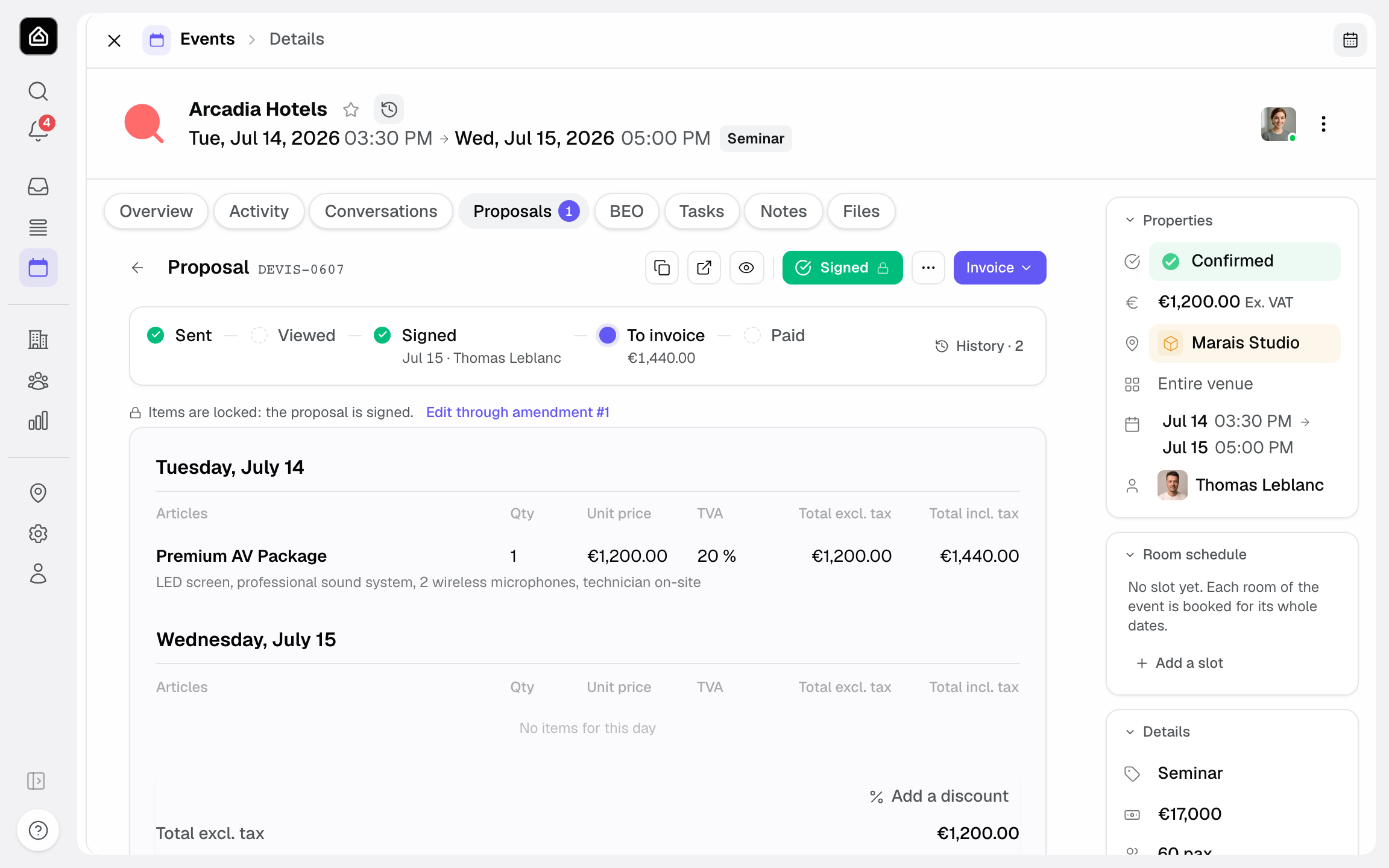
- The quote moves to Signed, with the signer's identity and the exact date and time kept alongside it.
- The event moves to Confirmed by itself, and its confirmed amount is recalculated from the live signed proposals. If one of your stages is linked to Proposal signed, the event moves to it as well.
- A notification reaches the event owner, and the signature is written into the event's activity.
- The signed PDF is stored with the quote and can be reopened at any time.
One guard matters: a signature on an event that is lost, cancelled or archived does not revive it. The quote is recorded as signed, the event's status is left alone, and you decide what to do with it.
Joinways does not send the client a confirmation on its own. To thank them automatically, create a workflow on the Event confirmed trigger: the signature confirms the event, and the workflow runs within the following hour. Otherwise, send the message yourself from the event.
Since the event confirms itself, keep an eye on the confirmed amount right after a signature. It is the figure your dashboards rely on.
Record a signature collected on paper
Some clients need a stamp, an internal sign-off or two signatures. Record a manual signature keeps the file straight without forcing them online.
- Download the quote as a PDF and send it to the client.
- Get the signed document back, scanned or photographed clearly.
- On the quote, choose Record a manual signature, confirm the signer and the signature date, and attach the signed PDF.
The quote reaches the same Signed status and the same chain runs: the event confirms, the amount is recalculated, the PDF stays attached. The only difference is that the date is the one you entered rather than one captured automatically.
Quotes signed on a booking platform
When a request came through a booking platform and was signed there, use Import a signed proposal: attach the PDF signed on the platform and Joinways records the proposal as signed on the right event. Your history stays complete even for deals you never quoted from Joinways.
A contract separate from the proposal
By default, the contractual and financial conditions sit in the proposal. A venue can choose In a separate contract in its settings, Proposals & invoicing tab, Contract section. The proposal then stays short, and as soon as it is accepted or signed a Contract block appears under its lines. Generate the contract opens a panel where you pick the language, the purpose and the clauses. Send for signature copies the contract's signature link, which the client signs online like a proposal. Revenue stays carried by the proposal.
Traceability
An online signature keeps the signer's identity and the exact moment of signing with the quote, and the signed PDF alongside it. In a dispute you can show who signed what and when.
That is also why a signed quote is never edited in place. Any later change goes through an amendment, which keeps the original quote intact and becomes the contract once signed in turn.
Edge cases
- Quote edited after sending: the link always shows the saved version, and that is the one the client signs. Resend the quote to let them know it changed.
- Wrong signer: the page names the person expected to sign. Check the contact on the event before sending rather than after.
- Two signatures required: collect them on paper and record a manual signature. Online signing takes one signer.
- Trial cap reached: after three recorded signatures, online, manual or on a contract, use the manual route or move to Pro.
- Deal falls through after signing: do not delete the signed quote. Cancel the event and leave the document in place, it is the record of what was agreed.
Best practices
- Read the quote once more before sending: after signature, a correction costs an amendment.
- Send from Joinways rather than pasting the link elsewhere, so the send stays in the file.
- Turn on automatic follow-ups for sent proposals with no reply, for example with Enable the day 3 / 7 / 12 sequence.
- Separate the options from the base total so the client decides without having to ask you for a breakdown.
Troubleshooting
The client cannot see a Sign button
Cause: they were sent the PDF rather than the link. Solution: send them the link with Send or Copy the signature link.
The link no longer opens
Cause: the link has expired or the quote has moved on. Solution: reopen the quote, copy the signature link again and resend it.
The event did not confirm after the signature
Cause: the event was lost, cancelled or archived, and a signature never revives one. Solution: put the event back where it belongs yourself, the quote stays signed.
The client cannot sign online
Cause: the trial's three signatures are used up, and the page tells them e-signature is not available. Solution: move to Pro, or record the signature manually.
Real-world example
A client gets the quote by email at 6 p.m. She reads it that evening and signs from her phone at 9 p.m. The quote goes to Signed with her name and the exact time, the event confirms on its own, the confirmed amount updates and a notification is waiting for the planner the next morning. All that is left is to send her a word of thanks and start the invoice.
Another example
A works council needs two managers to sign on paper. You send the PDF, the contact circulates it, and a few days later returns it signed and stamped. You record a manual signature with that PDF: the quote reaches Signed, the event confirms, and the file continues exactly as it would have online.
FAQ
Which plans include e-signature?
Pro, with no limit, and the 30-day trial, capped at three signatures in total (online, manual, imported or on a contract). Free has no quotes module at all.
Does the client need an account?
No. The link opens a page where they read and sign, from any device, with nothing to install.
Does the event confirm itself?
Yes, as soon as the quote is signed, unless the event is lost, cancelled or archived. In that case nothing is touched.
Is the client sent a confirmation automatically?
Not on its own. Joinways notifies your team; to write to the client automatically, use a workflow on Event confirmed.
Can a workflow run when a quote is signed?
Not on the signature itself, but on its consequence: the signature confirms the event, and a workflow on Event confirmed runs within the hour. Chasing an unsigned proposal goes through the Proposal sent, no reply trigger.
Is a manual signature worth as much inside Joinways?
For the file, yes: the quote reaches the same status and the same chain runs. Online signing simply captures the moment and the signer for you.
Can I edit a quote before it is signed?
Yes, freely, as long as no signature has been recorded. Resend it afterwards so the client signs the current version.
And after signature?
Through an amendment, which keeps the original and becomes the contract once signed.
See also
- Create a quote
- Amendments to a signed quote
- Invoicing
- Plans and pricing
Bring every event inquiry into one queue.