Address the proposal to a platform, an agency or another company
The event's client is not always the one who pays: "Bill to" addresses proposals and invoices to the right party.
Updated
The client of an event is not always the one who pays. A request that came through a platform is often billed to the platform. An agency organises for its end client and receives the invoice. A subsidiary organises, the parent company pays.
The "Bill to" setting separates the two roles. The event keeps its client, with its contacts and history. Proposals, and so the invoices that follow from them, are addressed to the right party.
What you will learn
- Choose who an event's proposals are addressed to.
- Bill a platform, an agency or another company.
- Know which proposals are updated.
Where the setting is
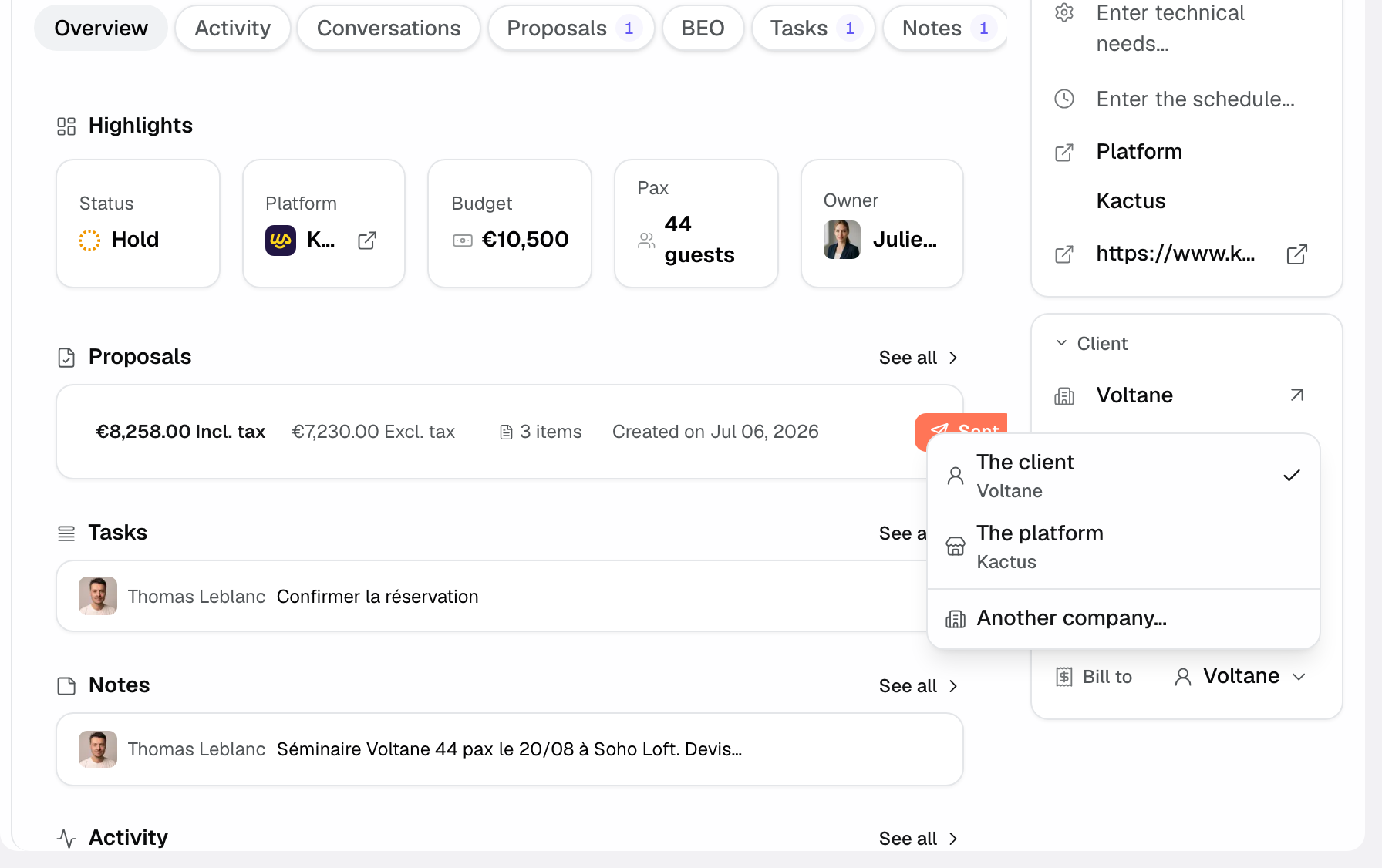
Open the event. In the right-hand column, the "Client" block ends with the "Bill to" row. By default, it shows the event's client.
Choose the recipient
- Click the "Bill to" row. A menu opens.
- Pick one of the options offered:
- "The client": the event's client, the default option.
- "The platform": offered when the event came through a booking platform. The platform's name shows underneath.
- "The agency": offered when the event's source is a named agency.
- "Another company…": opens the "Bill another company" window. Pick a company from your CRM: the proposal will be addressed to it, the event keeps its client.
The choice is saved at once. A request that came from a platform is billed to the platform by default, until you pick something else.
Fix the billing identity
When the proposal is addressed to a platform or another company, "Edit billing information" lets you fix its legal name, address or VAT number. Proposals that can still be edited pick up the change at once.
What the proposal shows
On a proposal page, a reminder appears as soon as the recipient is not the client, for instance "Proposal addressed to Kactus (platform), not to the client". It carries the same menu as the event page: you can change the recipient from the proposal. As long as the proposal goes to the client, nothing shows.
On the proposal PDF, the recipient block carries the chosen billing identity: the platform, the agency or the company.
Which proposals are updated
- Draft, pending and sent proposals take the new recipient as soon as you change "Bill to".
- An accepted or signed proposal keeps the recipient it had when it was agreed. To change it, use an amendment.
- Invoices issued from a proposal use that proposal's recipient.
Examples
An agency books your room for a product launch for its client. You keep the end client on the event, for its contacts and history, and you pick "The agency" in "Bill to". The proposal and invoices go to the agency.
A request comes through a platform that re-bills the client. The proposal is addressed to the platform by default. If that platform asks you instead to bill the client directly, pick "The client".
Troubleshooting
"The platform" is not offered
Cause: the event's source is not a platform. Fix: correct the event's source, or use "Another company…".
A signed proposal still shows the old recipient
Cause: an accepted or signed proposal is frozen. Fix: this is by design, the signed document does not change. Create an amendment if the recipient must change.
Frequently asked questions
Does the choice apply to a single proposal?
No. "Bill to" is an event setting. It applies to all of its proposals that can still be edited.
Does the event's client change?
No. The client, its contacts and the history stay on the event. Only the proposals' recipient changes.
See also
Bring every event inquiry into one queue.