Key concepts in Joinways
Inquiry, event, quote, contact, space: understand how the building blocks of Joinways fit together to run your business.
Updated
Before diving into Joinways, let's take a few minutes to learn its vocabulary. The tool is built on a handful of objects (inquiry, event, quote, space, contact) that come up everywhere. Once you know what each one represents and how they chain together, the interface becomes obvious: you read every screen as a step in the same journey.
The key idea to grasp right away: these objects don't live in isolation, they form a chain. An inquiry gets qualified, becomes an event, the event carries a quote, the signed quote turns into an invoice. Understanding this chain is understanding Joinways.
What you'll learn
- Tell apart inquiry, lead, event and quote
- Understand contacts, companies, spaces and venues
- Know what a function sheet (BEO) is
- See how it all fits together, from inquiry to signed event
The essential building blocks
Each building block matches a type of object you'll handle every day. Read them in order: together they describe the life cycle of a file, from the first message received to the day of the event.
- Inquiry (lead): an incoming message detected in Inquiries, still to qualify. It's the starting point: a client's intent, not yet a file.
- Event: the central file gathering dates, space, quote and tasks. Everything else organizes around it.
- Quote: the priced proposal, signable online, attached to an event.
- Invoice: the signed quote converted into an accounting document.
- Contact: the person you deal with; the Company is the organization grouping them.
- Space / Venue: the venue is your establishment, with its catalog of services; the space is the specific room or area where the event takes place.
Detailed object reference
Beyond the short definition, here's what each object carries, what it's for, and which others it links to. Treat this section as a reference card to reread whenever an object feels fuzzy.
The inquiry (lead)
The inquiry is the starting unit: a message captured on one of your channels and identified as event intent. It carries the raw details the AI was able to extract: likely date, budget mentioned, attendees (Pax), sender identity. It reserves nothing and blocks no availability. Its only possible outcome is to be qualified (turned into an event) or dismissed. It links to the contact who sent it and, once processed, to the event it produced.
The event
The event is the pivot of all of Joinways: it's the file everything else attaches to. It carries one or more dates, a venue and its spaces, a contact (and sometimes a company), one or more quotes, tasks, notes and the function sheet. It's what occupies a slot in the calendar. An event links back to the inquiry it was born from and forward to the quote and invoice it carries.
The quote
The quote is the priced proposal. It always lives inside an event, never alone, and draws its lines from the venue's catalog (« Items » tab). It has its own cycle, from draft to signature; once accepted or signed, it can be invoiced. A single event can carry several quotes (successive versions or options offered to the client); the accepted quote is the one that counts.
The invoice
The invoice is the accounting outcome: the signed quote converted into a document with tax value. It inherits the quote's lines and stays linked to it and to the event, so you can always trace the trail back. Its cycle goes from « Draft » to « Open » (issued, awaiting payment) then « Paid ».
The contact and the company
The contact is the individual you deal with; the company is the organization grouping them. A contact can exist alone (an individual) or belong to a company; a company can bring together several contacts. Both link to events, which gradually builds a history: the list of a contact's events, or of all the contacts of the same firm.
The space and the venue
The venue is your establishment; the space is the specific room or area you sell inside it. The venue carries the catalog of services and the opening hours; each space carries its capacity. A venue groups several spaces; an event occupies a given space on a given date, which lets two events share the same day in two different spaces.
The function sheet (BEO)
The function sheet is the operational document attached to the event. It describes the run of show, the services and the practical details for the team on the day. It feeds off the same event as the quote, but answers a different question: not "how much" but "how".
Inquiry and lead: two words, one reality
In Joinways, "inquiry" and "lead" mean the same thing: an incoming message that expresses interest and remains to be qualified. The word "lead" comes from sales vocabulary, "inquiry" is its plain-language equivalent. As long as it isn't qualified, an inquiry commits you to nothing: it waits for you to decide whether to turn it into an event or set it aside. That undetermined status is exactly what sets it apart from an event.
Space and venue: don't mix them up
A venue represents your establishment as a whole; spaces are the rooms or areas you sell inside it: main hall, terrace, private lounge. The distinction matters for planning: two events can take place on the same day in your venue if they occupy two different spaces, and the calendar can show the detail per space. The catalog of services you'll reuse in quotes is attached to the venue.
Contact and company: the person and the organization
The contact is the person you actually deal with: the bride, the lead on a seminar, the host of a birthday. The company is the organization grouping them, useful mostly for professional events where several people belong to the same firm. A contact can exist without a company (an individual), and a company can group several contacts. Linking these two objects correctly gives you, later on, a clear view of who's asking for what and on whose behalf.
The function sheet (BEO)
The function sheet (often called a BEO, for Banquet Event Order) is the operational document that guides execution on the day. Where the quote is used to sell, the BEO is used to do: it gathers the run of show, the services to deliver and the practical details so your team knows exactly what to set up. The quote answers "how much does it cost"; the BEO answers "who does what, when, where". Both describe the same event, but at two different moments and for two different audiences.
How it all fits together
Here's the thread, end to end. An inquiry lands in Inquiries and, once qualified, becomes an event, attached to a contact (and sometimes a company). You then create a quote for that event, drawing on the venue's catalog. Once the quote is signed, it converts into an invoice, and the function sheet (BEO) takes over to guide execution. Each object points back to the previous one: the invoice knows which quote it came from, the quote knows which event it belongs to, the event knows which inquiry it was born from.
The relationship map at a glance
- An inquiry produces at most one event (or none, if it's dismissed).
- An event belongs to a contact, and that contact may belong to a company.
- An event takes place in a space, itself attached to a venue.
- An event carries one or more quotes; each quote draws from the venue's catalog.
- A signed quote yields an invoice; the event also carries its function sheet (BEO).
Good to know: everything starts from the event. It's the thread the rest attaches to (dates, space, quote, contact, BEO). When you're hunting for a piece of information, always ask "which event does it belong to?"
The statuses to know
Each major object carries a status that says where it stands in its life cycle. These statuses aren't decorative: they determine what you can do (a « Signed » quote can become an invoice) and what you see (the calendar colors each event by status, reports count confirmed events).
- Event: Hold, Confirmed, Lost, Canceled.
- Quote: Draft, Sent, Accepted, Signed, Rejected.
- Invoice: Draft, Open, Paid (or Void, Uncollectible).
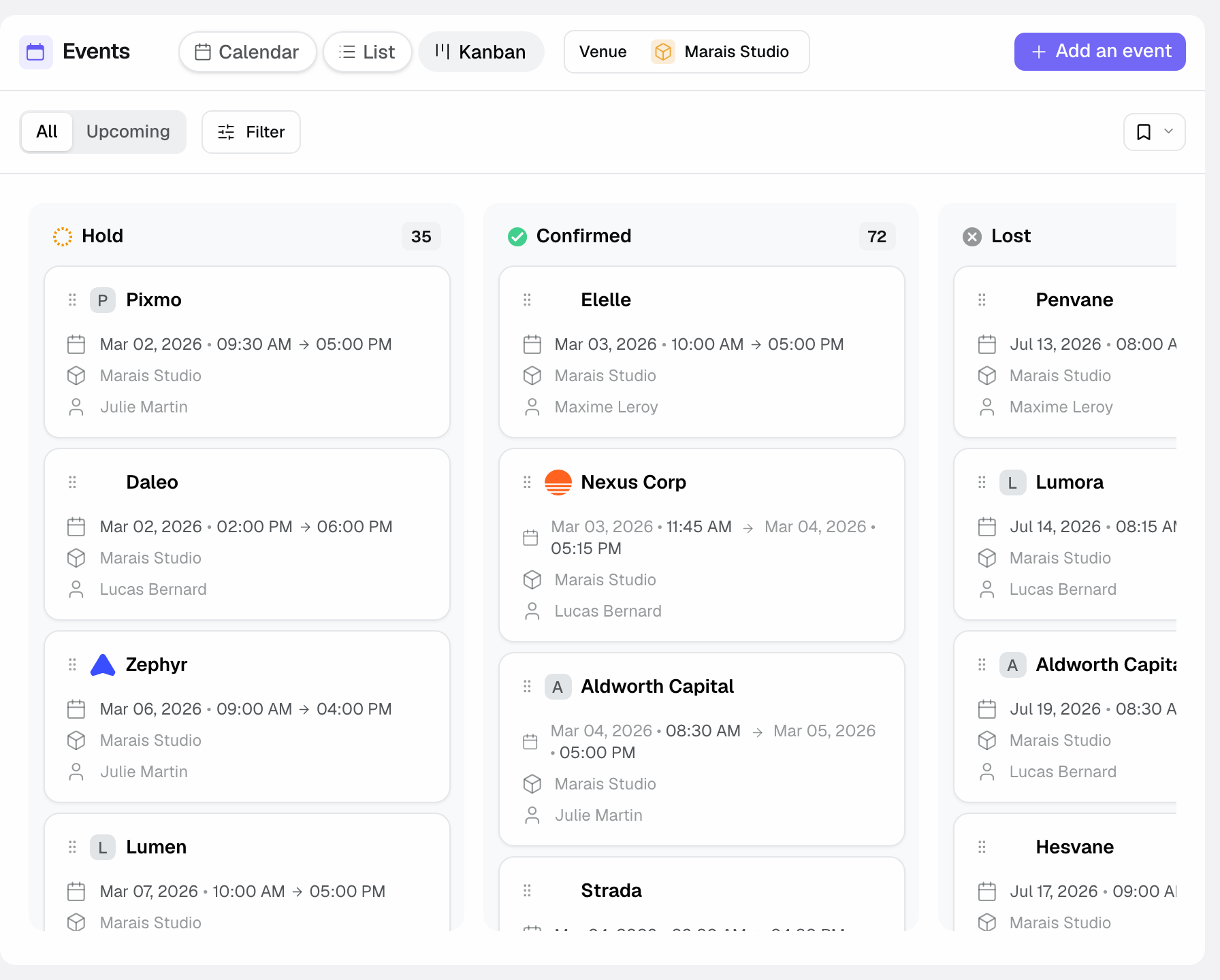
Read in order, these statuses tell a story. A « Hold » event is a serious but unguaranteed lead; it's the starting status of every event created from an inquiry. It moves to « Confirmed » as soon as the client commits, flips to « Lost » if it doesn't pan out, or to « Canceled » if it was confirmed then dropped. On the quote side, « Sent » means the client received the link, « Accepted » that they agreed, « Signed » that they signed online; an « Accepted » or « Signed » quote can be invoiced. An « Open » invoice awaits payment; « Paid » closes the cycle.
Edge cases
Some files don't follow the full chain. An inquiry that doesn't pan out stays in Inquiries or moves to the « Rejected » tab without ever becoming an event: that's normal, not every inquiry converts. Conversely, an event can be born without a prior inquiry: a booking taken over the phone is created directly, without going through Inquiries. Finally, the same contact can be linked to several events over time (a loyal client who returns every year): Joinways keeps that link, giving you their history at a glance.
A few other configurations are worth knowing. An event can span several days (a residential seminar) or occupy several spaces on the same day (cocktails on the terrace then dinner in the main hall): it's still a single event, with several slots. An event can also carry several successive quotes when the client wavers between options; only the accepted quote counts for what follows. And a company can be linked to a contact before any event exists yet: you're laying the commercial groundwork ahead of the first real inquiry.
Best practices
Always attach an event to the right contact at creation: that link feeds the client history and saves you, months later, from hunting for who the point of contact was. Mind the space / venue distinction if you have several rooms: an event attached to the wrong space muddles the space-by-space calendar. And always reason "by event": when you're missing a piece of information, start from the event's file rather than searching at random. It's the natural entry point to the quote, the contact and the BEO.
A few more reflexes keep your data healthy over time. Keep statuses up to date: an event left in "Option" when it's actually confirmed distorts your calendar view and your forecasts. Link a contact to their company as soon as the project is professional, so you can later retrieve all the events of the same firm. Give events explicit names ("Lea & Sam Wedding" rather than "Inquiry 14"): you'll tell them apart at a glance in the list. And don't hesitate to firmly dismiss an inquiry that isn't a real project, rather than letting it linger: your statistics will then reflect your real opportunities.
Troubleshooting
I can't find a quote? A quote never exists on its own: it belongs to an event. Open the relevant event and you'll find its attached quote there, with its status.
An inquiry doesn't show up as an event? It's probably still at the unqualified-lead stage. Until you've created the event from it, it remains a plain inquiry in Inquiries, not a file.
Event creation is refused for a slot? The venue is closed that day, the slot falls outside its opening hours, or it's a public holiday. Adjust the date or time, or review the venue's availability.
A contact appears twice? It's often the same person arriving via two channels (email then Instagram). Open one of the two records and use « Merge with another contact » to bring their history onto a single record.
Real-world example
Let's follow a complete file. An inquiry arrives via Instagram for a wedding. You qualify it and create the event "Lea & Sam Wedding", attached to the contact Lea (no company: she's an individual) and to the "main hall" space. You build a €12,000 quote for this event by drawing on the venue's catalog. Lea opens the link and signs: the quote moves to "Signed". You convert it into an invoice, and you prepare the function sheet (BEO) that will detail the run of show for your team. From the first message to the execution document, each object has stayed linked to the previous one: that continuity is what keeps you from ever losing the thread.
Another example
This time let's take a professional event to illustrate the company's role. An inquiry arrives by email: the firm "Atlas Consulting" is looking for a room for its annual seminar. You create the company Atlas Consulting, then the contact Sophie, head of internal events, and you attach her to that company. You qualify the inquiry into the event "Atlas Seminar 2026", over two days, occupying the main hall on day one and the private lounge on day two: a single event, two slots, two spaces.
You propose two quotes: a standard package and a premium one with a gala dinner. Sophie picks the premium and signs it online: that quote moves to "Signed", the other stays as a dismissed version. Six months later, Atlas Consulting comes back for another seminar: from the company's record, you find Sophie and the previous event at a glance, letting you pick the conversation back up where it left off. The company → contact → event → quote chain has kept everything linked.
FAQ
What's the difference between an inquiry and an event?
An inquiry is an incoming message to qualify, with no commitment; an event is the concrete file born from it once you decide to handle it. The inquiry is the intent, the event is the project.
Are lead and inquiry the same thing?
Yes. They're two words for the same thing: an incoming message detected in Inquiries, still to qualify. "Lead" is the sales term, "inquiry" its plain translation.
Can a quote exist without an event?
No. A quote is always attached to an event: that's what gives it context (dates, space, contact). To find a quote, open the event it belongs to.
What's the difference between a quote and a BEO?
The quote is used to sell: it prices the proposal and gets signed. The function sheet (BEO) is used to execute: it details the run of show and the services for your team on the day.
Do I always have to create a company for a contact?
No. An individual can be a contact without a company. The company is only useful when an organization groups several people, typically for professional events.
Can an event occupy several spaces or several days?
Yes. A single event can span several days and occupy several spaces (cocktails on the terrace, dinner in the main hall). It remains one file, with as many slots as needed.
What happens to an inquiry I haven't qualified?
It stays a lead in Inquiries as long as you don't process it. You can qualify it later, or dismiss it if it's not a real project: in that case it never becomes an event.
Does Joinways prevent double bookings?
It makes them visible rather than blocking them: the calendar on the « Events » screen shows each event on its venue, with the per-space detail and its status color. Creation is only refused when the venue is closed (closure day, outside opening hours, public holiday).
See also
- Get started in 15 minutes
- Understanding unified Inquiries
- Create an event
Bring every event inquiry into one queue.