Get started with Joinways in 15 minutes
From connecting your inbox to your first signed quote: the complete 15-minute path to get Joinways running in your venue, step by step.
Updated
Welcome to Joinways. This walkthrough takes you from zero to a first complete file: capture an inquiry, turn it into an event, send a quote and receive a signature. The goal isn't to configure everything today, but to push one real inquiry through the whole cycle so you understand how the tool thinks. Allow about 15 minutes of actual hands-on time.
Keep one principle in mind: Joinways works best when it captures your inquiries where they actually arrive (your email, Instagram, WhatsApp) and then centralizes them. So there's nothing to type in at the start: you connect your channels and let the inquiries surface.
What you'll accomplish
- Connect an inquiry source: email, Instagram or WhatsApp
- Set up your first venue, its spaces and a catalog of services
- Process an incoming inquiry and turn it into an event
- Send a quote and get an online signature
Prerequisites
Two things are enough to start smoothly. First, an active Joinways account with admin rights: connecting an email account or an Instagram account touches workspace settings, which is restricted to administrators. Second, your billing details (company name, tax ID, VAT), which will make your quotes compliant from the very first send. If you don't have them handy, it's not a blocker: you can fill them in before generating the first document.
- An active Joinways account and admin rights to connect your email accounts.
- Your billing details (company name, tax ID, VAT) for compliant quotes.
Step 1: Connect your inquiries
It all starts by connecting a channel. As long as no source is plugged in, Inquiries stays empty: Joinways doesn't guess your inquiries, it reads them in the channels you open to it. Connecting your email means authorizing the app to read incoming messages to spot event inquiries, not to delete them or reply on your behalf.
- Go to « Settings » then « Integrations », « Sources » tab: this is where you plug in the channels that feed Inquiries (« Your business email », Instagram, « WhatsApp Business », Aircall and the « Chrome extension » for booking platforms). The « Personal » tab does something else: it connects your own Gmail or Outlook so you can send emails from Joinways and sync your conversations.
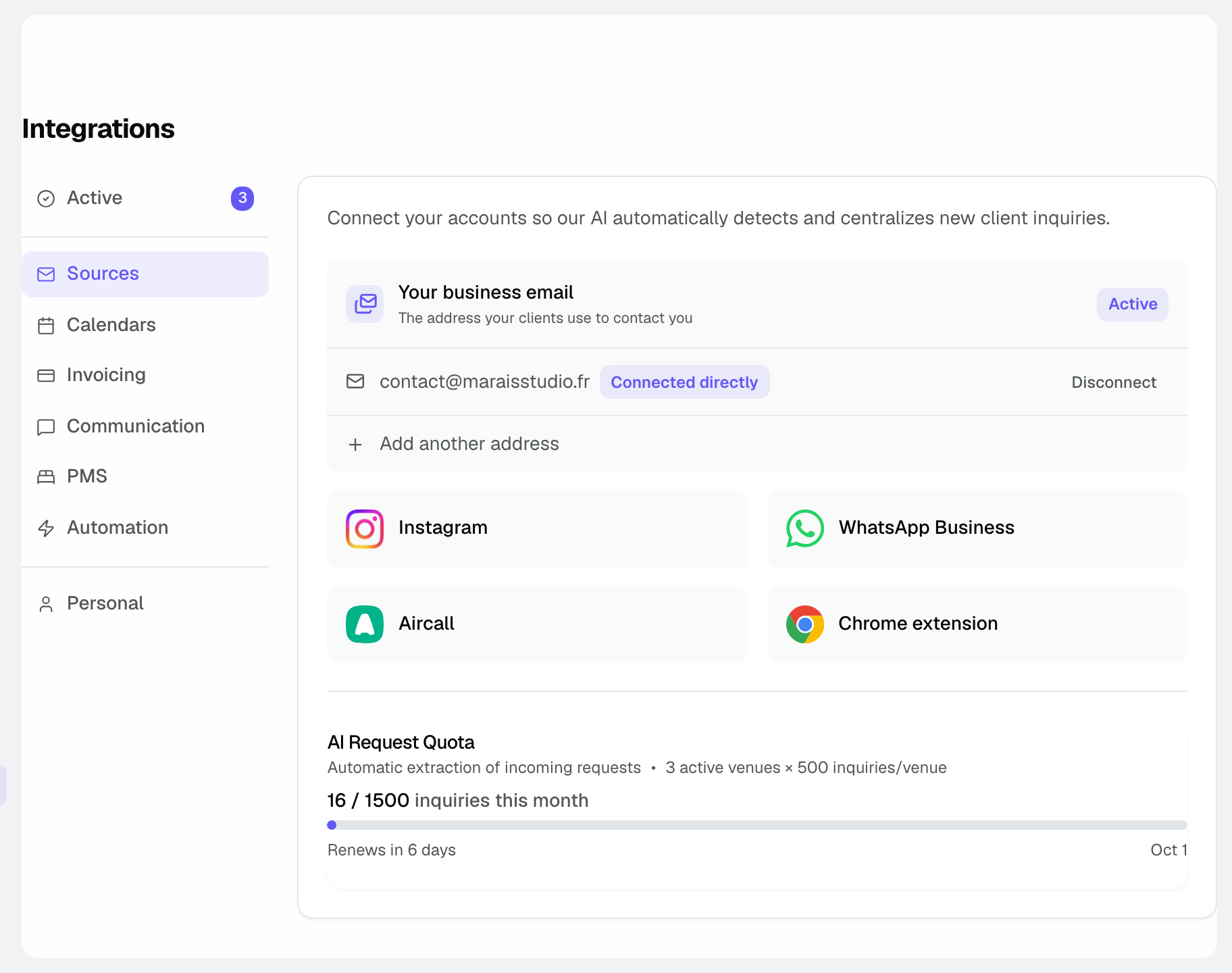
- Connect « Your business email », i.e. the address that receives your inquiries (Gmail, Outlook or Microsoft 365, including a shared mailbox through your personal account), then Instagram and « WhatsApp Business » if clients write to you there. The provider's authorization window opens; approve the requested access. If your address is a distribution list, the wizard guides you to automatic forwarding.
- Let the AI analyze your messages. After a few minutes, event inquiries surface automatically in Inquiries, already sorted apart from the rest of your mail.
How to tell it's working: the channel shows "connected" in Settings, and at least one first inquiry appears in Inquiries. If your mailbox is large, the initial sync may take a few minutes. That's normal, and it won't repeat every time you open the app.
Tip: connect the channel your inquiries actually arrive through. For many venues, that's email and Instagram; there's no need to plug everything in at once.
Step 2: Set up your venue
A venue in Joinways represents your establishment; spaces are the rooms or areas you sell inside it (main hall, terrace, private lounge). This distinction matters: the catalog, opening hours and closures are set at the venue level, capacity at the level of each space. Setting up this structure once saves you re-entering the same information for every event.
- Open Settings then Venues, and create your venue by filling in its name and basic information. Its spaces are then added from inside the venue.
- Add your spaces (rooms) and their capacity. Capacity is shown next to each space when you pick it for an event, so you can see at a glance whether it fits the group.
- Fill in your catalog in the venue's « Items » tab: rental, catering, options. Every item entered here can be reused in one click in your quotes, which speeds everything up. Spaces and their capacity go in the « Venue & spaces » tab.
The catalog is the real time-saver of this step: a service described and priced once is reused across every later quote, with no re-typing and no risk of a price error.
Step 3: Process your first inquiry
An inquiry in Inquiries is still just a message: no file, no calendar, no quote. Turning it into an event gives it an existence in Joinways so you can track it. The AI has already done part of the work by extracting the key details from the message. Your job is to verify, not to retype everything.
- Open Inquiries and select an inquiry. The full message appears, along with the details the AI was able to extract from it.
- Check the information the AI extracted in the « Extracted data » panel: date, budget, number of attendees. This panel is read-only: you correct things at the next step, in the conversion form.
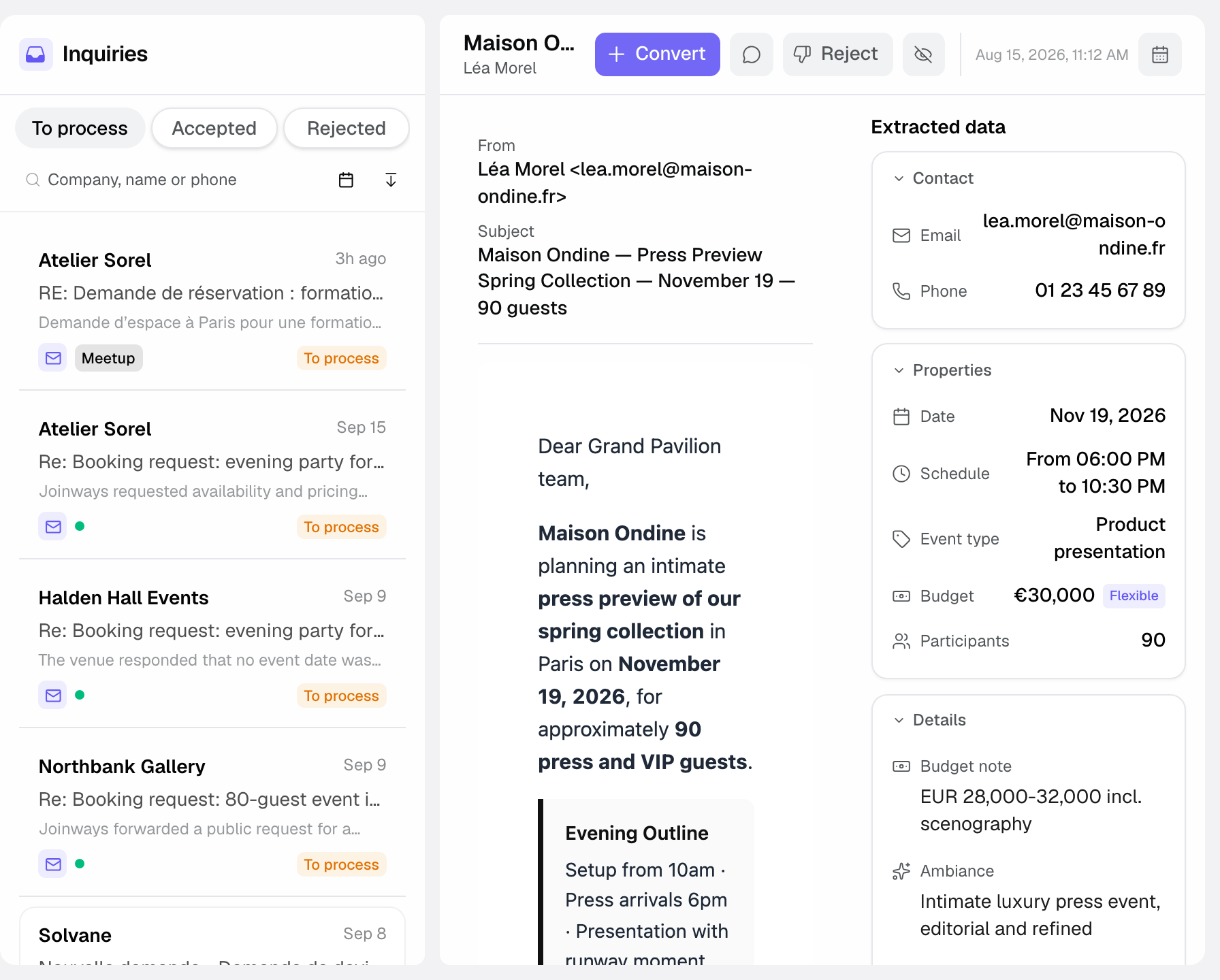
- Click « Convert »: the « Create event » form opens, pre-filled with the detected contact, date, attendee count and venue. Fix anything the AI misread, fill in what is missing (dates and times, venue and assignee are required), then confirm with « Convert to event ». The event is created with the « Hold » status.
After this step, the inquiry is no longer a line in Inquiries but a full event, with its file, its place in the calendar and the ability to attach a quote to it.
Step 4: Quote and signature
The quote is the priced proposal you send the client. Building it from the event guarantees it stays attached to the right file and the right space. It can be signed online: the client has nothing to print, and you immediately know where their decision stands.
- In the event, create a quote by pulling from your catalog. Each added line carries its label and price exactly as you defined them in step 2.
- Check the result with « Preview PDF ». The signature link is prepared automatically: it's the version the client sees, on-brand, with no access to your back-office.
- Click « Send » to email it, or « Copy the signature link » to share it yourself. The client reviews and signs online. You're notified the moment they sign, with no need to chase to find out whether they've seen the document.
How it works
The thread is always the same: a connected channel feeds Inquiries, an inquiry becomes an event, the event carries a quote, and the signed quote triggers what comes next (invoice, organization). Each step builds on the previous one. That's why connecting a channel and creating a venue are the two foundations to lay first.
Screens and statuses reference
To help you find your way during onboarding, here are the main screens you pass through and what you do on each. None is required to close the first loop, but knowing them saves you hunting around.
Key screens
- Inquiries: the entry point. Every inquiry captured on your channels surfaces here, sorted apart from other mail.
- Events: the list of your active files, with their date, space and progress.
- Calendar: a view of the « Events » screen (next to « List » and « Kanban »); each event takes its slot there, venue by venue.
- Quotes: no separate screen; quotes live in each event's « Proposals » (or « Proposals & Invoices ») tab, with their sending and signature status.
- Settings: connections, venues and spaces, catalog, billing details, everything that's configured once.
Statuses you'll encounter
An inquiry starts as « To process ». If you reply from Joinways it moves to « Sent » and stays in the queue; once converted it becomes « Validated » and moves to the « Accepted » tab; once rejected it becomes « Declined » and moves to « Rejected ». A quote goes from « Draft » to « Sent », then « Accepted » and « Signed » once the client approves it. A connected channel shows « Connected » in the integrations.
Edge cases
If your inquiries come by phone or in person rather than by message, create the event directly from « Events », without going through Inquiries. If you run several establishments, create one venue per establishment so availability and catalogs stay separate. Finally, if the date is still vague, enter the most likely one: dates and times are required at creation, and you'll adjust them once the client decides.
A few other situations come up often at the start. If the same inquiry arrives twice on two channels (a client who writes by email then follows up on Instagram), turn only one into an event and dismiss the other to avoid two competing files. If an inquiry specifies neither date nor budget, create the event anyway: it gives you a thread to follow up with the client and fill in the details over time. And if you're testing the tool with an old inquiry already closed elsewhere, mark the event accordingly rather than sending it a quote. Your statistics will stay clean.
Tip: don't try to configure everything before processing your first inquiry. One connected source and one venue are enough to do the full loop; the rest gets refined with use.
Another example
Marc runs a wine estate that hosts corporate seminars. He barely receives anything on Instagram: his inquiries mostly arrive by email and, sometimes, by phone. So he connects only his Outlook mailbox, lets the sync sweep his recent exchanges, and watches about ten seminar inquiries surface. He creates his venue "Domaine des Coteaux" with two spaces, the reception hall (120 people) and the cellar (40 people), and a tight catalog: full-day exclusive hire, coffee break, seated lunch, cellar tour.
A prospect called him the day before for a 30-person seminar: no message in Inquiries, so Marc creates the event directly and attaches the contact by hand. For another inquiry that came in by email, he clicks « Convert », corrects in the form the attendee count the AI had underestimated, then confirms. He builds two quotes the same afternoon by pulling from his catalog and sends them. Two different entry paths, by phone and by email, but the same structured file at the end.
Best practices
Connect the channel that carries the most inquiries first: you'll see the tool deliver value immediately rather than configuring in a vacuum. Fill in even a minimal catalog from the start (three or four common services) so your first quotes come together in a few clicks. And get into the habit of correcting AI-extracted details when creating the event: clean data at the source prevents errors that would otherwise propagate all the way to the quote.
Beyond these starting reflexes, a few habits pay off over time. Give your venues and spaces meaningful names ("Main hall" rather than "Room 1"): you'll find them faster in quotes and the calendar. Fill in each space's capacity, even roughly: it's shown when you pick the space for an event. Process Inquiries regularly rather than in one batch: an inquiry caught early is an inquiry answered before the competition. Finally, complete your billing details before the first quote so you don't have to redo a document you've already sent.
Troubleshooting
My emails don't show up in Inquiries? Check that the address receiving your inquiries is connected in the « Sources » tab (« Your business email ») and shows « Connected »: a mailbox connected in the « Personal » tab does not create inquiries. If it is, wait a few minutes: the initial sync scans recent history before everything shows up.
The date carried over at conversion is wrong? The AI probably misread an ambiguous date in the message. Fix it in the form that opens after « Convert », before confirming: the value you confirm is the one that counts.
My client says they can't sign the quote? Check that the quote isn't « Rejected » or « Cancelled »: those can no longer be signed. If the signature block shows « Signature link unavailable », click « Retry » and send the link again.
My catalog doesn't appear when I build a quote? Check that your services are created in the venue's « Items » tab and that the event belongs to that venue: the catalog belongs to the venue, and a quote built on another establishment won't see it.
Real-world example
Camille runs a reception hall. Monday morning, she connects the Gmail mailbox that receives her inquiries in two minutes. She creates her venue "Le Pavillon", adds the main hall (150 people) and the terrace, then enters four services: hall rental, catering package, furniture setup, DJ option. She opens an Instagram inquiry for an 80-person birthday in September, clicks « Convert », checks the date the AI proposed and confirms. In the file, she builds a quote pulling rental, catering and DJ, then sends it. The next day, a notification tells her the quote is signed. Total: under 20 minutes for her very first completed file.
FAQ
Do I have to set everything up before starting?
No. Connect at least one inquiry source and create a venue; you'll fill in the rest as you go. The point of this walkthrough is to push one inquiry through the whole cycle, not to have a perfect configuration.
How many channels can I connect?
You can connect several channels (email, Instagram, WhatsApp, Aircall, booking platforms through the Chrome extension) and they all feed the same Inquiries view. Start with the one that carries the most inquiries, then add the others later.
Will the AI reply to my clients on its own?
No. The AI reads and qualifies incoming messages to surface them in Inquiries and extract their details; sending quotes and replies stays in your hands.
What happens after the quote is signed?
You can convert the signed quote into an invoice, automate your follow-ups so you never forget one, and track your numbers in Reports.
How long does the first sync take?
A few minutes usually. Joinways sweeps your recent mail first; after that, new inquiries surface continuously with no further wait.
Can I create an event without going through Inquiries?
Yes. For inquiries received by phone or in person, create the event directly from the events list: Inquiries is just one of the entry points, not a mandatory step.
Is my data isolated if I run several venues?
Yes. Each venue keeps its own spaces, catalog and availability. Create one venue per establishment and the information won't mix between them.
What should I do with an inquiry that isn't a real project?
Reject it with the « Reject » button, choosing whether to notify the contact. It moves to the « Rejected » tab without creating an event: your files and statistics keep reflecting your real opportunities.
See also
- Key concepts
- Understanding unified Inquiries
- Create an event
- Create a quote
Bring every event inquiry into one queue.