Reports & performance
Your numbers at a glance, included in every plan: inquiries, response time, conversion, revenue. « Inquiries », « Commercial » and « Accounting » views, with breakdowns by venue and by member.
Updated
Reports & performance
The « Reports » section gives you an overview of your business: inquiries received, event pipeline, revenue and performance by venue or team member. At the top of the page, two buttons structure the data: « Inquiries » and « Events ». « Events » splits into two views, « Commercial » and « Accounting ».
This article describes every view, KPI and filter in the dashboard. The goal is not just to show you where to click, but to explain how each number is computed so you can interpret it with confidence and turn it into concrete decisions.
Prerequisites
Reports are included in every plan, with nothing to switch on. To get meaningful figures you must already have inquiries and events in Joinways: an empty workspace shows no trends.
Every workspace member sees the same reports: the page is not restricted to a role. The better your venues and events are filled in, the more reliable the breakdowns by venue and by member.
What you'll learn
You'll learn how to open reports, tell the « Inquiries », « Commercial » and « Accounting » views apart, read each metric and chart, use the period filter, then turn those numbers into action: adjusting pricing, response time and marketing campaigns.
Access reports
In the sidebar, click « Reports ». The page opens on the « Inquiries » view, with a period selector at the top. The selected period is kept when you switch views. There is no venue or owner filter: breakdowns by venue and by member are shown directly in the views.
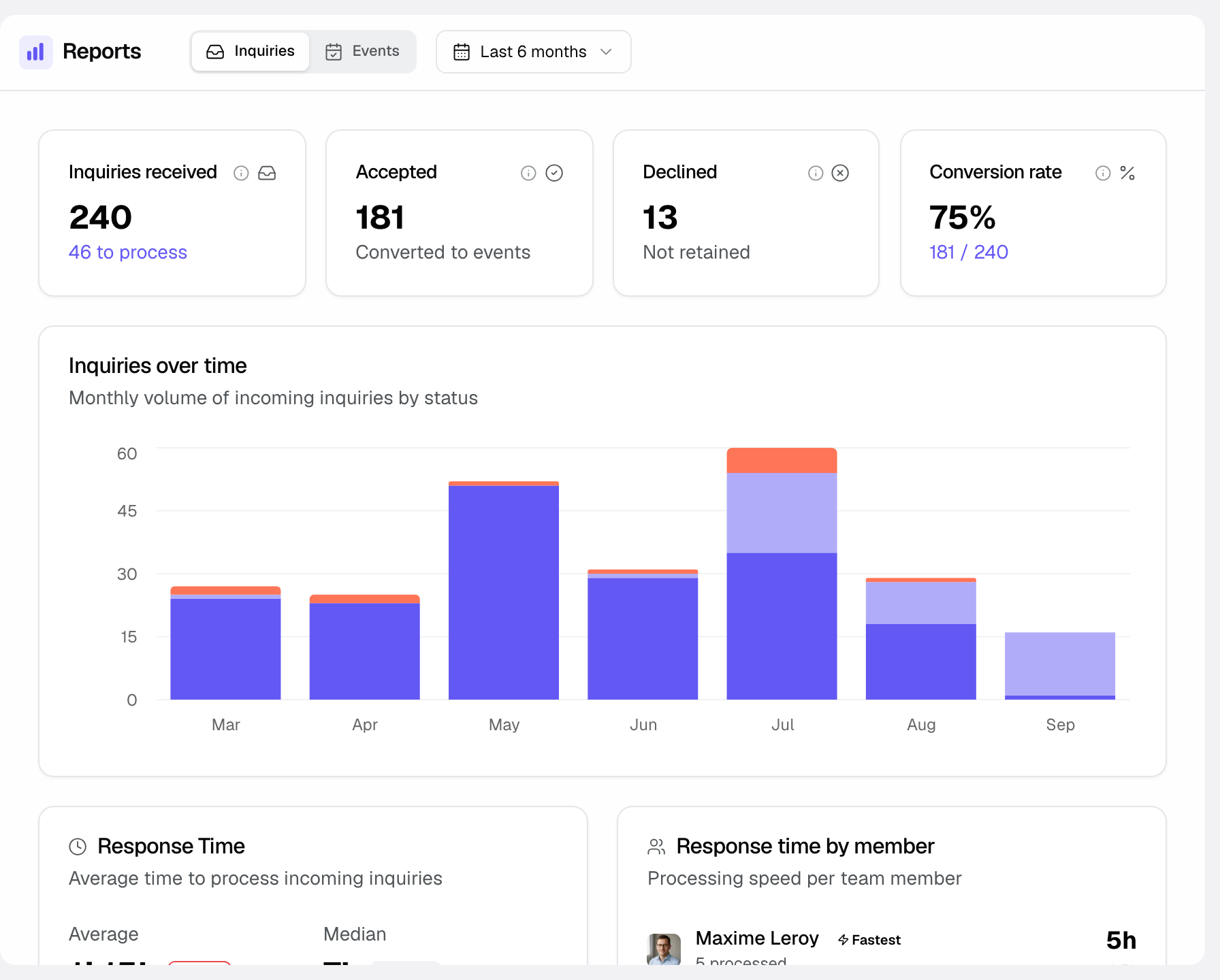
In practice:
- Open Reports from the sidebar; the dashboard loads on the first tab.
- Pick a period at the top; all KPIs and charts recompute.
- Click « Inquiries » or « Events » depending on your question. Under « Events », pick « Commercial » or « Accounting ».
Inquiries view
This view analyzes your incoming leads. It answers the question “how many enquiries do we receive, where do they come from and how many convert?”. It is the starting point of your whole sales funnel.
- Check the KPIs at the top for lead volume and quality over the period.
- Read the « Inquiries over time » chart to see how things evolve over the period.
- Review the breakdowns by source and by venue to identify your best channels.
Items shown in this view:
- Metrics: « Inquiries received » (with the « to process » count), « Accepted », « Declined », « Conversion rate ».
- « Inquiries over time » chart: stacked « Accepted », « To process », « Declined » bars, daily when the period is under two months, monthly otherwise.
- « Response Time » card (average, median, < 1h, 1-4h, 4-24h, > 24h buckets) and « Response time by member » card.
- « Inquiries by source »: « Direct » (emails received, emails and calls added by hand) then each platform by name.
- « Inquiries by venue »: volume, accepted, declined and to process for each venue, by source.
Commercial view
This view analyzes your pipeline by confirmation date: revenue is attached to the month the event was confirmed. It is the view suited to steering commercial performance and measuring the sales effort of a period.
- Read the four metrics at the top: confirmed revenue, open pipeline, conversion and confirmation time.
- Open « Funnel » to compare, month by month, confirmed, in-progress, lost and cancelled opportunities.
- Open « Venues & channels » and « Team » to compare your venues, channels and salespeople.
Items shown in this view:
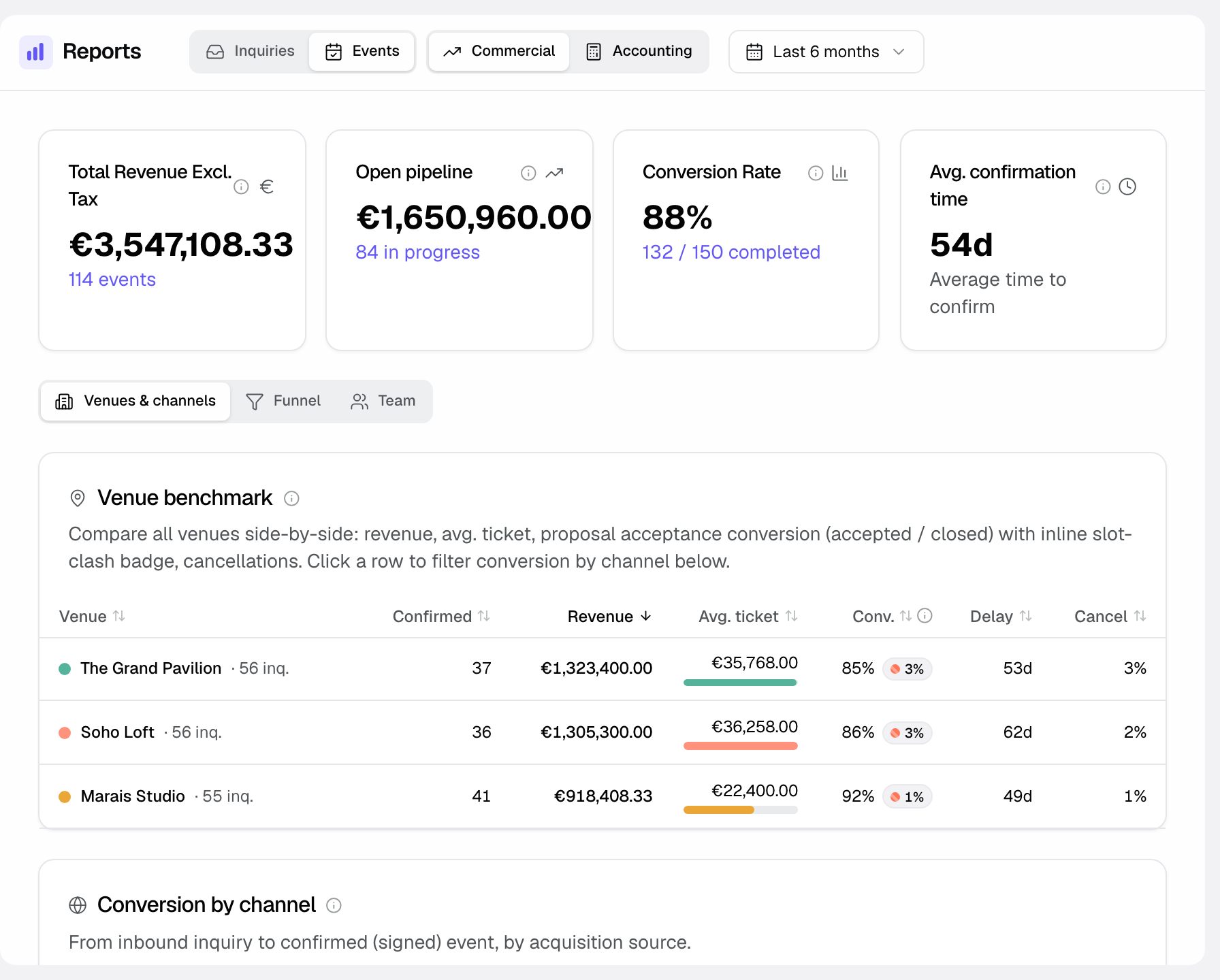
- Metrics: « Total Revenue Excl. Tax » (dated at confirmation), « Open pipeline », « Conversion Rate », « Avg. confirmation time ».
- « Venues & channels »: « Venue benchmark » and « Conversion by channel ».
- « Funnel »: « Commercial funnel », monthly bars of confirmed, in-progress, lost and cancelled opportunities, with the revenue line.
- « Team »: « Loss reasons » and « Top performers ».
Accounting view
This view organizes data by event date, not confirmation date. It shows « Total Revenue Excl. Tax », « Avg Revenue Excl. Tax/Event », « Revenue/guest » and « Forecast revenue », then the « Global Performance » and « Venue Performance » charts and the « Revenue by Venue » list. It is the view suited for accounting reconciliation: revenue is attached to the month the event takes place.
The difference is essential: an event confirmed in January for a reception in June appears in January in the « Commercial » view and in June in the « Accounting » view. Choose the view depending on whether you are steering the sales effort or recognising revenue.
Filters
A single filter applies to every view: the period. There is no venue or owner filter. To isolate a venue, use the venue breakdowns shown in each view.
- Period: « Current month », « Last 3 months », « Last 6 months » (default), « Current year », « All data » and « Custom ». The « Accounting » view adds « Next 6 months » and « Next 12 months ».
Metrics reference
This section recaps every metric, view and filter in the dashboard with a one-line definition explaining in plain terms what it represents.
- Inquiries received: total number of inquiries that came in over the selected period.
- Accepted: inquiries accepted and converted into an event.
- Declined: inquiries rejected, not relevant or not retained.
- To process: inquiries neither accepted nor declined, shown under the inquiries received total.
- Conversion rate: share of inquiries that succeed, a key indicator of commercial effectiveness.
- Inquiries over time: bars stacked by status, daily or monthly depending on the period length.
- Inquiries by source: volume per channel, « Direct » grouping non-platform inquiries.
- Inquiries by venue: inquiry volume attributed to each venue.
- Global Performance (« Accounting » view): revenue excl. tax per month as an area and number of events as a line, upcoming months shaded.
- Open pipeline: estimated budget of the holds created over the period, or their number when no budget is entered.
- Commercial funnel: opportunities per month, split into confirmed, in progress, lost and cancelled.
- Avg. confirmation time: average number of days between an event's creation and its confirmation.
- Venue benchmark and Top performers: revenue, avg. ticket, conversion, delay and cancellation per venue; confirmed events and conversion per member.
- Period filter: restricts calculations to the chosen months. Loaded history covers the current month and the previous 11 months, plus the next 12 months in the « Accounting » view.
How it works
Reports aggregate your inquiries and events over the chosen period. The « Inquiries » view counts inquiries by status, the « Commercial » view attaches revenue to the event's confirmation date, the « Accounting » view to the event date.
Amounts come from each event's « Revenue » field (excl. tax). It is computed from accepted, signed, invoiced or paid quotes; an amendment replaces the quote it changes. An amount entered by hand is never overwritten by this calculation. Changing the period recomputes the display without reloading the page.
Interpreting your reports
Reports are only useful if you turn them into concrete actions. Make it a habit to analyze your metrics at least once a month and compare results with the previous period or last year.
- Inquiry conversion rate: if this rate drops, analyze the reasons (pricing too high, response time too slow or inadequate offering).
- Revenue by venue: use « Revenue by Venue » to spot the venues carrying most of the revenue and focus on those that remain underused.
- Seasonality: compare month over month to anticipate slow periods and adjust your promotions.
Recommended actions by metric
Here's how to turn data into decisions. If your average revenue per event stagnates, offer premium options in your quotes. If your conversion rate drops, reduce your response time to inquiries. If a venue lags behind in « Revenue by Venue », launch a targeted campaign for that venue.
Edge cases
Cancelled events do not inflate revenue: only confirmed events count, plus the « Cancellation fee » (excl. tax) of a cancelled event, attached to the month of cancellation. In the « Commercial » view, cancellations count in the conversion rate as closed opportunities. Archived events are excluded everywhere. No filter changes this behavior.
The same event does not appear in the same month across views: the « Commercial » view dates it at confirmation, the « Accounting » view at the event date. On a recent workspace, some monthly trends will be partial until you have several months of history.
Best practices
Review your reports weekly to spot trends in inquiry volume, conversion rates and revenue. You then adjust pricing, marketing efforts and team capacity on figures rather than on a hunch.
- Always compare a period with the previous one, or the same period last year, rather than a number in isolation.
- Use the « Commercial » view to steer sales and the « Accounting » view for financial reconciliation.
- Set the venue on every event so the breakdowns by venue stay reliable.
Share key metrics with your team during weekly meetings: everyone sees where the goals stand.
Troubleshooting
My revenue numbers seem incorrect.
Cause: the event's « Revenue » does not match the quote (amount entered by hand, missing amendment), or the event is not confirmed. Solution: open the event, check its status and « Revenue », or create an amendment to the quote.
The same event shows up in two different months.
Cause: the Commercial view dates at confirmation and the Accounting view at the event date. Solution: this is not an error; choose the view that matches your need (sales effort or revenue recognition).
My cancelled events lower my conversion rate.
Cause: in the « Commercial » view, a cancellation counts as a closed opportunity that was not won. Solution: this is by design. Revenue only includes confirmed events and cancellation fees.
Real-world example
A reception venue notices its conversion rate dropped this quarter. In the « Inquiries » view, the « Inquiries by venue » card shows many inquiries « to process » for that venue, and « Response time by member » reveals delays over 24 h. The manager reorganizes handling and, the following month, the conversion rate recovers.
Another example
To close out the year, a manager compares the « Commercial » and « Accounting » views. The « Commercial » view shows a high volume confirmed in December, but the « Accounting » view spreads that revenue over next year's event months: she adjusts her cash-flow forecasts accordingly.
FAQ
Are dashboards available on all plans?
Yes. Reports are included in every plan. There are no custom reports: the three views described here are the same for everyone.
Do reports include cancelled events?
Not in revenue: only confirmed events count, plus cancellation fees. Yes in sales tracking: the « Commercial funnel » and the conversion rate count cancellations as closed opportunities. No filter excludes them.
Can I export reports?
No: the « Reports » page has no export, neither PDF nor CSV. To keep a record, take a screenshot of the view. You can also export raw data (events, companies, people) as CSV from Settings > « Import / Export », then redo your calculations in a spreadsheet.
How far back does historical data go?
Reports load the current month and the previous 11 months. The « Accounting » view adds the next 12 months. Even with « All data », older months do not appear.
Which view should I use for accounting?
The « Accounting » view, which organizes data by event date: it is the one suited to accounting reconciliation.
See also
- Budget and revenue per event
- Import / Export
- Understanding Leads
Bring every event inquiry into one queue.