Key concepts in Joinways
Inquiry, event, slot, quote, package, BEO, agent: how the building blocks of Joinways fit together.
Aggiornato il
Joinways is built on a handful of objects that come back everywhere: the inquiry, the event, the quote, the venue, the BEO. Knowing them saves you from looking for information in the wrong place, and makes the settings easier to read.
This article presents them in the order a booking goes through them, from the first email received to the day of the event. Each concept links to the article that covers it in detail. For a short definition of a word, see also the glossary.
What you'll learn
- How an inquiry becomes an event, then a signed quote and an invoice.
- The difference between workspace, venue, space and combination.
- What an event carries: status, stage, slots.
- What a package, a vendor and the client form are.
- What the Joinways agent is for and what the reports measure.
Prerequisites
- None. Read this article before or while you get started.
The chain: from inquiry to invoice
- The inquiry arrives by email, from a platform or from your website form. Joinways reads it and files it in "Inquiries".
- The event is created when you convert the inquiry with "Convert". It starts with the "Hold" status. An inquiry received by phone can also become an event created by hand.
- The quote is prepared on the event, from the venue's catalog. The client reviews and signs it online.
- The invoice is created from the accepted or signed quote.
Everything hangs off the event: dates, spaces, contact, quotes, BEO, tasks, emails. To find a piece of information, first ask yourself which event it belongs to.
Workspace, venues and spaces
- Workspace: your Joinways account, with its team, settings and subscription. It usually carries your venue's name.
- Venue: a property you sell (hotel, estate, event space). It has its own opening hours, closures, catalog, billing profile and BEO settings. With a single venue, the sidebar shows "My venue", which opens its page directly.
- Space: a bookable room or area in a venue (ballroom, terrace, cellar), with its capacity.
- Combination: a space made of several rooms (for example two salons opened into one). The planning reads it on the rooms it is made of.
- Whole-venue rental: with the whole-venue setting on, the venue is booked rather than a space.
The people who work in the workspace are teammates. Each has a role ("Owner", "Admin", "Member", "Operations" or "Read-only") and access to all venues or some of them. See Manage your venues and their spaces and Invite and manage your team.
Inquiries
- Inquiry: a message about an event project, before it becomes a booking. "Lead" is a synonym. Inquiries are split between "To process", "Converted" and "Rejected".
- Inquiries mailbox: the address your clients write to (contact@, events@…), connected to Joinways or forwarded to it.
- Platform: a booking website (Kactus, Naboo, Funbooker…) that sends you inquiries by email. Joinways recognizes it from its first email and tracks the quotes it issues.
- Marketing source: the advertising origin of an inquiry (Google Ads, Meta Ads, Microsoft Ads, Facebook / Instagram or a utm value). It shows in the inquiry's "Origin" block and in the reports.
See Understanding Inquiries, Process an incoming inquiry and The marketing source of inquiries.
The event: status, stage and slots
The status says where the sale stands: "Hold", "Confirmed", "Lost" or "Canceled". It colors the planning and sorts the "Kanban" view.
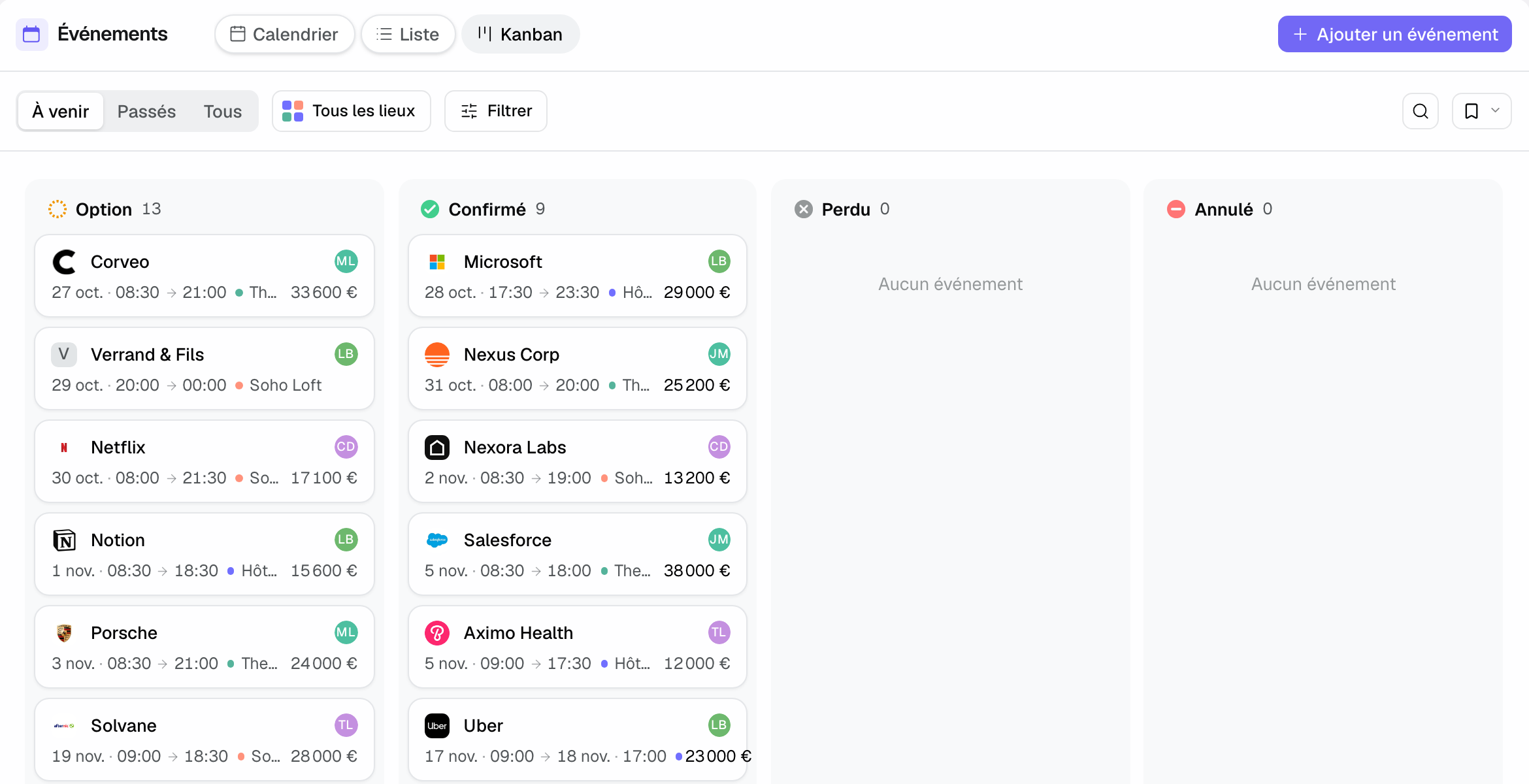
- Stage: a free subdivision of a status that you define (for example "Site visit done" within "Hold"). Joinways can move the stage forward on its own, never backward. The event header shows "Status › Stage". See Track progress with event stages.
- Slot: a space booking within the event, on a time range and a day. A slot can have a name ("Cocktail", "Dinner"), a room setup (theater, banquet…) and a headcount. A multi-day or multi-room event stays a single event, with several slots.
Quotes and invoices
- Catalog: the venue's items (room hire, catering, equipment) with their price and VAT rate. See Manage your catalog and pricing.
- Package: a catalog item made of other items, for example a day delegate package. The client reads a single line, and each item keeps its own VAT rate. The composition can be changed quote by quote. See Sell bundled packages.
- Quote: the priced proposal, always attached to an event. It goes from "Draft" to "Sent", then "Accepted" or "Signed", or "Rejected".
- Amendment: a change to an already signed quote, tracked and signable in turn, without losing the original version. See Manage amendments to a signed quote.
- Billing profile: the venue's legal details (company name, address, VAT number) printed on quotes and invoices. They are asked the first time you send a quote.
- Invoice: the accounting document created from an accepted or signed quote. See Invoice a signed quote.
The BEO
The BEO (banquet event order) is the document for the day of the event: program, slots, quantities, setup, instructions. The quote sells, the BEO delivers. See Prepare a BEO.
- Client form: the questions the client fills in online to prepare their BEO (schedule, dietary needs, requirements). The starting questions depend on the venue type. See The BEO client form.
- Vendor: an outside supplier (caterer, DJ, florist) attached to the event. They receive a link to their services and can upload their invoice there. See Work with vendors.
- Included at the venue: what the venue provides at no extra cost (sound system, linen…), shown on the client's BEO.
- BEO settings: what each venue shows to the client, the staff and the vendors. See Set up a venue's BEO.
The Joinways agent
The Joinways agent answers your questions about your inquiries, events, quotes and clients, and prepares actions: reply to an inquiry, convert it and prepare the quote, create a task. Nothing changes without your confirmation. It opens from the "Agent" entry in the sidebar or with ⌘J.
Actions waiting for your approval are gathered in "To approve". On the Pro plan, the agent can also prepare each new inquiry as soon as it arrives. See The Joinways agent: ask, prepare, confirm and Automatic triage of new inquiries.
Reports
"Reports" has five tabs: "Inquiries", "Sales", "Confirmed revenue", "Clients" and "Operations". Goals set a revenue target per month and per venue, and the "Confirmed revenue" tab compares actuals with that goal. The "Clients" tab separates loyal and new clients, and lists those to follow up. See Goals, forecast and win probability and The Clients tab.
Example: a seminar from start to finish
Atlas Consulting writes to events@ for a 40-person seminar. The inquiry lands in "Inquiries" with "Google Ads" as the source in its "Origin" block. You convert it: the event is created on "Hold", with a "Plenary" slot in the ballroom and a "Lunch" slot in the restaurant.
The quote uses the catalog's "Day delegate" package: one line for the client, with coffee, lunch and room at their own VAT rates. Atlas Consulting signs online and the event moves to "Confirmed". The client fills in the client form, the caterer receives their vendor link, and the BEO goes to the team. After the event, you create the invoice from the signed quote.
Troubleshooting
I can't find a quote
Cause: a quote always belongs to an event. Solution: open the event and go to its quotes tab.
An inquiry doesn't show in the events
Cause: it hasn't been converted yet. Solution: open it in "Inquiries" and click "Convert".
I can't see some venues or settings
Cause: your role or your venue access doesn't cover them. Solution: ask an admin to check your row in "Settings" > "Teammates".
Frequently asked questions
What is the difference between an inquiry and an event?
The inquiry is the message received, with no commitment. The event is the booking you open to handle it: it carries the dates, the spaces, the quotes and the BEO.
What is the difference between a status and a stage?
The status is fixed and the same for every venue ("Hold", "Confirmed", "Lost", "Canceled"). The stage is a subdivision you define within a status.
Does editing a package on a quote change the catalog?
No. The edited composition only applies to that quote. The catalog package stays as it is.
Can the agent send an email without me?
No. It prepares the email, and you approve it on its card after reading it.
See also
Provalo sulle tue prossime richieste per 30 giorni, senza carta.