Connect WhatsApp
Connect your WhatsApp Business number: messages that look like an event inquiry arrive in "Inquiries".
Aktualisiert am
Many clients would rather message you on WhatsApp than send an email. Those messages land on one person's phone, and an inquiry read between two meetings is easily forgotten.
Connect your WhatsApp Business number: messages that look like an event inquiry arrive in "Inquiries", with the date, the guest count and the client's number, just like an inquiry received by email.
What you'll learn
- Connect your WhatsApp Business number with Meta.
- Know which messages become inquiries.
- Handle a WhatsApp inquiry through to the event.
- Fix the most common connection blockers.
Prerequisites
- An owner or admin role: the "Sources" tab of the integrations is reserved for them.
- A Meta account that manages, or can create, a WhatsApp Business account.
- A number dedicated to Joinways: once connected, it can no longer be used in the WhatsApp mobile app.
1. Connect WhatsApp Business
- Go to "Settings" > "Integrations", "Sources" tab.
- Click the "WhatsApp Business" card. The "Connect WhatsApp Business" window opens.
- Read the warning about your number, then click "Connect with Meta".
- In the Meta window, pick or create the WhatsApp Business account, then the number to connect, and approve the permissions.
- Back in Joinways, the message "WhatsApp Business connected" appears and the card shows "Active".
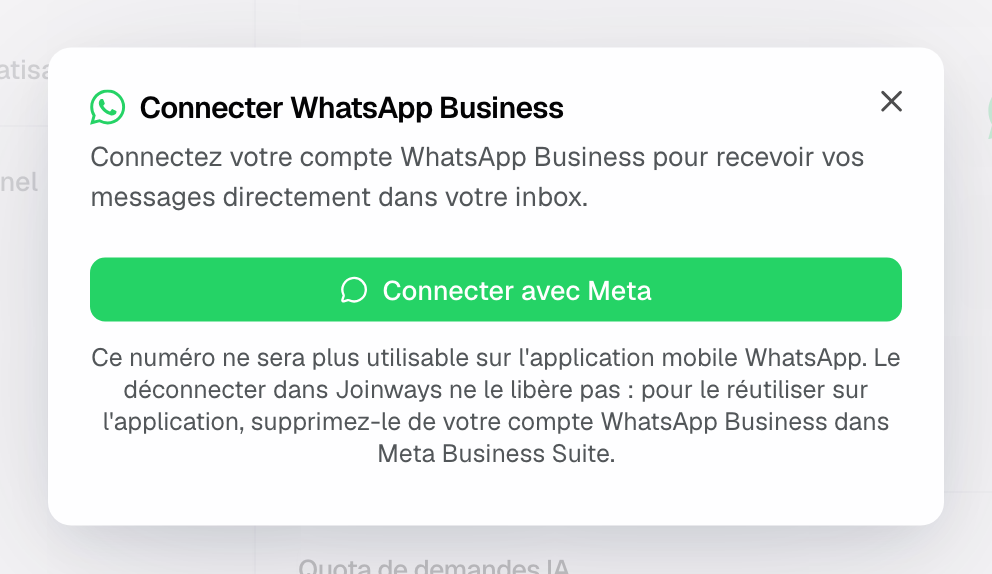
Important: your number will be managed from Joinways. It will no longer be usable on the WhatsApp mobile app, and disconnecting it in Joinways does not give it back: to use it on the app again, delete it from your WhatsApp Business account in Meta Business Suite.
The Meta window opens as a pop-up. If nothing shows, allow pop-ups for Joinways in your browser, then try again.
2. What reaches "Inquiries"
- AI reads every message received. Those that look like an event inquiry arrive in "Inquiries"; the rest (thank-yous, unrelated questions) stay out of the list.
- The inquiry keeps the client's text, their WhatsApp profile name and their number.
- A photo or video caption and a document's file name are read as text.
- Voice notes are received but not transcribed: only written information is used to create the inquiry.
To check the connection, ask someone close to you to send the number a message such as "Hello, do you have a room for 40 people on June 12?". It should appear in "Inquiries" shortly after.
3. Handle a WhatsApp inquiry
A WhatsApp inquiry is handled like any other: check the date, complete the budget or spaces, then convert it into an event. See Process an incoming inquiry.
Good to know: Joinways receives WhatsApp messages but does not send any. Reply to the client by phone, at the number shown on the inquiry, or by email if you have their address.
Example: a wedding requested on WhatsApp
A groom-to-be writes to Domaine des Tilleuls: "Hello, do you have availability on September 14 for 80 people?". The inquiry arrives in "Inquiries" with the date and guest count. The manager checks availability, calls the client back, then converts the inquiry into an event once the date is held.
Troubleshooting
"Action required: disconnect WhatsApp from your phone"
Cause: the number is still linked to the WhatsApp mobile app. Solution: in WhatsApp on the phone, open Settings > Account > Delete my account, wait 3 minutes, then click "Connect with Meta" again.
"No WhatsApp Business account was found on this Meta account."
Cause: the Meta account used manages no WhatsApp Business account. Solution: create one during the connection, in the Meta window, then try again.
"No WhatsApp number found yet."
Cause: the number was just added at Meta and is not available yet. Solution: try again in a few minutes.
"Connection cancelled, or the Meta window was blocked"
Cause: the Meta window was closed before the end, or the browser blocked the pop-up. Solution: allow pop-ups, then try again.
The channel is connected but no inquiry arrives
Cause: no new message has arrived since the connection, or AI found no inquiry in the messages received. Solution: send a test message that mentions a date and a guest count.
Frequently asked questions
Can I reply to the client from Joinways?
No. Joinways receives WhatsApp messages and turns them into inquiries, without sending any. Call the client or email them.
Can I use my usual WhatsApp number?
Only if you accept not to use it in the mobile app any more: once connected, it is managed from Joinways. A dedicated number is better.
Do older messages come in?
No. Only messages received after the connection reach Joinways.
Do WhatsApp messages count toward the inquiry quota?
Yes, like any other inquiry extracted by AI. The "AI Request Quota" card shows at the bottom of the "Sources" tab.
See also
Testen Sie es 30 Tage lang mit Ihren nächsten Anfragen, ohne Kreditkarte.