Connect WhatsApp
Centralize inquiries received on WhatsApp Business in your Inquiries so nothing slips through.
Updated
WhatsApp is often the fastest channel for your clients. Many prospects would rather fire off a message in a few seconds than write a formal email or pick up the phone. By connecting WhatsApp Business to Joinways, you handle those conversations like any other inquiry, without switching tools or losing the thread.
This article details how to link your WhatsApp Business account, what then surfaces in Inquiries, and how to follow up and convert a conversation into an event. The goal: a WhatsApp message doesn't stay stranded on a phone, but becomes a file tracked like any other incoming inquiry.
For an event venue, reply speed is often decisive: the prospect who gets a clear answer right away starts picturing it, while the one left waiting goes elsewhere. Centralizing WhatsApp in Inquiries means replying fast without letting a conversation get lost in a personal thread.
Prerequisites
Before starting the connection, gather the conditions below. WhatsApp imposes a stricter framework than other channels, because it relies on Meta's WhatsApp Business API.
- A WhatsApp Business account eligible for the API.
- A number set up for WhatsApp Business that you accept to stop using in the WhatsApp mobile app: once linked, it is managed from Joinways.
- A Meta account allowing you to complete the authorization steps.
- An owner or admin role in Joinways: the Sources tab of Integrations is only visible to these roles.
What you'll learn
- Connect WhatsApp Business to your Joinways workspace.
- Receive incoming conversations in Inquiries.
- Track a WhatsApp inquiry and convert it to an event.
- Understand eligibility conditions and resolve common blockers.
Connect WhatsApp
Connecting happens from settings and goes through a Meta authorization. Follow the steps in order.
- Go to Settings then Integrations.
- In the Sources tab, click the WhatsApp Business card, then Connect with Meta.
- Follow the authorization steps via Meta, selecting the WhatsApp Business account and the number to link.
- Confirm the permissions, then return to Joinways: the WhatsApp card now shows the connected account.
Important: your number will be managed from Joinways. It can no longer be used in the WhatsApp mobile app, and disconnecting it in Joinways does not release it: to use it in the app again, remove it from your WhatsApp Business account in Meta Business Suite.
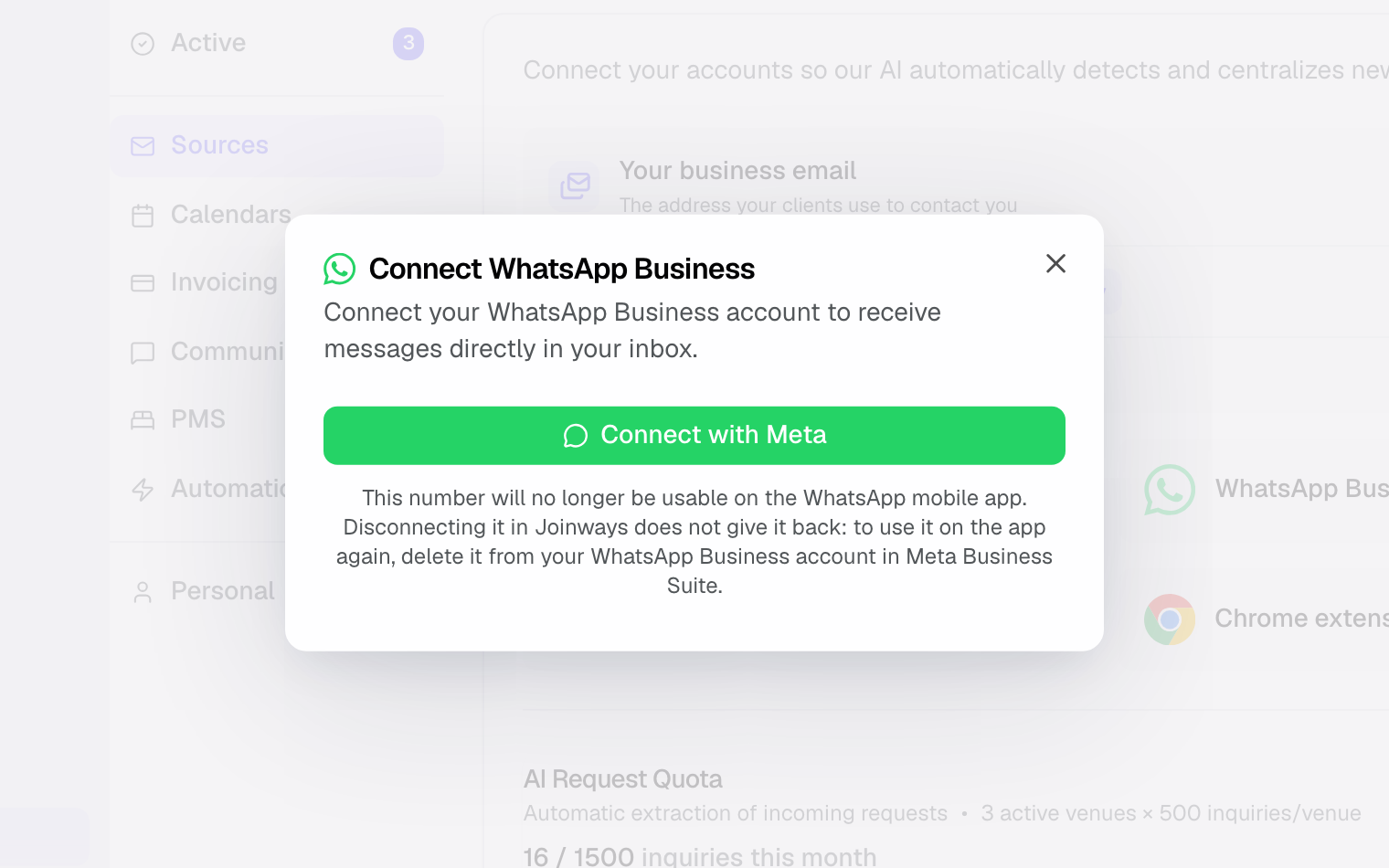
Once the connection is established, new incoming conversations start surfacing in Inquiries, ready to be handled.
To confirm everything is in place, ask a friend to message the professional number: their conversation should appear in Inquiries, a sign that the channel works.
Good to know: depending on your country and plan, using the WhatsApp Business API may be subject to conditions. Check your eligibility before relying on this channel for your inquiries.
What surfaces in Inquiries
Once WhatsApp is connected, the channel feeds Inquiries just like your emails. Here is what you find there.
- Messages that look like an event inquiry surface in Inquiries; the AI filters out the rest.
- The content of the exchanged messages, to keep the full conversation context.
- The sender on the WhatsApp side, so you can identify who you are talking to.
From there, you qualify the inquiry and convert it to an event like an email inquiry. Joinways does not send WhatsApp messages: reply to the client by phone or email.
As with the other channels, the idea isn't to turn Inquiries into a parallel WhatsApp messenger, but to bring useful conversations into the same workflow as your email inquiries and your DMs.
How it works
Joinways relies on Meta's WhatsApp Business API to link your professional number to Inquiries. Incoming conversations surface there automatically, without you having to watch the WhatsApp app in parallel.
The inquiry keeps the client's message and number. You complete it in Joinways and convert it to an event once it becomes serious.
The benefit is concrete: a WhatsApp message no longer sits on a phone checked at random. It joins a single workflow, which reduces the risk of forgetting to reply to a prospect who, for their part, expects a quick answer.
Because the conversation is tied to a file, you keep a record of what was said even if several team members step in: the history doesn't live in one person's phone.
Since this relies on the WhatsApp Business API, it requires an eligible number dedicated to professional use; that requirement is what sets WhatsApp apart from less regulated channels.
Edge cases
A few situations to know with WhatsApp, more regulated than other channels.
- Number not eligible: it must be set up for WhatsApp Business and no longer be linked to the WhatsApp mobile app.
- Country restrictions: using the WhatsApp Business API may be subject to conditions depending on your country and plan.
- Number already in use: a number active on the regular WhatsApp app cannot be switched to the API as is without preparation.
- Interrupted authorization: if the Meta steps are not completed, the channel is not activated.
- No conversation visible: right after connecting, Inquiries may stay empty until a new message arrives.
Best practices
- Check your number's eligibility for the WhatsApp Business API before starting the connection.
- Call the client back quickly on the number shown, then complete the inquiry in Joinways (date, guests, budget) to keep the record up to date.
- Convert to an event as soon as the inquiry is serious, so information is not lost in the thread.
- Reserve a dedicated number for Joinways: once linked, it can no longer be used in the WhatsApp mobile app.
- Handle WhatsApp conversations as a priority: intent there is often hot and the reply expected quickly.
Troubleshooting
Number not eligible?
Cause: the number is not set up for WhatsApp Business, or it is still linked to the mobile app. Solution: set it up for WhatsApp Business, delete the WhatsApp account from the phone, then restart the connection.
Authorization via Meta fails?
Cause: the authorization steps were not completed, or a permission was declined. Solution: click the WhatsApp Business card again, then Connect with Meta, and accept all the Meta steps.
The channel is connected but no conversation surfaces?
Cause: no new message may have arrived yet since connecting. Solution: ask a friend to message the professional number; the conversation should then appear in Inquiries.
Message "Action required: disconnect WhatsApp from your phone"? Cause: the number is still linked to the mobile app. Solution: in WhatsApp on the phone, open Settings, Account, Delete my account, wait 3 minutes, then run Connect with Meta again.
Real-world example
A future spouse messages you on WhatsApp: "Hi, do you have room on September 14th for 80 people?" The inquiry lands in Inquiries with the date and guest count. You check availability in Joinways, call the client back, then convert the inquiry to an event once the date is confirmed.
Another example
A company contacts you on WhatsApp for an end-of-year seminar. The message lands in Inquiries. You call the contact back, record the headcount and date on the inquiry, then create the event: the whole team follows the record in Joinways.
FAQ
Can I reply from Joinways?
No. Joinways receives WhatsApp messages and turns them into inquiries, but does not send WhatsApp messages. The client's number is on the inquiry: you can call them, or email them if their address is known.
What type of account is required?
A WhatsApp Business account eligible for the API. A regular personal WhatsApp account won't do.
Can my consumer number be used?
Not unless you remove it from the WhatsApp mobile app: the number must be set up for WhatsApp Business, and once linked it can no longer be used on the phone.
Are there restrictions by country?
Yes. Depending on your country and plan, using the WhatsApp Business API may be subject to conditions.
Can I convert a conversation to an event?
Yes. Like with an email or a DM, a WhatsApp conversation converts to an event as soon as it becomes a real inquiry.
Is the history kept?
Yes. The conversation is tied to the file, which keeps the history in the same place as your other exchanges.
Do I have to keep the WhatsApp app open?
To receive inquiries, no: they arrive in Joinways with nothing open. Note that once linked, the number can no longer be used in the WhatsApp mobile app, and Joinways does not send WhatsApp messages.
Can several people follow the conversation?
Yes. Since the conversation is tied to the file, your team accesses it without depending on one person's phone.
What if I don't have an inquiry yet?
The channel stays connected and ready; as soon as a message arrives on the professional number, it surfaces in Inquiries.
See also
Bring every event inquiry into one queue.