Manage companies
Group contacts and events by organization to manage your B2B accounts and spot recurring clients.
Updated
For venues working with companies, agencies or public bodies, a single client is almost never one person or one event. A sales team sends you a seminar, HR an off-site evening, and an executive assistant handles logistics: three contacts, several files, one organization. The company record exists to gather all of this in one place and track an account over time.
In practice, the company record groups all the contacts and events of the same organization, with its information (name, website, phone, address, registration number, VAT number). At creation, Joinways completes this information automatically by looking the company up on the web. It is the B2B tool that lets you think by account rather than by isolated file, and spot your best recurring clients.
Prerequisites
Access to the Companies section: this is where company records are created and viewed.
Contacts (people) to attach, or the ability to create them, to link the organization's contacts to the record.
The organization's exact name, and ideally its website: Joinways completes the record from these two pieces of information.
What you'll learn
- Create a clean company record, with no duplicate.
- Attach contacts and events to it to centralize the account.
- Let Joinways complete the record automatically from the company name.
- Track the value generated by an account over time.
Why think by company
Without a company record, your B2B clients scatter into isolated contacts and independent events. You lose the big picture: you can't see at a glance that one organization gave you five events in a year. By grouping contacts and files under a single record, you track the account as a whole and identify your recurring partners.
This account view also smooths the sales relationship: a new contact from the same organization immediately inherits the history, and you can justify a partner rate with the cumulative revenue in front of you.
Create a company
A record is created in a few fields from the dedicated section. Here is the flow and what happens at each step.
- Open « Companies » then « New company »: type the name; suggestions, with their logo, appear to avoid typos and duplicates.
- Save: the record completes itself in the background. The « Continue by adding an event » option goes straight on to creating an event.
- Attach contacts from the record's « People » tab (« New people »), or from the « Company » block of each contact record.
Tip: no need to type everything. As soon as the record is created, Joinways looks the company up and fills the empty fields: website, phone, address, registration number and VAT number.
What a record contains (reference)
A company record is organized into a few blocks. Here is each element and what it holds, in one line.
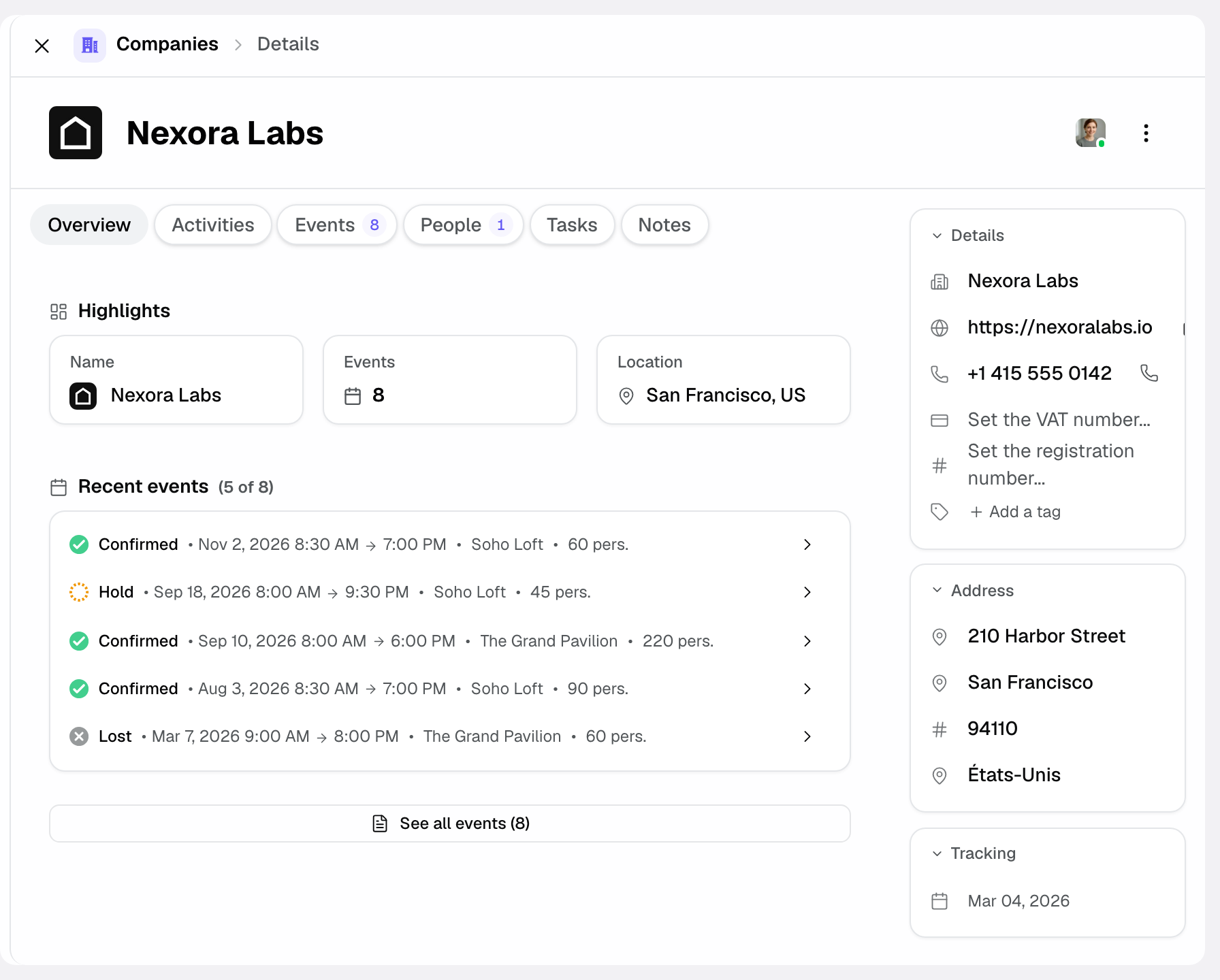
- Details: name, website, phone, registration number and VAT number; Address: street, postal code, city, country.
- « People »: the organization's contacts attached to the record.
- « Events »: all the files linked to the company, gathered in one place.
- « Overview », « Activities », « Tasks » and « Notes »: the record's other tabs, for the account's history and follow-up.
- Revenue (ex. VAT): shown as a column in the « Companies » list, it adds up the confirmed events (and cancellation fees) linked to the company.
Attaching contacts and events
The heart of the record is the link: one company connects several people and several files. Here is how those links are built.
- Attach each contact to the company: they then appear in the record's contact list.
- Link this organization's events: they appear in the record's event list.
- Open the record: you see at a glance all the account's contacts and files.
Automatic enrichment
You don't have to fill in every field: when the record is created (from « Companies » or while creating an event), Joinways looks the company up on the web from its name and website, then fills only the fields that are still empty. Here's what it can add.
- Contact details: website and phone.
- Address: street, postal code, city and country.
- Legal identifiers: registration number and VAT number.
How it works
The company record acts as a central point: contacts and events are not copied into the record, they are linked to it. A given contact remains a person in their own right, simply attached to the organization. Meanwhile, cumulative revenue builds from the linked events: each confirmed event adds to the account total.
Enrichment starts from the company name (and its website if known): Joinways searches the web, fills only empty fields and never overwrites a value you entered. You can adjust everything afterwards in the record.
Edge cases
- Duplicate record: two records for the same organization scatter contacts and events; always search before creating.
- Ambiguous or very common name: enrichment may find nothing or pick a namesake. Enter the website to help it, and check the registration number.
- Shared contact: a contact stays a single person; attaching them to a company does not duplicate them.
- Account without an event: a record can exist with no linked file; its cumulative revenue then stays at zero until the first confirmed event.
Best practices
- Centralize recurring accounts to spot your best B2B clients.
- Track the « Revenue (ex. VAT) » column of the « Companies » list to prioritize your follow-ups.
- Avoid duplicates by searching for the company before creating it.
- Attach each new contact to the record to keep a complete account view.
- Check the information added automatically, especially the registration and VAT numbers, before invoicing.
Troubleshooting
Problem: the AI doesn't enrich the record.
Cause: name too generic or namesakes, with no website to resolve it. Solution: enter the organization's website; fields left empty can also be filled by hand.
Problem: two records exist for the same company.
Cause: the record was created without searching first. Solution: open one of the two records and choose « Merge with another company », then the record to keep: events, contacts, notes and history are transferred, and the other record is deleted (this can't be undone).
Problem: an event doesn't appear in the record.
Cause: the file isn't linked to the company. Solution: link the event to the record so it appears in the list; it will count toward cumulative revenue once confirmed.
Real-world example
An event agency gives you 5 events a year. You create its company record; Joinways fills in its website, address and registration number, and you attach the three usual contacts. The « Companies » list shows its « Revenue (ex. VAT) » on confirmed events: you easily justify a partner rate, figures in hand.
Another example
A public body organizes a gala and several meetings each year. Over time the contact changes: the old manager leaves, a new one arrives. Because everything is attached to the company record, the new contact immediately inherits the event history and cumulative revenue, with nothing to rebuild.
FAQ
Can a company have several contacts?
Yes, that's the whole point: gathering all the people of an organization under one record.
Can a company have several events?
Yes: all the organization's files are attached to its record, and confirmed events feed the account's cumulative revenue.
How does AI enrichment work?
Joinways looks the company up on the web from its name and website, then fills the empty fields: website, phone, address, registration number and VAT number.
How do I avoid duplicates?
Search for the company name before creating a new one: if it already exists, attach to the existing record.
Can I track an account's revenue?
Yes: the « Revenue (ex. VAT) » column of the « Companies » list adds up the confirmed events linked to each account, useful to spot your best B2B clients.
Can one contact belong to several companies?
The contact stays a single person; attach them to the relevant organization to keep a consistent account view.
See also
- Manage people
- Enrich companies with AI
- Analyze your revenue
Bring every event inquiry into one queue.