The Operations tab: occupancy, team and venues
Occupancy rate, seasonality, booking lead time, team responsiveness in opening hours, sales per member and by-venue tables.
Updated
Revenue does not tell the whole story of how a venue runs. Are the rooms full on Saturdays and empty on Tuesdays? Does the team reply quickly to Sunday-evening inquiries? Which venue converts best? These questions are answered in booked days, response times and venue comparisons.
The "Operations" tab brings them together: venue occupancy and seasonality, booking lead time, the team's responsiveness in opening hours and sales per member, then the by-venue tables of inquiries, sales and revenue.
What you'll learn
- Read the three indicators: occupancy, booking lead time, replies within an hour.
- Analyse occupancy by venue, by month and by day of the week.
- Measure the team's responsiveness and each member's sales.
- Compare venues on inquiries, sales and revenue.
Prerequisites
- Access to reports: "Owner", "Admin", "Member" or "Read-only" role.
- For accurate occupancy and response times: each venue's opening hours and closures, in "Settings" > "Venues". See Manage your venues and their spaces.
- Several venues to see the "By venue" part.
1. Read the three indicators
Open "Reports" and click "Operations", on the right of the tab bar. Choose the period: besides the usual ranges, "Next 6 months" and "Next 12 months" show occupancy already booked.
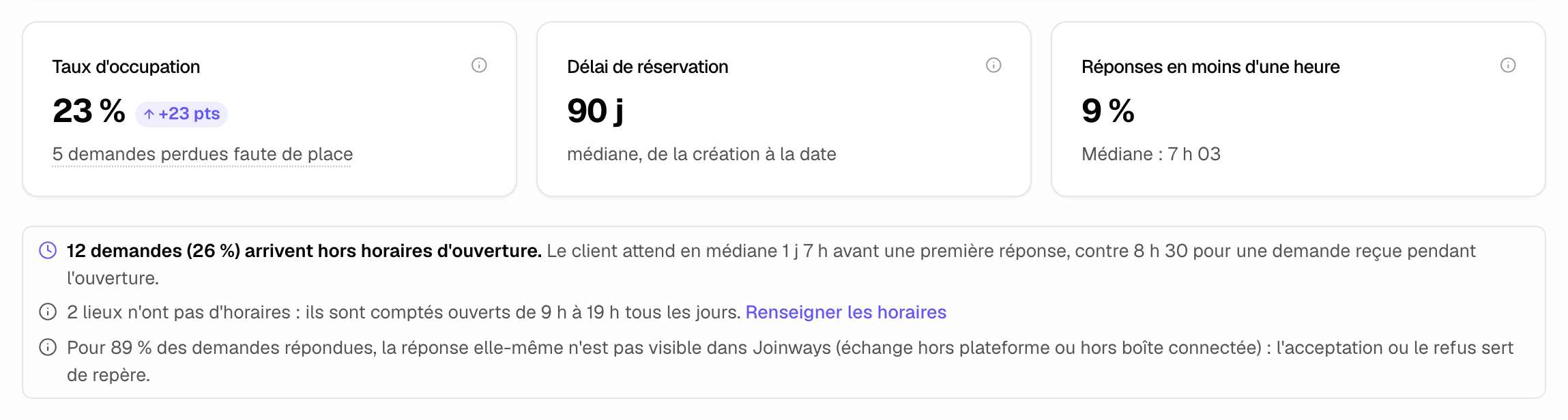
- "Occupancy rate": opening days covered by at least one confirmed event, out of the period's opening days, closures deducted. Below it, the number of inquiries lost to a booked date opens those inquiries.
- "Booking lead time": median time between a confirmed event's creation and its date.
- "Replies within an hour": share of inbox inquiries that got a first reply within one opening hour, with the median time.
Below the cards, notices appear when useful: the share of inquiries arriving outside opening hours and the wait they get, venues without opening hours (counted open from 9 am to 7 pm every day, with the "Set opening hours" link), and the share of replies Joinways cannot see directly.
2. Analyse occupancy
The "Occupancy" part brings together:
- "Seasonality": each venue's occupancy month by month, in whole months, upcoming bookings included. The darker the cell, the busier the venue.
- "By day of the week": occupancy from Monday to Sunday.
- "Booking lead time": confirmed events split into "Under a month", "1 to 3 months", "3 to 6 months", "6 to 12 months" and "Over a year".
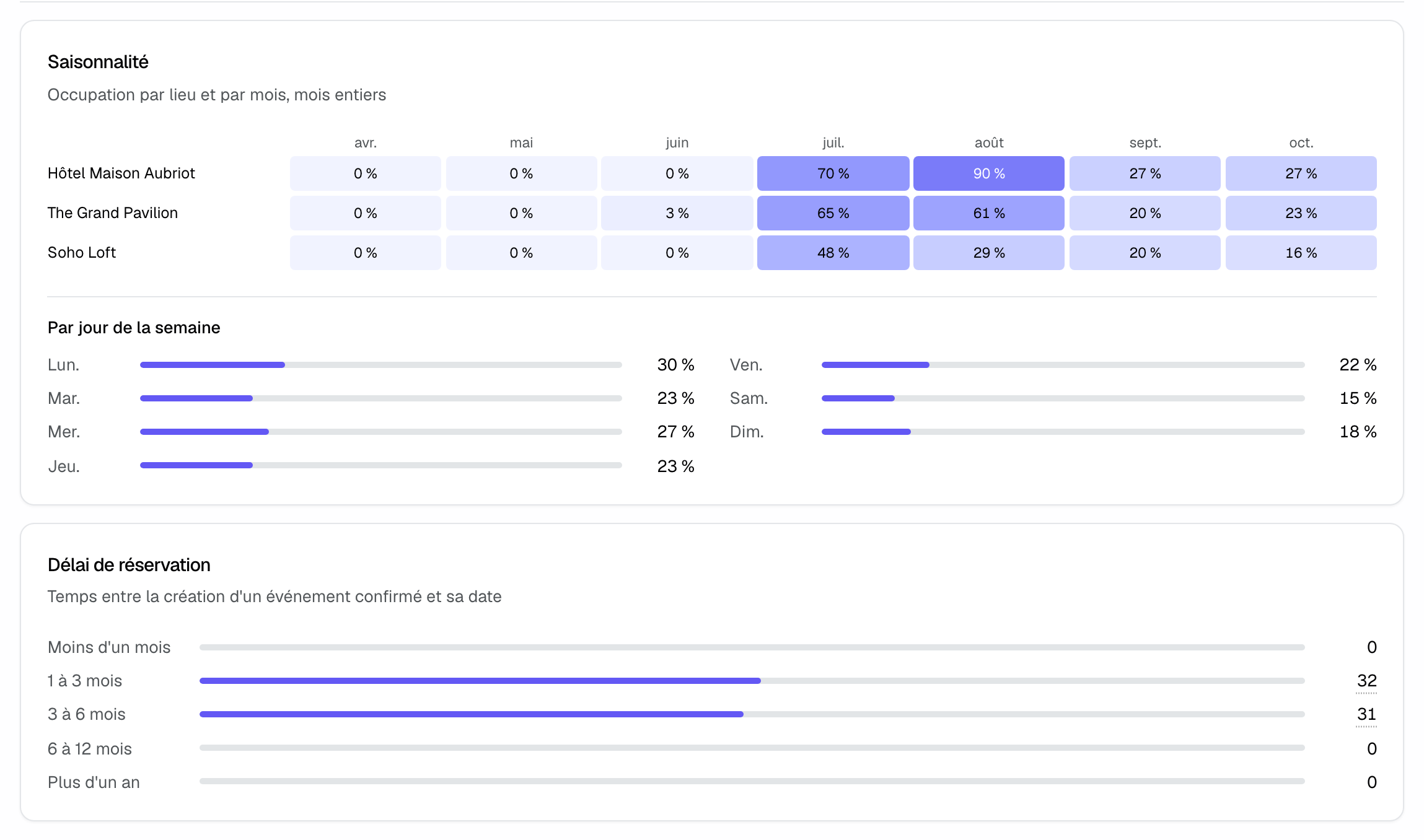
A booked day runs from the event's start date to its end date, or is limited to the selected dates when the event has some. Calendar imports count; an event counts for 62 days at most. A day booked while the venue is closed is left out of the rate. Booking lead time excludes imported events and after-the-fact entries, whose creation date says nothing about the real lead time.
3. Measure the team's responsiveness
The "Team and responsiveness" part starts with "Time to first reply", which splits inquiries into "< 15 min", "15 – 60 min", "1 – 4 h", "4 – 24 h", "> 24 h" and "No reply". The delay counts in each venue's opening hours: an inquiry received on Saturday at 10 pm counts from the next opening. The "First signal:" line shows how the team replied: platform, quote, email, info request, or acceptance or rejection.
"When inquiries arrive" crosses the day of the week with two-hour slots, at the venue's local time. The darker the cell, the more inquiries arrive: useful to plan who is on duty.
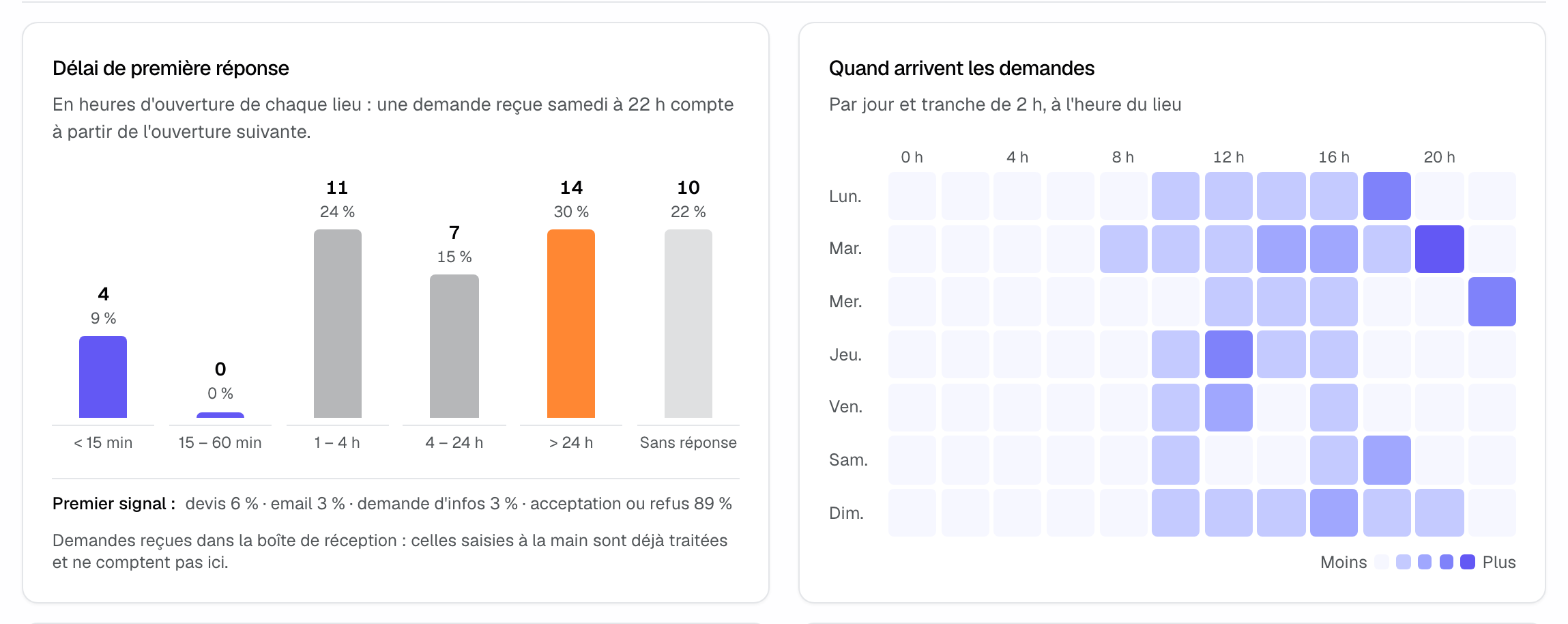
The first signal is the earliest of: a reply or quote on the platform, a Joinways quote sent, an email sent from the event or the inquiry thread, an information request. Failing that, acceptance or rejection in Joinways is used as the marker. These measures cover inbox inquiries: inquiries entered by hand, already handled, are not included.
4. Follow each member
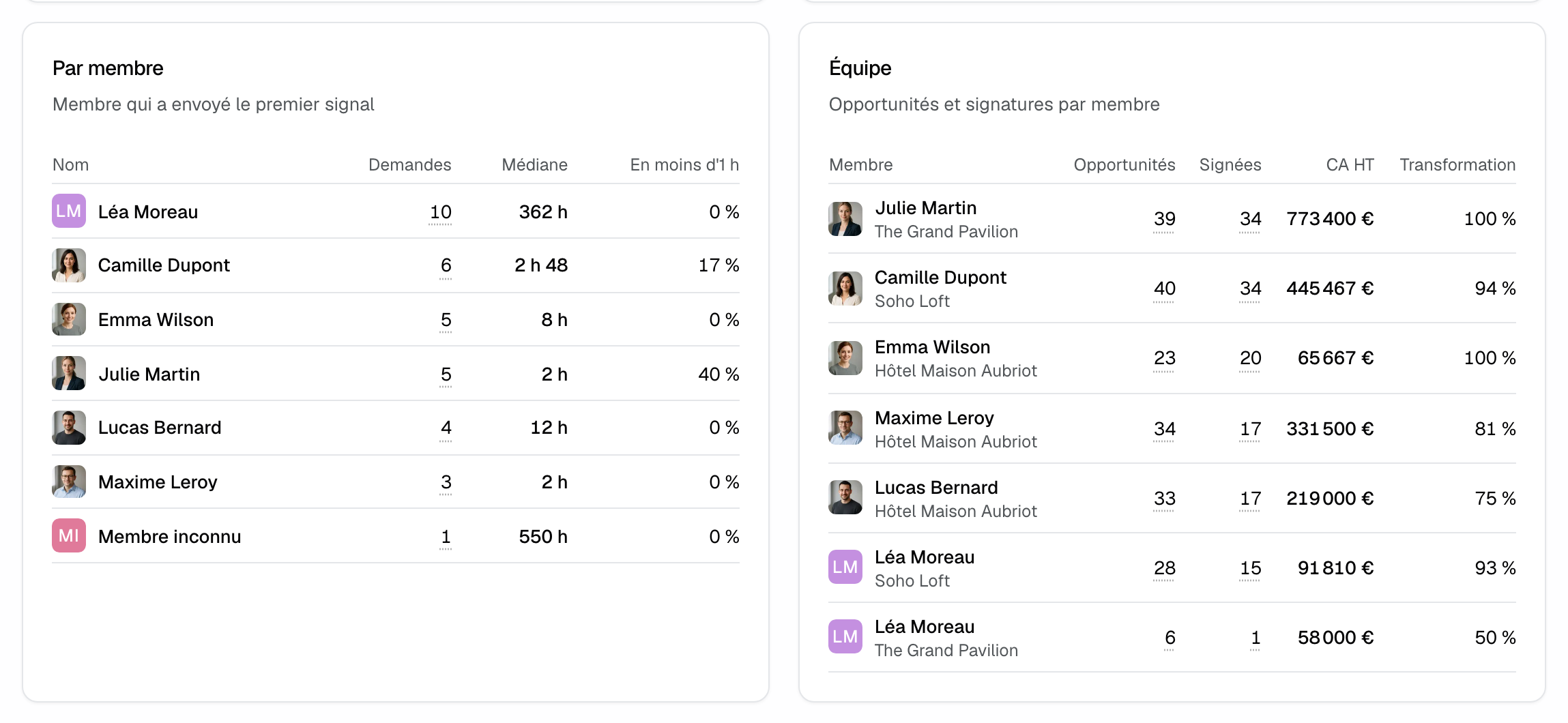
- "By member": for each member who sent the first signal, the number of "Inquiries", the "Median" and the share "Under 1 h".
- "Team": for each member in charge, the period's "Opportunities", "Signed", "Revenue excl. tax" and "Conversion".
5. Compare venues
With several venues shown, the "By venue" part gives three tables:
- inquiries: each venue's "Inquiries", "Confirmed" and "First reply";
- sales: "Opportunities", "Signed", "Revenue excl. tax", "Change", "Average ticket", "Conversion", "Average delay" and "Cancellation";
- realized revenue: "Events", "Revenue excl. tax" with its share of the total, and "Occupancy". When venues have goals, a "Goal" column is added.
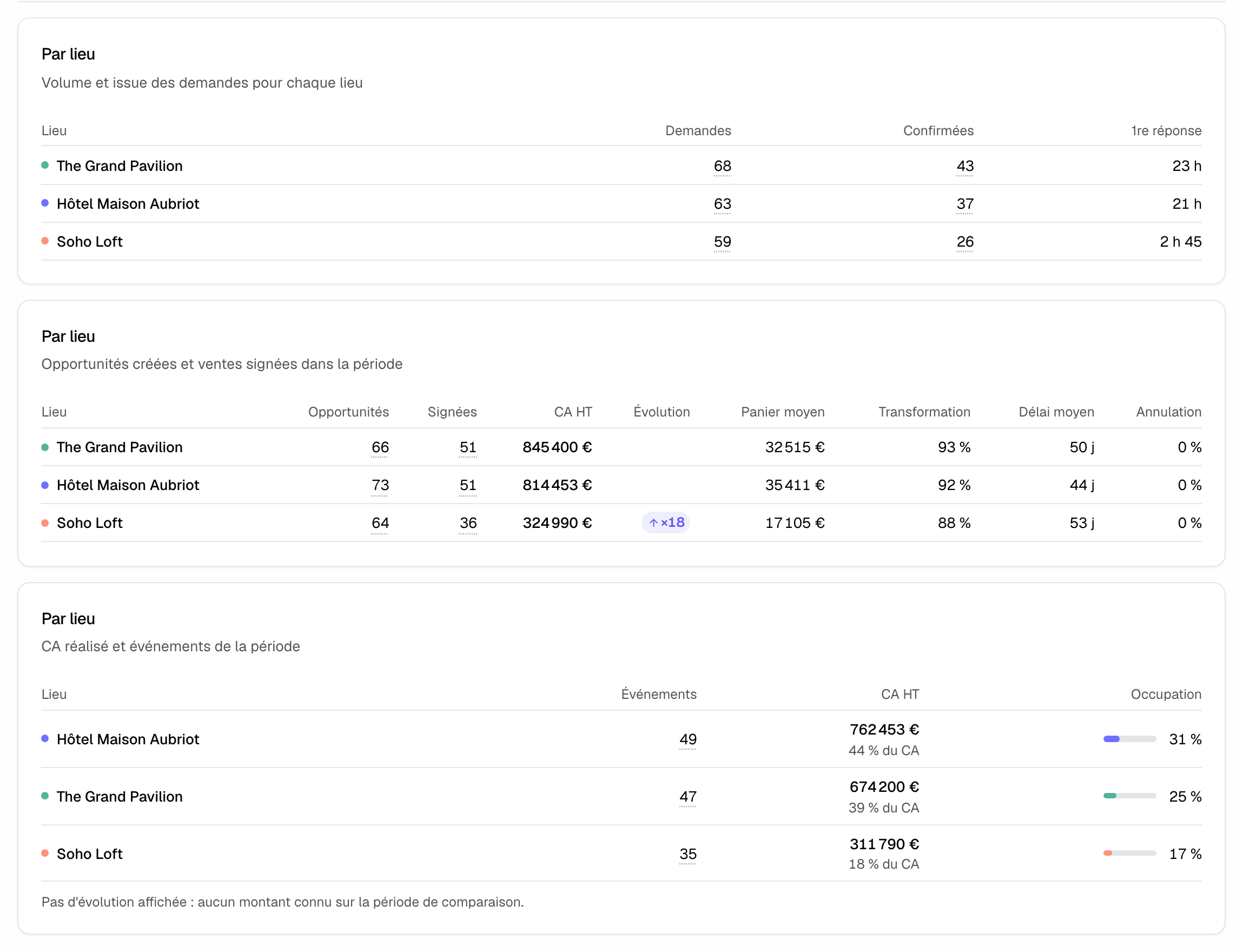
Every dotted-underlined number opens the list of inquiries or events concerned.
Example: a rooftop replying too late at weekends
A rooftop sees "Replies within an hour" at 9% and 30% of inquiries beyond 24 h in "Time to first reply". "When inquiries arrive" reveals peaks on Tuesday evening and Sunday afternoon, and "By day of the week" shows Saturdays at 15%. The team adds Sunday cover, enters its real opening hours and launches a Saturday offer: the tab tracks the effect month after month.
Troubleshooting
Reply time looks very long
Cause: a venue without opening hours is counted open from 9 am to 7 pm every day, or its closures are missing. Solution: click "Set opening hours" and enter the venue's hours and closures.
Most replies are dated by acceptance
Cause: the team replies outside Joinways (platform without tracking, mailbox not connected). Solution: connect the mailbox that receives inquiries and reply from Joinways; see Manage your email connections.
Occupancy rate looks too low
Cause: the venue has no opening hours, so all its days, Sundays included, count as open. Solution: enter the venue's opening days and closures.
The "By venue" part does not appear
Cause: only one venue is shown, through the "Venue" filter or because the workspace has only one. Solution: select several venues.
Frequently asked questions
Do events imported from a calendar count in occupancy?
Yes, they take up days. They do not count in booking lead time, as they have no real creation date.
How are opening hours counted?
From each venue's opening hours and closures, in its time zone. Full-day and partial closures are deducted, and the delay is capped at 60 calendar days.
Why does seasonality show whole months?
So that a few days never pass for a month. Rates, weekdays and totals do follow the chosen period.
Can I export this tab?
No, "Operations" cannot be exported. The by-venue and by-member tables are in the "Inquiries" and "Sales" exports.
See also
Try it on your next inquiries for 30 days, no credit card.