The Inquiries tab: volume, conversion and sources
Inquiries received, the journey to confirmation, volumes by source or status, win rate and the sources table.
Updated
A platform that sends many inquiries does not necessarily convert many, and an inquiry left waiting on a Saturday night is often signed by the competitor who replied first. Knowing how many inquiries arrive, where they come from and how many become events tells you where revenue is lost.
The "Inquiries" tab ranks each inquiry by the date it was received. It brings together volume, the inquiry journey up to confirmation, volumes by source or by status, and the sources table.
What you'll learn
- What counts as an inquiry in reports.
- Read the four indicators: inquiries received, win rate, first reply, unanswered.
- Follow the inquiry journey and volumes by source or by status.
- Compare sources and filter reports on one of them.
Prerequisites
- Access to reports: "Owner", "Admin", "Member" or "Read-only" role.
- Inquiries in the inbox or entered by hand.
- For an accurate reply time: each venue's opening hours, in "Settings" > "Venues". See Manage your venues and their spaces.
1. What counts as an inquiry
The tab counts inquiries received in the inbox and those entered by hand, dated when received. An inquiry counts only once:
- an inquiry merged into another, or deleted from the inbox, does not count;
- an inquiry transferred by the platform to another venue of the workspace counts for the venue that holds it; a transfer is not a rejection;
- two identical inquiries for the same venue count once;
- events imported from a calendar are not inquiries.
2. Read the four indicators
Open "Reports" > "Inquiries" and choose the period. The same figure, "Inquiries" with the number to handle, appears in the tab bar.

- "Inquiries received": the period's volume. The "N to process" link opens the inbox.
- "Win rate": inquiries whose event is confirmed, out of the inquiries received in the period.
- "First reply (median)": median time to the first signal sent to the client, in the venue's opening hours, with the share answered in under an hour.
- "Unanswered": inquiries with no reply signal and no processing in Joinways, and how many have waited more than 24 h. The number opens these inquiries.
Responsiveness detail (reply time ranges, arrival times, members) is in the "Operations" tab. See The Operations tab.
3. Follow the inquiry journey
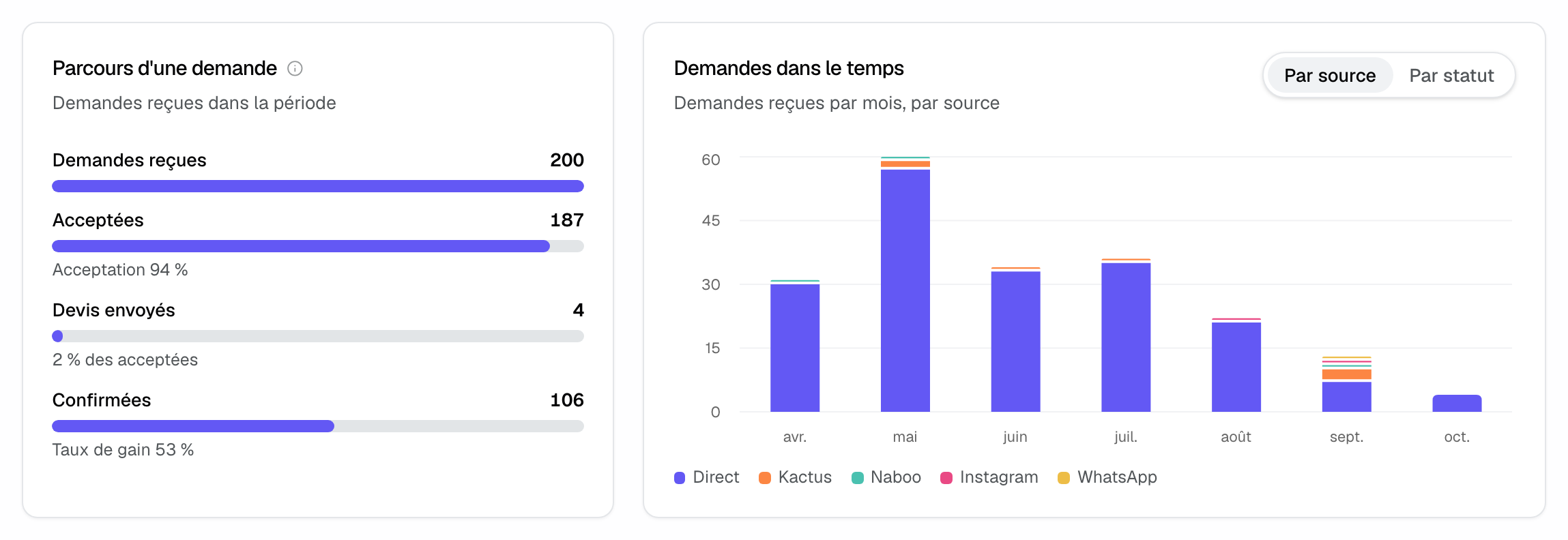
"Inquiry journey" follows the inquiries received in the period: "Inquiries received", then "Accepted" with the acceptance rate, "Quotes sent" (Joinways quotes or quotes sent through the platform) with the share of accepted, and "Confirmed" with the win rate.
"Inquiries over time" shows inquiries received, daily over a period of two months or less, monthly beyond. The toggle on the right switches between "By source", one color per source, and "By status": "Accepted", "Declined", "To process".
4. Compare sources
"By source" shows where inquiries come from and what they become: "Inquiries", "Share", "Quotes sent", "Confirmed", "Win rate" and "First reply". With a comparison, a "Change" column is added.
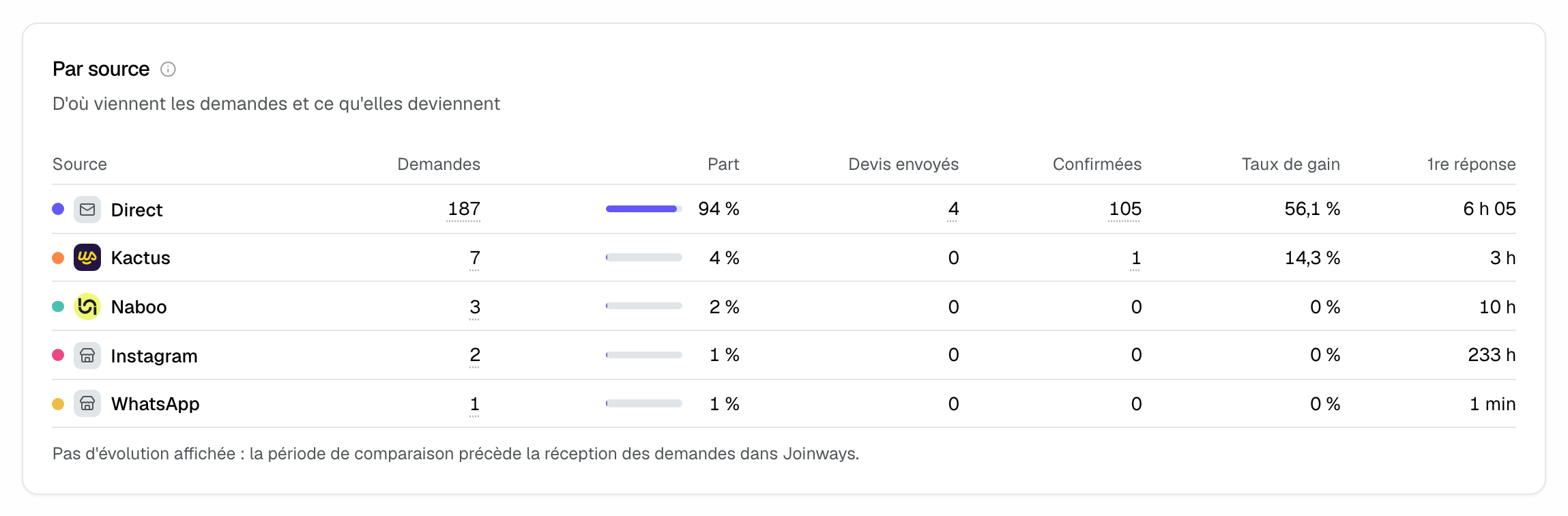
Different spellings of the same platform are grouped into one source, with the same color in every chart. "Direct" groups emails, the website and the form. Dotted figures open the inquiries concerned. Click a source name to filter every report on it; "All sources", in the "Source" filter, removes that filter.
Tip: a high-volume source with a low win rate costs processing time. Filter on it, then open "Sales": "Profitability by source" adds revenue and commission.
Example: an estate comparing two platforms
An estate receives 200 inquiries in six months. "By source" shows that one platform brings 7 inquiries at a 14% win rate, while direct inquiries convert at 56%. The estate clicks the platform: every tab switches to that source alone. In "Sales", it checks what the platform brought in, net of commission, before renewing its subscription.
Troubleshooting
Figures only cover one source
Cause: a "Source" filter is on, set from the menu or by clicking a source in a table. Solution: open "Source" and choose "All sources".
First reply time looks very long
Cause: a venue without opening hours is counted open from 9 am to 7 pm every day. Solution: enter its opening hours; the "Operations" tab flags the venues concerned.
"No change shown"
Cause: the comparison period predates the inquiries received in Joinways. Solution: choose "vs previous period" or "No comparison".
Frequently asked questions
Does an inquiry transferred to another venue count as rejected?
No. It counts for the venue that receives it. A transfer is not a rejection.
What is the difference between acceptance rate and win rate?
Acceptance measures the inquiries you agree to handle. Win rate measures those whose event is confirmed, out of all inquiries received.
Where can I see responsiveness per member?
In the "Operations" tab, "Team and responsiveness" part: reply time ranges, inquiry arrival times and each member's median time.
Can I export these figures?
Yes. "Export" produces an Excel file including "By source", "Venue × source", "Processing by member" and "Inquiries detail".
See also
Try it on your next inquiries for 30 days, no credit card.