The marketing source of inquiries (Google Ads, Meta Ads, utm)
See which inquiries and which revenue come from Google Ads or Meta Ads: detection, display on the inquiry and in reports.
Updated
You pay for Google Ads or Meta Ads campaigns to fill your calendar, but the inquiries they bring arrive through your website like all the others. With no other information they land in "Direct", and you cannot tell how many signed proposals a campaign really brought in.
Joinways reads the campaign parameters the visitor arrived on your site with (utm_source, utm_medium, Google, Meta or Microsoft click IDs) and works out the inquiry's marketing source. You see it on the inquiry, and reports split Google Ads, Meta Ads and your other campaigns out of "Direct".
What you'll learn
- Where the campaign information comes from.
- How Joinways classifies an inquiry as Google Ads, Meta Ads, Microsoft Ads or other.
- Where to see the marketing source: on the inquiry and in reports.
- How to set up your campaigns so inquiries are recognized.
Prerequisites
- Inquiries coming in through your website: the Joinways inquiry form placed on your site, or your site's own contact form if it adds an "ORIGINE" section to the email it sends you (see below).
- Campaign links that carry parameters: the click ID added automatically by Google Ads, Meta or Microsoft Ads, or utm_* parameters you add to your URLs.
- For reports: access to "Reports".
1. Where the information comes from
There are two paths, depending on how your website passes inquiries on.
The Joinways inquiry form
The form script reads, on the page where the visitor fills in the form, the utm_source, utm_medium, utm_campaign, utm_term and utm_content parameters, as well as the gclid, gbraid, wbraid (Google), fbclid (Meta) and msclkid (Microsoft) click IDs. They are saved on the inquiry with the page and the referrer. Nothing to set up in Joinways.
Your website's contact form
If your website sends its inquiries by email, it can end each email with an "ORIGINE" (or "ORIGIN") section: a heading, then one line per parameter, in the form key: value (for example utm_source: google, utm_medium: cpc, gclid: …). Joinways reads that section in the email received by your inquiries mailbox. A utm_source: line elsewhere in the message does not count: only that section is read.
2. How the source is decided
Joinways applies the same rules everywhere, on the inquiry and in reports:
- Google Ads: a Google click ID (gclid, gbraid or wbraid), or utm_source google with a paid medium.
- Meta Ads: utm_source facebook, instagram, meta, fb, ig, an or msg with a paid medium (an and msg are the Audience Network and Messenger values Meta puts in {{site_source_name}}).
- Microsoft Ads: an msclkid, or utm_source bing or microsoft with a paid medium.
- Facebook / Instagram: an fbclid on its own. Meta also adds it to non-paid links: it does not prove an ad.
- Other campaign: any other utm_source value is shown as written (for example "Newsletter" for utm_source=newsletter).
A medium (utm_medium) is paid according to the Google Analytics 4 rule: it contains "cp" (cpc, cpm…), starts with "paid" (paid, paid_social…), or is ppc or retargeting. So utm_source=meta without a paid medium stays "Meta", not "Meta Ads".
Important: the marketing source only replaces "Direct". A platform inquiry (Kactus, Naboo…), a call or an agency inquiry keeps its source even if a campaign was involved: the commission follows the platform.
3. See it on the inquiry
In "Inquiries", open the inquiry. When a campaign is recognized, the "Extracted data" panel shows an "Origin" block with the "Source" (Google Ads, Meta Ads, Microsoft Ads, Facebook / Instagram or the utm value) and, when present, the "Campaign", "Content" and "Keyword" (utm_campaign, utm_content, utm_term).
When the inquiry becomes an event, the event inherits its marketing source: that is what lets you trace signed revenue back to the campaign.
4. Find it in reports
In "Reports", marketing sources appear as channels in their own right, next to "Direct", "Phone" and the platforms, with no commission:
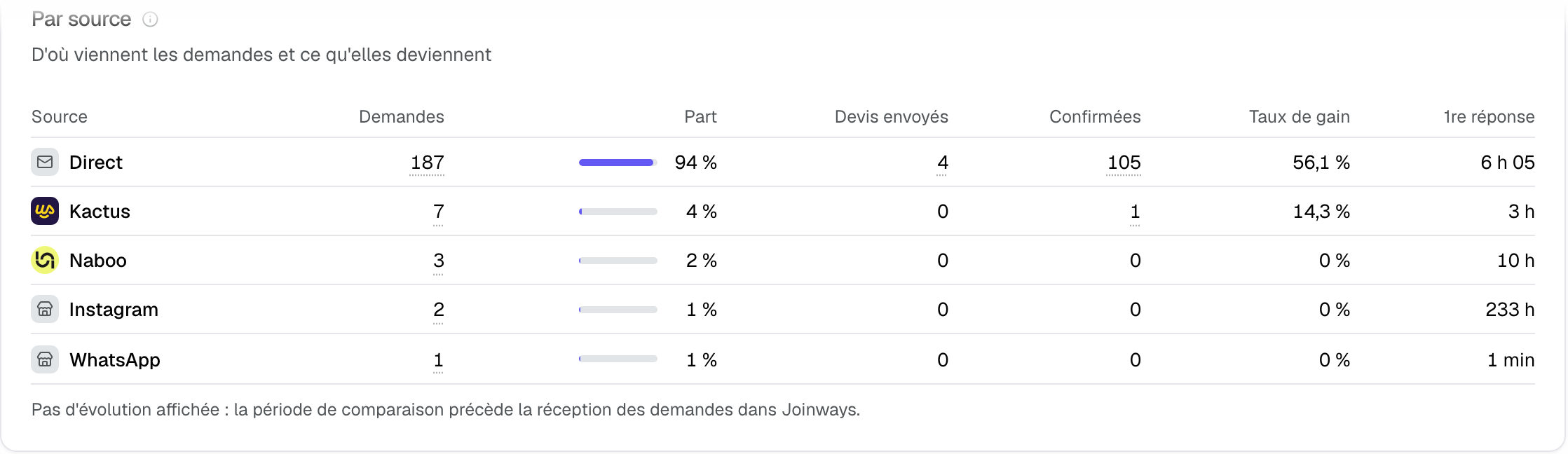
- "Inquiries" tab, "By source" table: the number of inquiries per source, their share, proposals sent, confirmed events, win rate and first response time. See The Inquiries tab.
- "Sales" tab, "Profitability by source" table: signed revenue per source. See The Sales tab.
- "Clients" tab, "New clients by source": the source of new clients' first event.
- The Excel export of reports uses the same labels in its "By source" sheet.
5. Set up your campaigns
- Google Ads: keep auto-tagging on (gclid parameter). Nothing else to do.
- Meta Ads: in your ads' URL parameters, add for example
utm_source={{site_source_name}}&utm_medium=paid_social&utm_campaign={{campaign.name}}. Meta replaces {{site_source_name}} with fb, ig, an or msg. - Microsoft Ads: keep auto-tagging (msclkid) on.
- Other campaigns (newsletter, partner, trade show): add at least utm_source to your links, for example utm_source=wedding-show.
The parameters must reach the page that holds the form. If your site redirects the visitor from page to page and loses them, pass them along, or use the "ORIGINE" section of your own form.
Example: an estate testing Meta Ads for weddings
An estate runs a Meta Ads campaign "Weddings 2027" to its "Request a quote" page, where the Joinways form sits. Three months later, the "Inquiries" tab of reports shows a "Meta Ads" row with 18 inquiries, and the "Sales" tab the signed revenue they brought. On each inquiry, the "Origin" block shows the "Weddings 2027" campaign: the team knows which ads bring real projects.
Troubleshooting
An inquiry from an ad stays in "Direct"
Cause: the campaign parameters did not reach the form (auto-tagging off, a redirect that drops them), or your site's contact form does not send an "ORIGINE" section. Solution: open your page with a campaign link and check that the address contains gclid, fbclid or utm_source when you fill in the form.
The source shows "Facebook / Instagram" rather than "Meta Ads"
Cause: only an fbclid is present, with no paid medium. Solution: add utm_source and a paid utm_medium (paid_social, cpc…) to your Meta ads' URL parameters.
A Kactus inquiry carries a campaign but stays "Kactus"
Cause: this is intended, the marketing source only replaces "Direct". Solution: none; the platform stays the source so its commission is right.
Frequently asked questions
Do I need to set anything up in Joinways?
No. Parameters are read automatically for the Joinways inquiry form and for the "ORIGINE" section of your site's emails.
Can I filter the Inquiries list by marketing source?
Not at the moment. The marketing source is read on the inquiry ("Origin" block) and compared in reports.
Are inquiries received before the setup classified?
Only if their campaign parameters were saved. An inquiry that arrived without parameters keeps its original source.
Do marketing sources carry a commission?
No. They are channels, like "Direct" or "Phone": no commission is deducted in reports.
See also
Try it on your next inquiries for 30 days, no credit card.