Connect Instagram
Connect your professional Instagram account: direct messages that look like an event inquiry arrive in "Inquiries".
Aggiornato il
Many inquiries start on Instagram: a couple comes across your wedding photos, an agency spots your rooftop, and they reach out by direct message. Those messages are easily lost among story reactions.
Connect your professional Instagram account: AI reads every new direct message, and those that look like an event inquiry arrive in "Inquiries", ready to become events.
What you'll learn
- Connect a professional Instagram account.
- Know which direct messages become inquiries.
- Keep the connection active over time.
- Fix connection errors.
Prerequisites
- A professional Instagram account (business or creator). A personal account cannot be connected.
- The credentials of that Instagram account.
- An owner or admin role: the "Sources" tab of the integrations is reserved for them.
1. Connect Instagram
- Go to "Settings" > "Integrations", "Sources" tab.
- Click the "Instagram" card. The "Connect Instagram" window recalls the requirements and what Joinways reads.
- Click "Continue with Instagram".
- Sign in to the professional account and accept the two requested permissions: reading your profile and managing your messages.
- Back in Joinways, the card shows "Active".
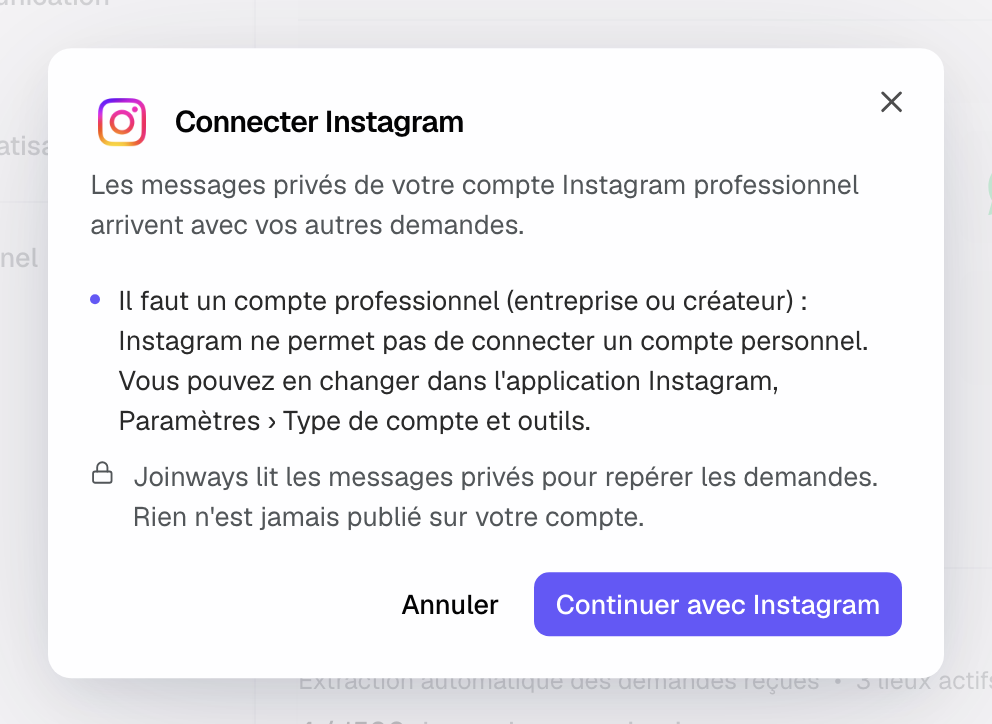
Tip: is your account still personal? In the Instagram app, open Settings › Account type and tools to switch to a professional account, then start the connection.
2. What reaches "Inquiries"
- Direct messages that look like an event inquiry arrive in "Inquiries", with the client's message and their Instagram profile.
- The rest (story reactions, emojis, unrelated chats) stays in Instagram, out of the list.
- Only messages received after the connection are read; older ones stay in Instagram.
Joinways reads direct messages to spot inquiries. It never posts anything on your account and does not send messages: you reply to the client in Instagram, then follow the inquiry in Joinways. See Process an incoming inquiry.
3. Keep the connection active
The Instagram authorization lasts 60 days. Joinways renews it automatically while it is valid. If renewal fails, you get a notification three days before it expires; if the authorization has expired or was withdrawn, the connection is deactivated and a notification asks you to reconnect it in "Settings" > "Integrations" > "Sources".
The card's gear opens "Instagram Settings": the connected account, and disconnection.
Example: a rooftop spotted on Instagram
An agency spots Rooftop Lumière and sends a direct message: "Hello, do you host product launches? We would be 120, ideally a Thursday evening in March.". The message arrives in "Inquiries" with the guest count and the period. The manager replies in Instagram, offers two dates, then converts the inquiry into an event. Reactions to his stories are not brought in.
Troubleshooting
"Instagram did not validate the connection. Check that the account is professional, then try again."
Cause: the account is still personal. Solution: switch it to a professional account in Instagram, then start the connection again.
"You declined the access on Instagram. Nothing was connected."
Cause: one of the permissions was declined on the Instagram screen. Solution: start the connection again and accept both permissions.
"Connection refused: your role doesn't allow you to connect Instagram…"
Cause: only owners and admins connect Instagram, or the connection was started from another Joinways account. Solution: ask an owner or admin to do it.
A specific message did not reach "Inquiries"
Cause: AI judged it unrelated to an event, often because it is very short. Solution: reply to it in Instagram; if it is an inquiry, create the event by hand.
Frequently asked questions
Do I need a Facebook page?
No. The connection is made directly with your professional Instagram account.
Can I connect several Instagram accounts?
No, one account per workspace. To switch, disconnect it from the card's gear, then connect the other one.
Can I reply from Joinways?
No. Reply in Instagram; the inquiry stays in "Inquiries" to track the date, the budget and the conversion into an event.
Do Instagram messages count toward the inquiry quota?
Yes, like any other inquiry extracted by AI. The "AI Request Quota" card shows at the bottom of the "Sources" tab.
See also
Provalo sulle tue prossime richieste per 30 giorni, senza carta.