Webhooks: push Joinways events to your own tools
Have Joinways call your HTTPS endpoint as soon as an inquiry, an event or a quote changes, with a signature to verify and automatic retries.
Aggiornato il
A hotel group wants every confirmed booking in its data warehouse within the minute, without manual exports. Polling the API every five minutes costs calls and sometimes misses a change.
A webhook reverses the direction: Joinways calls your HTTPS address as soon as an inquiry, an event or a quote changes, with the up-to-date record and a signature to verify. There are two mechanisms: subscriptions, which listen to the whole workspace, and the "Call a webhook" action of an automation, which only fires when its rule decides.
What you'll learn
- Choose between a subscription and the automation action.
- Create a subscription and keep its secret.
- Verify a call's signature.
- Understand retries and automatic disabling.
- See and delete the workspace's webhooks.
Prerequisites
- The Pro plan or the free trial.
- The "Owner" or "Admin" role to create a subscription and see the "Developers" page.
- A public HTTPS address that answers fast. Local addresses, private ranges and internal names are refused.
1. Choose the right mechanism
- Subscription: you register an address once, and Joinways calls it on every change of the chosen type, anywhere in the workspace. Zapier uses it, and it is what you need to copy your data or drive Make or n8n.
- "Call a webhook" action: an automation step, sent after the rule's delay and conditions. For example, two days after the end of a wedding of more than 100 guests.
- Neither: to read data on demand, use an API key and call the API.
2. Create a subscription
A subscription is not created from a form in the app. There are two ways:
- Zapier: a Zap built on a Joinways trigger creates the subscription for you (see Connect Joinways to Zapier).
- The API:
POST /api/v1/webhookswith an API key, atarget_urland theevent_typeslist.
Eight event types are available:
lead.created: an inquiry arrives.lead.archived: an inquiry is archived.lead.merged: a duplicate inquiry is merged into another (merged_into_lead_idfield).event.created: an event is created.event.status_changed: an event's status changes (previous_status,new_status).event.stage_changed: an event's stage changes (previous_stage_id,new_stage_id,new_stage_name).quote.created: a quote is created.quote.status_changed: a quote's status changes, signature included.
The response holds the signing secret (whsec_…), only once. Store it right away: without it you cannot verify any call. A workspace holds at most 25 active subscriptions.
3. Receive and verify a call
Each delivery is a JSON POST: event_type, account_id, occurred_at, the type's own fields, and data, the record read again when the delivery is built, in the shape the API returns (an item of GET /events or GET /leads, or the quote object of GET /quotes/{id}). Multi-day events carry their per-day hours in day_hours.
The headers:
X-Joinways-Event: the event type.X-Joinways-Delivery: a unique id, the same for every retry of one delivery. Deduplicate on it.X-Joinways-Timestamp: the send time, in Unix seconds.X-Joinways-Signature-V2:sha256=followed by an HMAC-SHA256 of<timestamp>.<raw body>, computed with your secret.X-Joinways-Signature: the first version, an HMAC-SHA256 of the raw body alone, kept for existing receivers.
To verify, compute the HMAC on the body exactly as received, before any JSON parsing, compare it with the header, and reject a timestamp older than 5 minutes to block replays. A body reformatted by your framework will never match.
Tip: answer 200 as soon as you receive the call, then process the payload in the background. An endpoint that works before answering ends up failing, then disabled.
4. Retries and automatic disabling
- A call with no answer after 10 seconds counts as a failure. Redirects are not followed.
- Each delivery is tried 3 times in a row. If it fails on a network error, a timeout, a 5xx, 408 or 429, it is retried after 10 minutes, 30 minutes, 2 hours, 6 hours and 24 hours, with the same
X-Joinways-Delivery. - Another 4xx answer is not retried. A 410 answer deletes the subscription: this is how Zapier reports a turned-off Zap.
- After 10 failed deliveries in a row, the subscription becomes "Disabled".
- A failing webhook never blocks the action in Joinways.
5. The "Call a webhook" action of an automation
In an automation, the "Call a webhook" action sends the matched record to the address you enter, after the rule's delay and conditions. The X-Joinways-Event header is then workflow.action, so one endpoint can tell the two sources apart.
The secret is optional. When set, the call carries the X-Joinways-Signature header, computed on the raw body. A network error, 5xx, 408 or 429 is retried; another 4xx answer or a redirect is logged as skipped in the automation's history.
6. See and delete webhooks
Open "Settings" > "Developers", "Webhooks" tab. The tab's counter gives the total. The list gathers every outbound endpoint of the workspace:
- subscriptions, with the "Zapier" or "API" source, the address, the events listened to, the "Active" or "Disabled" state and the creation date;
- automation webhooks, with the source "Automation ·" followed by the rule's name and the "Edit in the automation" link.
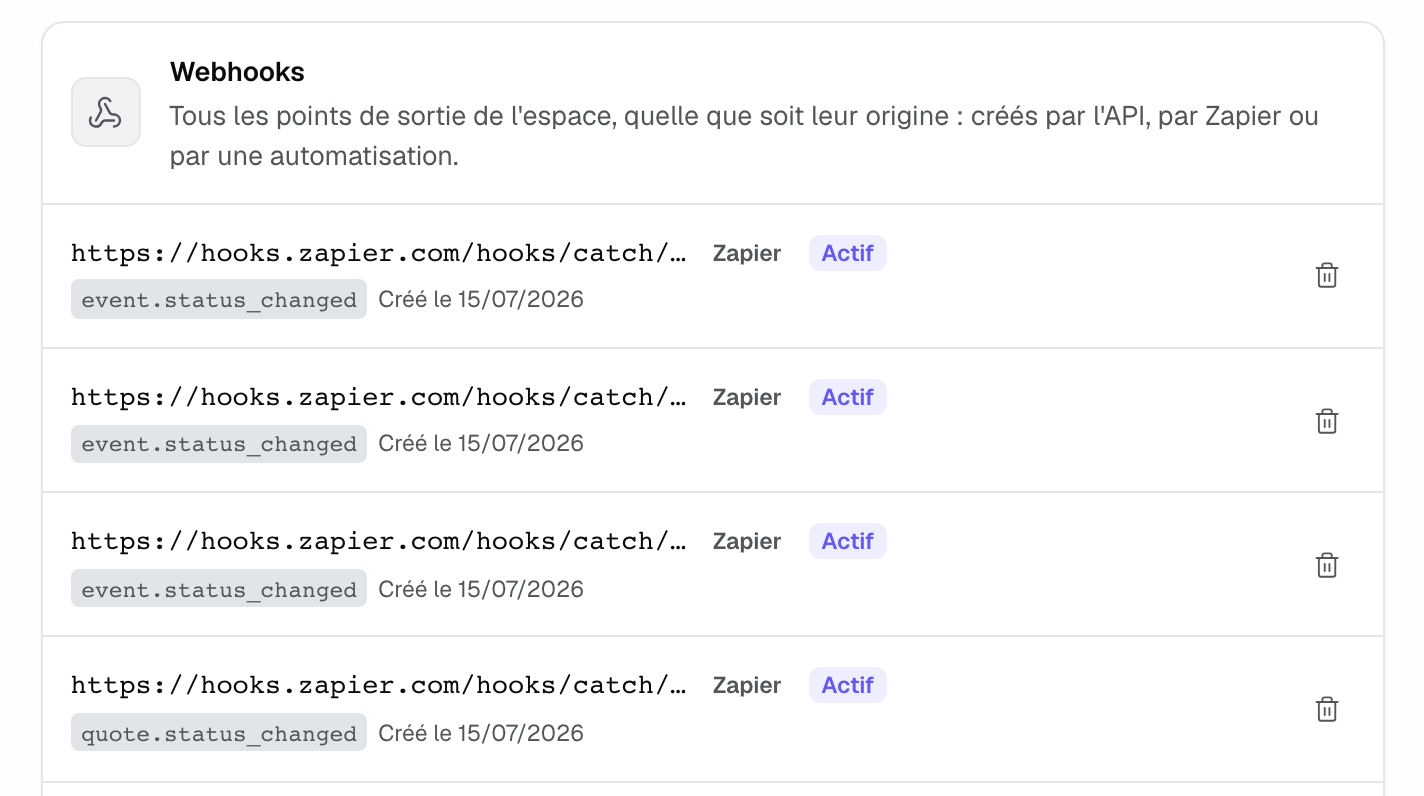
To delete a subscription, click the trash icon. The "Delete this webhook?" window shows the address and the events concerned; deletion cannot be undone. A disabled subscription cannot be re-enabled: create it again.
Example: a group's bookings in its data warehouse
A group of three hotels subscribes an endpoint to event.status_changed and event.stage_changed. Its receiver checks the V2 signature, answers 200 at once, then writes the row keyed on the event id: a retry updates the row instead of duplicating it. The day the endpoint goes down, Joinways retries for about thirty hours; if it stays silent ten times in a row, the subscription shows "Disabled" in the "Webhooks" tab.
Troubleshooting
Nothing arrives
Cause: the subscription is disabled, or it does not listen to the type you are testing. Solution: check its state and events in the "Webhooks" tab, and create it again if needed.
The signature never matches
Cause: the fingerprint is computed on a re-serialized body, or the V2 is computed without the timestamp. Solution: capture the raw body before any parsing, and compute the V2 on <timestamp>.<raw body>.
The address is refused at creation
Cause: it is not public HTTPS, or it points to a private or internal host. Solution: expose a public address; in local development, use a tunnel.
Creation answers 422 quota_exceeded
Cause: the workspace already has 25 active subscriptions. Solution: delete the ones you no longer use.
I lost the secret
Cause: it only shows at creation. Solution: delete the subscription and create a new one.
Frequently asked questions
Can the same change arrive twice?
Yes, after a retry. Deduplicate on X-Joinways-Delivery and make your processing idempotent.
Can several addresses listen to the same event?
Yes. Every active subscription that listens to that type receives the delivery.
Is delivery guaranteed?
It is retried for about 33 hours. After that it is not replayed: keep the API as your source of truth for reconciliation.
Can I create a subscription from the app?
No. Subscriptions are created through Zapier or the API; the "Webhooks" tab lists and deletes them. An automation's action is set up entirely in the automation.
See also
Provalo sulle tue prossime richieste per 30 giorni, senza carta.