How AI assesses and prioritizes your inquiries
AI assesses each inquiry’s quality in the background to automate qualification and, depending on your settings, trigger quote generation.
Updated
Not all inquiries are equal. A precise inquiry with a firm date and a budget is more likely to convert than a vague message. Joinways automatically assesses the quality of every inquiry analyzed by AI, not to impose a verdict, but to power automation and help you focus your efforts where it counts.
This page explains in detail what the AI looks at in an inquiry, how that assessment flows in the background across Joinways, and how to use it to work through your Inquiries in the right order, without ever losing control of your priorities.
Prerequisites
- Have a connected mailbox that feeds your Inquiries (incoming email analyzed by AI).
- For the auto-filled proposal: a venue attached to the event and items in that venue's catalog.
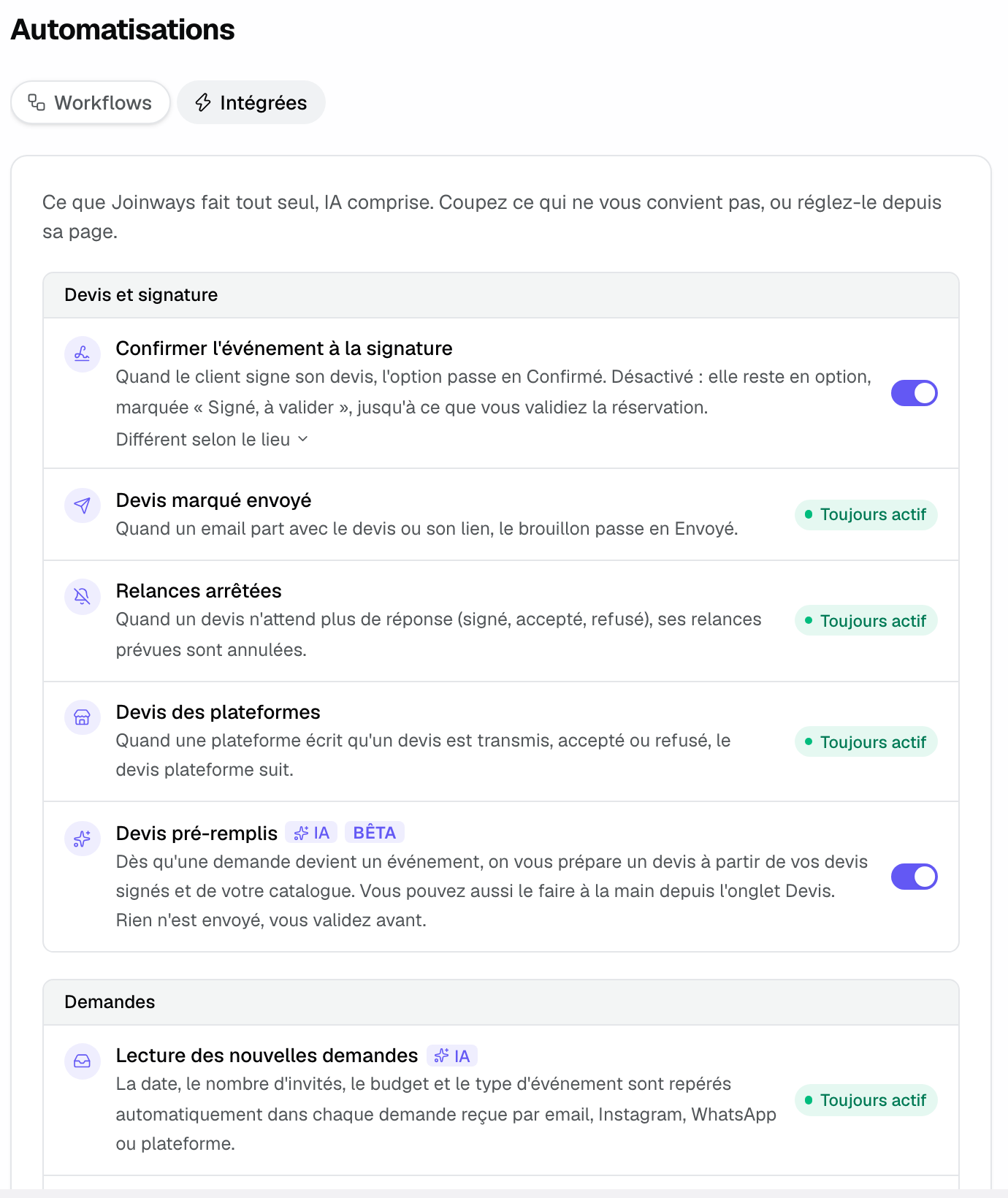
- Nothing to turn on for the analysis: it's always on ("Incoming inquiry reading", "Built-in" tab of Workflows).
- For the automatic proposal: the "Auto-filled proposals" switch ("Settings" > "Workflows", "Built-in" tab). It's on by default during the trial and on paid plans.
What you'll learn
- Understand what the AI assesses in an inquiry
- See how that assessment powers automation
- Prioritize your inquiries effectively day to day
- Know how to correct extracted fields when you convert
What the AI assesses in an inquiry
The AI reads the inquiry, extracts the key details, then rates its own extraction. The point isn't to judge the person but to measure how complete the inquiry is: the more usable information it contains, the higher the index.
In practice, the index adds up the information found. Here's how it's built:
- The AI first spots the inquiry's precision: presence of a date, an attendee count and an event type.
- It adds points for a link to the request on the platform, full contact details (email and phone) and precise needs (technical, service, schedule).
- It derives an index between 0 and 0.95, kept in the background on the inquiry.
The inquiry's precision
A precise inquiry gives the AI something to work with. Three elements matter most: the date, the attendee count and the event type. The more these fields are filled in and clear, the more complete the inquiry is considered.
- The AI looks for an event date: a firm date beats a fuzzy time frame.
- It identifies the attendee count (Pax), which drives feasibility and sizing.
- It detects the event type (wedding, seminar, birthday…), useful to frame the service.
Budget and intent
The budget is one of the details the index counts. The tone of the message isn't scored: wording that shows a real wish to book doesn't raise the index, but it remains a good signal for you.
- An explicit budget (amount, range) is a strong sign of seriousness.
- A clear intent ("I'd like to book", "can you send me a quote") isn't part of the index, but it helps you spot a mature inquiry.
- Conversely, a vague message with no dated project stays workable but lower priority.
What the evaluation doesn't look at
The evaluation doesn't compare the inquiry with your venue: it checks neither your spaces' capacity nor your type of service. A request for 250 people in a 120-capacity room can still be rated complete. That check stays with you, when you convert the inquiry.
Reference: the signals and notions assessed
For reference, here is each element the AI takes into account and what it means:
- Date: the event date; a firm date is more qualifying than a vague time frame.
- Attendees (Pax): the expected size of the event.
- Event type: the nature of the event (wedding, seminar, etc.).
- Budget: a stated amount or range, a signal of intent.
- Link and contact details: link to the request on the platform, client's email and phone.
- Extracted fields: date, budget and Pax shown on the inquiry, used by AI and automation.
How it works
The assessment happens with no action from you, at the moment the inquiry is analyzed:
- An inquiry arrives in your Inquiries.
- The AI analyzes it and extracts the fields (date, budget, PAX, type).
- It counts the information found to estimate how complete the inquiry is.
- This assessment stays in the background: it does not appear as a score to sort by in your Inquiries.
- If the « Auto-filled proposals » option is on, converting a sufficiently complete inquiry into an event prepares a draft proposal, provided the event has a venue.
You therefore keep control of your processing order: the assessment helps and automates, but does not decide for you.
Edge cases
A few situations are worth knowing to read the assessment correctly:
- An off-topic or very short message may not be analyzed by the AI, and therefore not assessed.
- A less complete inquiry is not disqualified: it can still turn into a booking with good follow-up.
- If an extracted field is inaccurate, correct it in the conversion window: the event and the prepared quote use your values. The index itself isn't recalculated.
- If the « Auto-filled proposals » option is off, or the event has no venue, no proposal is prepared, even for a very complete inquiry.
Prioritize day to day
Since the assessment is not shown as a score, you prioritize from the extracted fields visible on each inquiry. Here is how to proceed:
- Rely on the extracted fields (date, budget, PAX) to spot the most complete inquiries.
- Reply quickly to high-potential inquiries: speed makes the difference.
- Convert the most complete inquiries into events: if « Auto-filled proposals » is on, a draft quote is prepared right away.
- Then come back to the less complete inquiries to follow up on them.
Best practices
- Correct inaccurate extractions in the conversion window: the event and the quote rely on your values.
- Don't neglect less complete inquiries: good follow-up can make the difference.
- Enable automatic quote generation to save time on the best-qualified inquiries.
- Reply first thing in the morning to dated and budgeted inquiries to maximize your chances.
Troubleshooting
Problem: a qualified inquiry did not trigger an automatic quote.
Cause: the « Auto-filled proposals » option is off, the event has no venue, or the inquiry was too incomplete.
Solution: check the "Auto-filled proposals" switch in the "Built-in" tab of Workflows, attach a venue to the event, or run "Generate with AI" from the event's "Proposals" tab.
Problem: an inquiry seems ignored by the AI.
Cause: the message is off-topic or very short, so it is not analyzed.
Solution: handle it manually; add the date, budget and attendee count if needed.
Problem: the extracted fields are wrong.
Cause: the message was ambiguous or poorly worded.
Solution: correct the values in the conversion window. The index isn't recalculated, but the event and the proposal rely on the values you confirm.
Real-world example
On Monday morning, Yanis opens his Inquiries. Those with a firm date and a budget are the most complete: he converts them into events before 10 am. For these, a draft proposal is already prepared: he just reviews and sends it.
Within an hour he has handled the hottest inquiries and scheduled a follow-up for the vaguer messages, without letting anything slip.
Another example
Sarah gets a request for 250 people while her venue holds 120. The inquiry is complete, so the index is good: Sarah is the one who spots the capacity gap in the « Extracted data », then offers her other space rather than an unsuitable proposal.
Conversely, a seminar inquiry for 40 people with a budget fits her offering perfectly: she handles it first.
FAQ
Can I see a numeric score per inquiry? No. The assessment powers automation behind the scenes; it is not shown as a sortable score in Inquiries. You keep full control over your processing order.
Can an inquiry go unassessed? Yes: an off-topic or very short message may not be analyzed by the AI.
What is the evaluation based on? On how much information was found in the message: client, event type, venue, date, budget, platform link, contact details and detailed needs.
Is a poorly qualified inquiry lost? No. A less complete inquiry can still turn into a booking with good follow-up.
How do I make the result reliable? Correct inaccurate values in the conversion window: the index doesn't change, but the event and the prepared proposal rely on your values.
Can the assessment generate a quote on its own? Not on its own: a draft quote is prepared when you convert a complete enough inquiry into an event, if « Auto-filled proposals » is on and the event has a venue.
Does the assessment decide for me? No. It is a decision aid: you stay in charge of your processing order and your replies.
See also
Try it on your next inquiries for 30 days, no credit card.