Connect Mews: rooms and rates on your events
Link your Mews PMS to see, on an event page, the free rooms and their rates on the event's dates.
Aggiornato il
When a seminar or a wedding asks for rooms, the question comes right away: how many are free on those nights, and at what price? With Mews connected, the answer is on the event page, without opening the PMS.
The connection uses a Mews access token, read-only. It links one Mews property to one Joinways venue, or to your whole workspace.
What you'll learn
- Generate an access token in Mews.
- Connect Mews to one venue or to the whole workspace.
- Read rooms and rates on an event.
- Pick the rate behind the prices shown.
Prerequisites
- Be an owner or admin of the Joinways workspace.
- Have access to your property's integration settings in Mews.
- A Mews property with a bookable accommodation service and a time zone.
1. Generate the token in Mews
- In Mews, open Settings, Integrations, Connector API.
- Add Joinways as an integration and generate an access token.
- Copy the token.
2. Connect Mews
- In Joinways, open "Settings" > "Integrations", "PMS" tab, then click the "Mews" card.
- Paste the token into "Mews access token".
- Under "Venue", pick the venue whose events will show the rooms, or leave "All venues" if this property covers your whole workspace.
- Click "Connect". "Mews connected" shows.
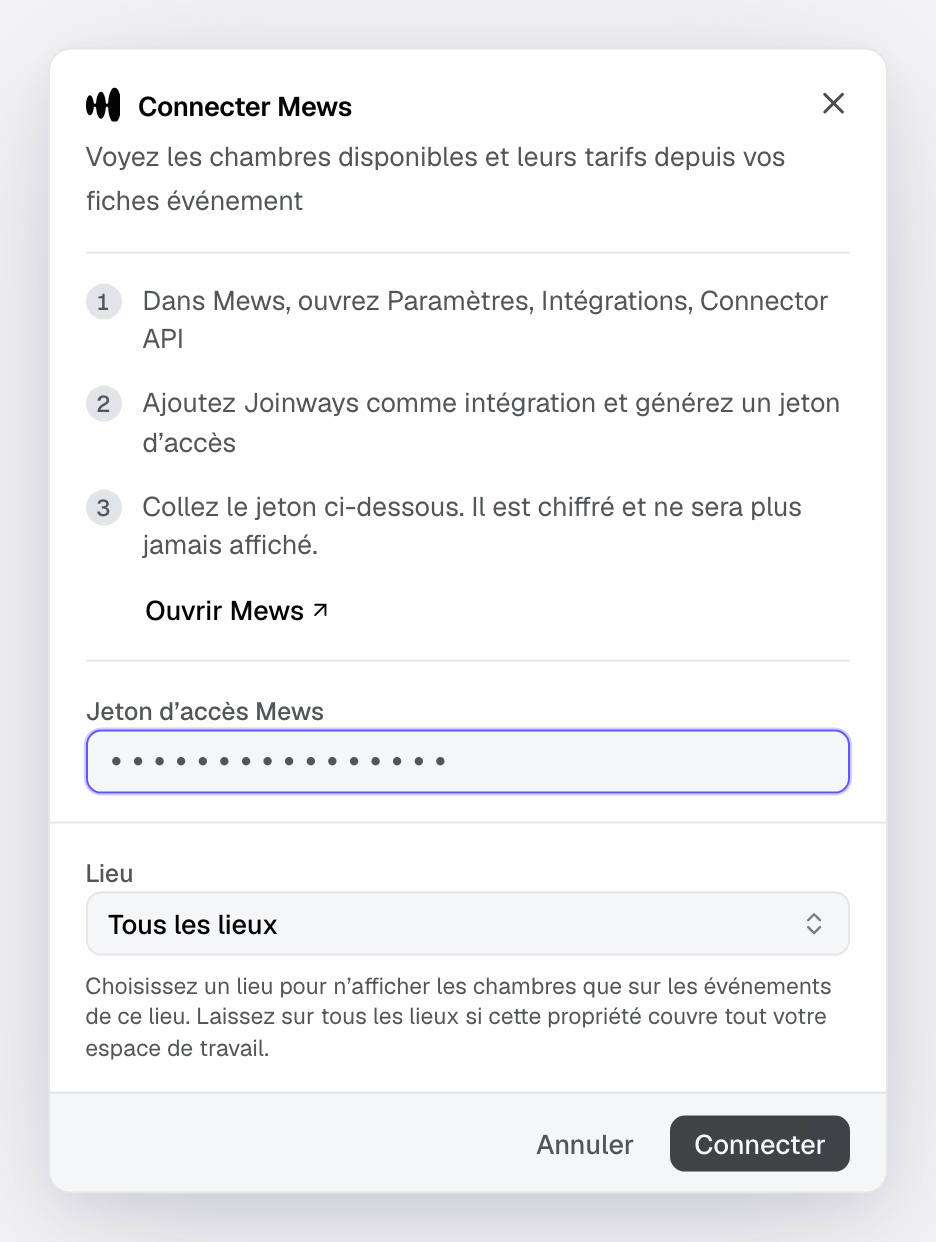
The token is encrypted and never shown again.
3. Read rooms on an event
As soon as a venue is linked to Mews, the right-hand column of its events shows an "Accommodation" block, collapsed. The whole team sees it, not only whoever connected the PMS.
- Open the event and expand "Accommodation".
- Click "Check availability". Joinways queries Mews for the event's nights.
- Read, per room category, how many rooms are free on every night and the price of the stay. A category with no free room shows "Sold out".
- Click a category to see the night-by-night detail: free rooms and price for each night.
"Refresh" reads again. Nights come from the event's dates: an event on a single day has no nights.
Important: Joinways only reads. Nothing is booked, held or changed in Mews.
4. Choose the prices shown
Click the gear on the "Mews" card to open "Mews settings". In "Rate used for prices", pick the rate whose prices show on events, or "No prices, availability only".
Tip: are your invoices issued in your PMS? Say so in the venue settings, "Proposals & invoicing" page, "Identity" tab, "Invoicing software" section. Joinways then prepares the lines to type into the PMS and no longer issues invoices for that venue. See Invoice a signed quote.
Troubleshooting
"Mews rejected this token"
Cause: the token is incomplete or no longer active. Solution: copy it in full, or generate a new one in Mews.
No bookable accommodation service, or no time zone
Cause: the Mews property has no bookable accommodation service, or no time zone set. Joinways needs both to read availability. Solution: complete the setup in Mews, then reconnect.
"This event spans no overnight stay."
Cause: the event starts and ends on the same day. Solution: check its start and end dates.
No prices are shown
Cause: no rate is picked in "Mews settings", or the chosen rate has no price for these dates. Solution: pick another rate. Availability stays accurate.
"Mews refused the connection"
Cause: the token was revoked in Mews. Solution: an owner or admin reconnects Mews in "Settings" > "Integrations".
"Mews is limiting requests right now"
Cause: too many reads in a short time. Solution: try again in a few minutes.
Frequently asked questions
Does Joinways create bookings in Mews?
No. The integration reads availability and rates on demand. Bookings are made in Mews.
Can my teammates see the rooms?
Yes. Only the connection is reserved for the owner and admins; the "Accommodation" block is visible to the whole team.
How do I disconnect Mews?
Open "Mews settings" from the card's gear and disconnect. The "Accommodation" block disappears from events.
See also
Provalo sulle tue prossime richieste per 30 giorni, senza carta.