Share public access to an event
Give your client a link to view their quote, sign and follow their event, with no account needed.
Updated
Your clients don't have a Joinways account, and that's perfectly fine. The public link, also called public access or share link, opens a clean, professional, always-up-to-date view of their file: a quote to review, a signature to provide, information to confirm. It's the space you give your contact to follow their event without ever creating an account or remembering a password.
For a venue manager, this link replaces back-and-forth emails, lost PDFs and the dreaded "can you resend the quote?". The client opens a page, sees the essentials, takes action, and returns as often as they like. This article details everything the client can see and do from this link, how to get it, and how to keep it under control.
Think of it as a minimalist client portal: no dashboard to learn, no app to download, just the right page at the right moment. It's often your client's first "digital" contact with your organization, so it had better be smooth.
Prerequisites
- An event or quote created in Joinways, linked to a client contact.
- A finalized quote if you want the client to be able to review and sign it.
- Be a member of the workspace: any member can copy and send the link.
- An email address or channel (SMS, messaging) to send the link to the right person.
What you'll learn
- Get the public link from a proposal.
- Understand exactly what the client sees and can do.
- Send the link and support the client remotely.
- Know what to do if the link circulates too widely.
Get the public link
There is nothing to generate: as soon as you open a proposal, Joinways prepares the event's public link. The link is unique for the whole event; copied from a proposal, it opens that proposal directly. It stays valid as long as the event exists.
- Open the event, « Proposals & Invoices » tab, then the proposal to be signed.
- In the proposal's signature block, click « Copy the signature link ». « Open the signature page » shows you the page as the client will see it.
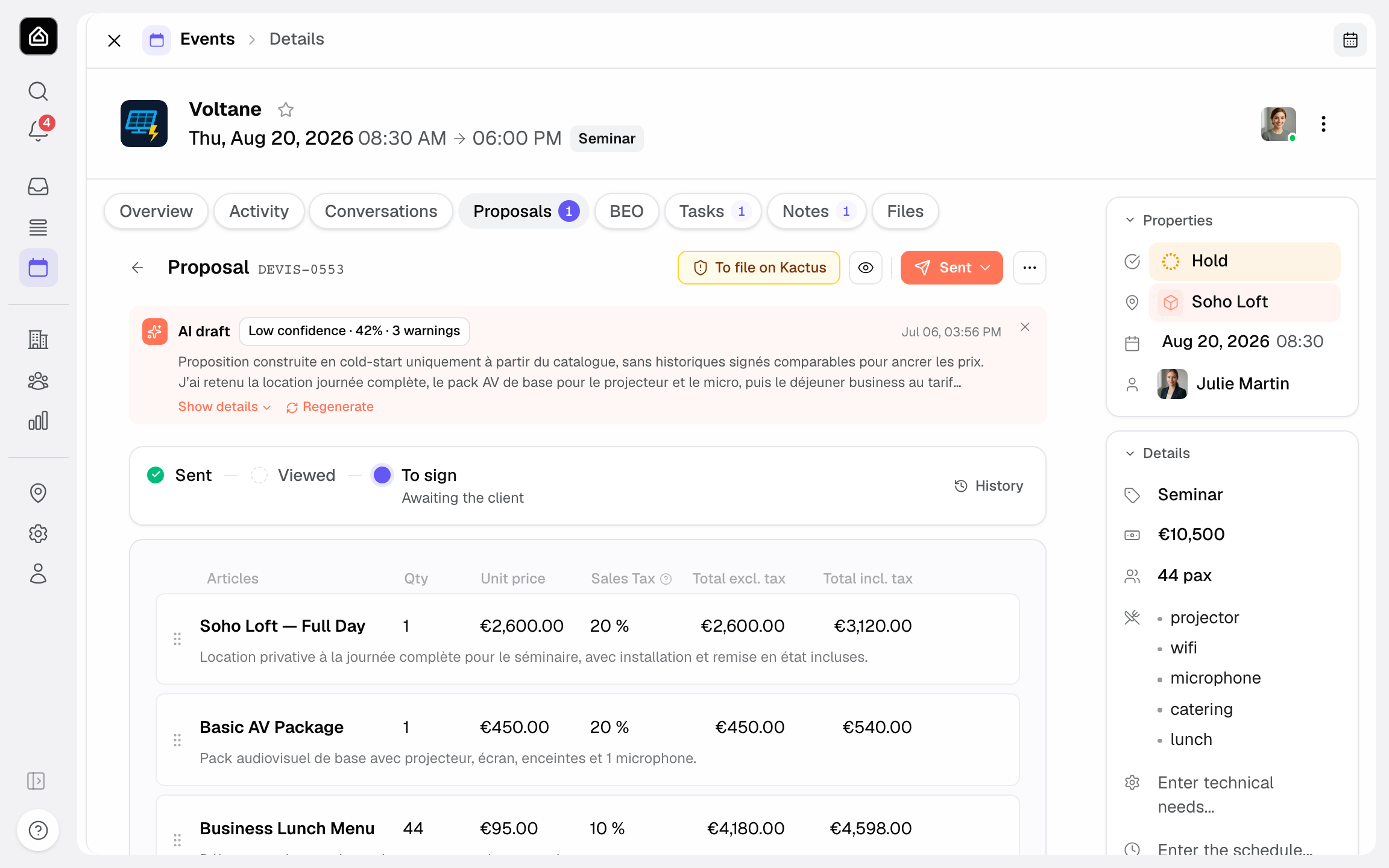
- The link is copied. Even simpler: click « Send » in the proposal, Joinways prepares an email that already contains the link.
- Send it to your client by email, SMS or any other channel.
- The client opens the link: the page loads without any sign-in prompt.
What the client can see and do
From the link, the client reaches a clear page focused on their file. They only see what concerns them, never your back office or other clients. Here's what they can review and the actions within reach.
- The quote: the breakdown of services, quantities, prices and total amount, laid out legibly.
- The signature: they click « Sign proposal », fill in « Your information » (signer name and email, company, address, purchase order), then sign online after entering a code received by email. They can then download the signed PDF.
- The key information about their event: dates, venue, booked spaces and venue photos, their details and those of their contact at your venue.
- Unlimited viewing: they return to the link as often as they like, before and after signing.
- Payment: as soon as an invoice is issued, it appears on the same page with « Pay now » and, depending on your setup, bank transfer details with a reference. The page also offers a language selector and translates the proposal automatically, with « Show original » to return to your text.
- Mobile access: the page opens on computer and phone alike, with no app to install.
The client can't edit the proposal: no lines, prices or quantities. One exception: they can tick the lines you marked as optional, and the total updates. They can't access any data other than their own.
Sending the link to the client
Once you have the link, the channel you send it through matters as much as the link itself. Email stays the most practical because it leaves a written trace, but an SMS or a message in your usual messaging app work too. What matters is that the link arrives whole and clickable.
- Pick the channel your client replies on fastest.
- Paste the full link, without breaking it.
- Add a sentence stating the expected action.
- Follow up politely if the signature is slow to come.
Reference: items accessible via the public link
To remove any ambiguity, here are the items the public link exposes to the client, and their nature.
- Quote: commercial document with services, amounts and total; viewable and signable.
- Electronic signature: the client's action to approve the quote online; timestamped once applied.
- Event information: dates, location and the main file details, read-only.
- Status: the client sees whether their quote is awaiting signature or signed, depending on progress.
- No account required: no sign-up, no password; the link acts as the access.
How it works
Technically, the public link is a unique address tied to the file. When the client opens it, Joinways displays a dedicated page, isolated from the rest of your workspace. No authentication is requested: the address itself serves as the access key.
- You open a proposal: Joinways turns on the event's public access if it isn't on yet.
- Joinways ties a unique address to that file.
- The client opens the address and sees the follow-up page, with no sign-in.
- When they sign, the action is recorded and the quote's status updates on your side.
- You follow progress in real time from your workspace.
Edge cases
A few situations deserve specific attention to avoid misunderstandings with the client.
- Several contacts: if several people need to see the file, send them the same link. It stays tied to the file, not to an individual.
- Quote changed after sending: if you update the quote, the client sees the most recent version on their next visit; warn them so they don't sign an outdated version.
- Link forwarded by mistake: since access depends only on the address, treat the link as confidential information.
- Request from a platform: if the platform's rules require the proposal to be filed there, Joinways shows no signature link and displays « Signature managed by the platform ».
Best practices
- Delete or cancel draft proposals before sharing the link: every proposal of the event, drafts included, is visible and signable by the client.
- Only share the link with the right contact, through a channel you control.
- Add a clear message about the expected action when you send it.
- If the link was forwarded to the wrong person, contact Joinways support: the link can't be regenerated from the app.
- Confirm receipt with the client if the signature is slow to come.
Troubleshooting
Problem: the client says the link won't open.
Cause: the address may have been truncated when copied or sent (an email that breaks the link). Solution: resend the full link, ideally as a button or clickable link, and ask the client to open it in a recent browser.
Problem: the client doesn't see the expected quote.
Cause: the link opens another proposal of the event. All the event's proposals appear under « Available proposals », except cancelled ones or those replaced by an amendment. Solution: ask the client to pick the right tab, or copy the link from the right proposal: it then opens directly on it.
Problem: you fear the link fell into the wrong hands.
Cause: the link was forwarded or posted by mistake. Solution: the link can't be regenerated from Joinways. Contact support to cut off access, then send the new link to the right contact.
Real-world example
A client is organizing a seminar. You send her the public link by email. She opens it on her phone on the train, scans the breakdown of services and the amount, signs the quote in seconds, then puts her phone away. Three days later, before confirming the headcount, she reopens the same link to double-check the dates and location, without calling you, without hunting for a PDF in her inbox.
Another example
A works council is planning a holiday party. The lead receives the link and forwards it to management for approval. Both people open the same link from their own desks, see exactly the same quote and information, and the lead signs once the go-ahead is given. No account was created, and you followed every step from your workspace.
FAQ
Does the client need an account or password?
No. The link is enough: there's no sign-up and no password to remember. That's the whole point of public access.
Can the client edit the quote?
No. They can only tick the lines offered as options before signing. Any other change goes through you, via a proposal update or an amendment.
Can the client sign from their phone?
Yes. The page opens on mobile just as on desktop, and online signing works with no app to install.
What exactly does the client see?
The quote (services and amount), the option to sign, and the key information about their event. They see neither your back office nor other clients' files.
Can the client return to the link after signing?
Yes. They can reopen the link as often as they like to re-check the details of their event.
What should I do if I think the link leaked?
Contact Joinways support: the link can't be regenerated from the app. Once access is cut off, send the new link to the right contact.
Can several people use the same link?
Yes. The link is tied to the file, not to an individual: you can forward it to all relevant contacts of the same event.
See also
Bring every event inquiry into one queue.