Notes and files of an event
Capture important details and store documents (floor plans, contracts, inspiration) in the same place as the rest of the file.
Updated
A wedding is a thousand details: the tablecloth color, grandma's allergy, the seating plan. Between a visit, a call and an email thread, this information risks getting lost in scattered notebooks or personal inboxes. The event's notes and files keep all of it at hand, in one place, for the whole team.
Notes record written information (special requests, recaps, instructions) while files store documents (plans, contracts, inspiration photos, menus). Together, they form the complete memory of the file.
Notes or discussion? To coordinate as you go ("can you call the client back?"), use the event's team discussion, opened with the "Discussion" button in the header. Keep notes for what must last. An important message in the discussion can be pinned as a note in one click.
Prerequisites
Before recording notes and storing files, gather the following.
- An active Joinways account with access to your workspace.
- An event created, which acts as the file that holds your notes and documents.
- The documents to upload ready on your device (plans, contracts, photos, menus).
- Your team members invited to the workspace, so they can access the shared context.
What you'll learn
- Add notes to an event
- Upload and organize files
- Know what notes and files hold
- Understand what stays private to the team
- Share context with your team
Add a note
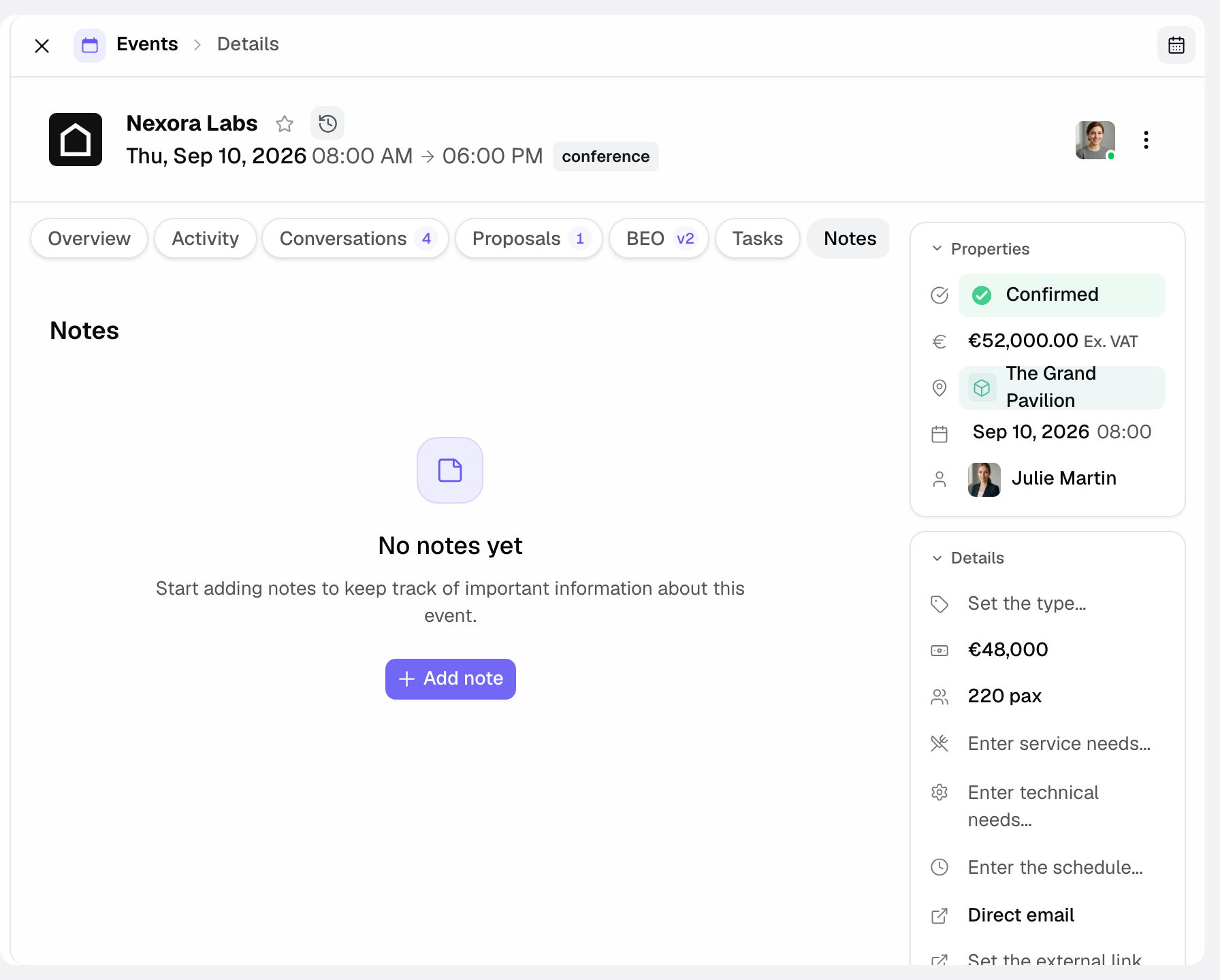
Notes are where you record everything said and decided around the event: a client's special request, a visit recap, an instruction for the team. They live in the event file and stay accessible to everyone.
- Open the event then the Notes tab.
- Click « Add note » and write it (special request, visit report…). Type @ followed by a colleague's name to mention them: they get a notification.
- Click « Save » (or Cmd/Ctrl + Enter): the note appears with its author and date, visible to the whole team. Any member can edit it from the card menu; only its author can delete it.
Upload a file
Files gather all the documents of the file. Rather than digging for a plan in your emails or a contract in an external shared drive, you find them attached to the event, accessible in one click on the day.
- Open the Files tab.
- Click « Upload file », then drag and drop your documents or click to select them. All file types are accepted, up to 50 MB per file, and you can send several at once.
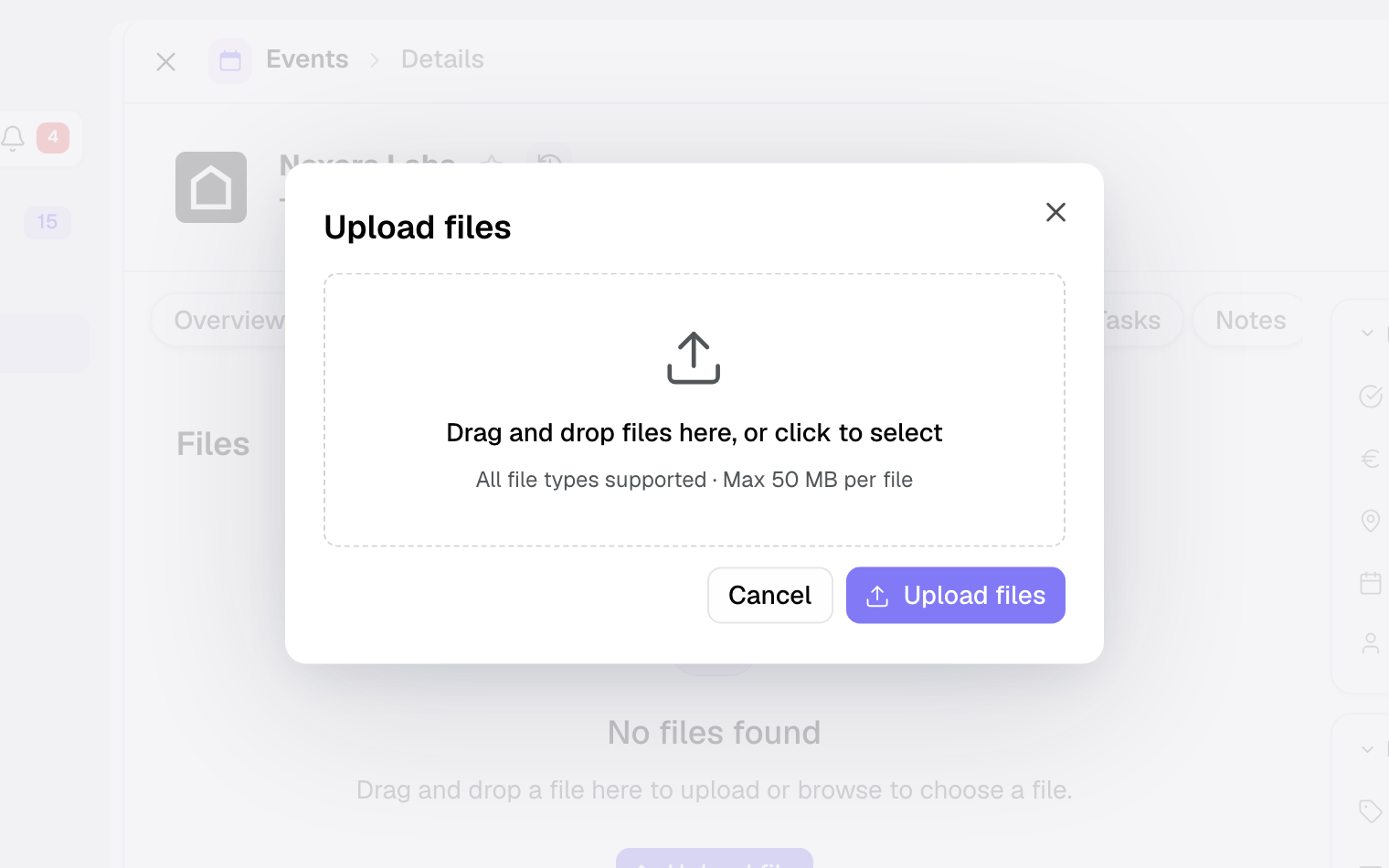
- They are stored in the event file, accessible to the whole team: click a file to « Preview » it, or use « Download » and « Delete ». If you upload a PDF recognized as a proposal or an invoice, Joinways offers « Pre-fill the event from this document? »: answer « Yes, extract » and AI completes the event.
Organize and name your documents
A well-organized file saves precious time on event day. The key is consistent naming and the habit of uploading as you go.
- Give each file an explicit name before uploading it ("Floor plan", "Catering contract", "Client inspiration"): the name can't be changed afterwards in Joinways.
- Upload documents as soon as you receive them to avoid forgetting.
- Add a context note if the document deserves an explanation.
Reference: what notes and files hold
Notes hold all the written information tied to the file. Here are the most common uses.
- Special requests: allergies, kids' corner, access constraints, decoration wishes.
- Visit recaps: what was said, shown and decided during a meeting.
- Team instructions: logistical directions, watch points, reminders.
Files, in turn, store the documents of the file. The most frequent are the following.
- Plans: floor plans, seating plans, annotated diagrams.
- Contracts: contractual documents and administrative papers.
- Inspiration photos: visual references shared by the client.
- Menus: proposals and menus approved by the caterer.
- Client documents: purchase order, administrative papers, a brief received by email. The signed quote and the BEO stay in their « Proposals & Invoices » and « BEO » tabs.
How it works
Notes and files are attached to the event and stored in its file. As soon as a team member adds a note or uploads a document, the information becomes immediately available to the others, with no manual sending or sharing.
These items are internal: they stay private to your team and are not shown to the client. They thus form a safe workspace to record sensitive remarks and documents without any risk of exposure.
On event day, the operations team opens the file and finds, in one place, the written context and the reference documents needed for a smooth execution.
Edge cases
A few situations deserve special attention.
- Confidential document: since notes and files are private, this is the right place for sensitive information not meant for the client.
- Multiple versions of one document: name each version clearly ("Plan v1", "Final plan") to avoid confusion.
- Request made verbally: note it right away rather than keeping it in your head, or you'll forget it.
- Archived event: notes and files remain viewable but become read-only. Unarchive the event to add or edit them.
- Public access to the event: don't confuse these internal notes with what can be shared via public access, which follows its own rules.
Tip: the signed quote stays in the « Proposals & Invoices » tab (« View signed PDF » button) and the BEO in its « BEO » tab, always up to date. Keep the « Files » tab for documents that don't exist elsewhere: plans, external contracts, photos, menus.
Best practices
- Note every special request as soon as it comes up, without delay.
- Name your files clearly so you find them instantly.
- Write a recap after each visit, while the details are fresh.
- Upload to « Files » the documents that don't exist elsewhere (plans, external contracts, menus): the signed quote and the BEO already have their own tabs.
- Write notes any colleague can read, not just you.
- Update the file as soon as something changes to keep a reliable source.
Troubleshooting
Problem: I can't find a note or file I added.
Cause: the item was added to a different event than the one open.
Solution: make sure you're in the right event file, then in the Notes or Files tab.
Problem: I'm worried the client can see my internal notes.
Cause: confusion between internal notes and information shared via public access.
Solution: rest assured, internal notes and files stay private to the team and are never exposed to the client.
Problem: a colleague can't tell which is the right version of a document.
Cause: several files have similar or unclear names.
Solution: delete obsolete versions, then re-upload the right version under a clear name (files can't be renamed in Joinways).
Real-world example
After the visit, the planner adds a note ("wants a kids' corner"), uploads the annotated plan and the client's inspiration photo. On the day, the team opens the file, reads the note and places the kids' corner in the right spot thanks to the plan: nothing is forgotten.
Another example
For a seminar, the sales rep records a participant's tree-nut allergy in a note and mentions @the head chef. On event day, the caterer checks the note and adapts the buffet, while the room manager follows the BEO in its tab. Everyone works from the same source.
FAQ
Does the client see these notes? No, internal notes and files stay private to your team.
What types of files can I store? Any type, up to 50 MB per file: plans, contracts, inspiration photos, menus and any document useful to the file. The signed quote and the BEO already have their own tabs.
Does the whole team see the notes? Yes, a note added stays visible to all team members.
How do I upload a file quickly? Open the Files tab and drag and drop your documents.
Where should I keep the signed quote? Nowhere else: it stays in the event's « Proposals & Invoices » tab, with its signed PDF (« View signed PDF »). The BEO has its own « BEO » tab.
Can I note a request after the fact? Yes, add a note at any time; ideally do it as soon as it comes up.
Do notes replace tasks? No: notes record information, tasks carry the actions to be done.
Should I write a note to answer a teammate? No: use the event's team discussion. Notes keep lasting information; the discussion is for coordination, and an important message can be pinned as a note.
See also
- Team discussion on an event
- Create an event
- Prepare a function sheet (BEO)
- Share public access to an event
Bring every event inquiry into one queue.