Connect Gmail
Link your Gmail inbox: your client emails are filed on their events, you reply from Joinways and your contacts are created for you.
Updated
Connecting your personal Gmail inbox links your client conversations to Joinways. Emails exchanged with a client are filed in the Conversations tab of their event, you reply from Joinways with your own address and signature, and your contacts are built from your sent emails. To have requests sent to an address such as contact@ or events@ land in Inquiries, connect that address in the Sources tab, Your business email card.
The goal is simple: keep the whole commercial conversation in the same place as your quotes, contacts and planning, without switching back and forth between Gmail and Joinways. This guide walks through connecting a Gmail or Google Workspace account step by step, what actually syncs, how the mechanism works under the hood, and how to resolve the rare hiccups.
Prerequisites
Before you start, make sure you have the following in place. They ensure the authorization goes through smoothly.
- A Gmail or Google Workspace account: this is the address you use to write to your clients.
- Rights to authorize an app: on a Google Workspace account managed by an organization, the admin can restrict third-party apps. Check that you can grant access, or ask your administrator.
- Access to your Joinways workspace. My mailbox is open to every member, with no special permission.
What you'll learn
- Connect your Gmail account securely via OAuth2.
- Understand what syncs and the automatic contact import.
- Check that your conversations are filed on the right events.
- Diagnose and fix the main issues: reconnection, sync delay, permissions.
Connect Gmail, step by step
Connecting takes only a moment. Follow these steps in order; at each one, the guide explains what you see on screen and what you authorize.
- Open Settings then My mailbox. You land on the Personal tab of Integrations, where the mailboxes linked to your account are centralized.
- Click Connect an account (or Add another account if a mailbox is already linked), then Connect Google Account.
- A Google window opens. Authorize Joinways via the Google window (OAuth): pick the relevant account, then confirm the requested access. You stay on Google's servers throughout this step.
- Back in Joinways, the mailbox appears in the Personal tab with the In Sync badge. Syncing starts right away in the background.
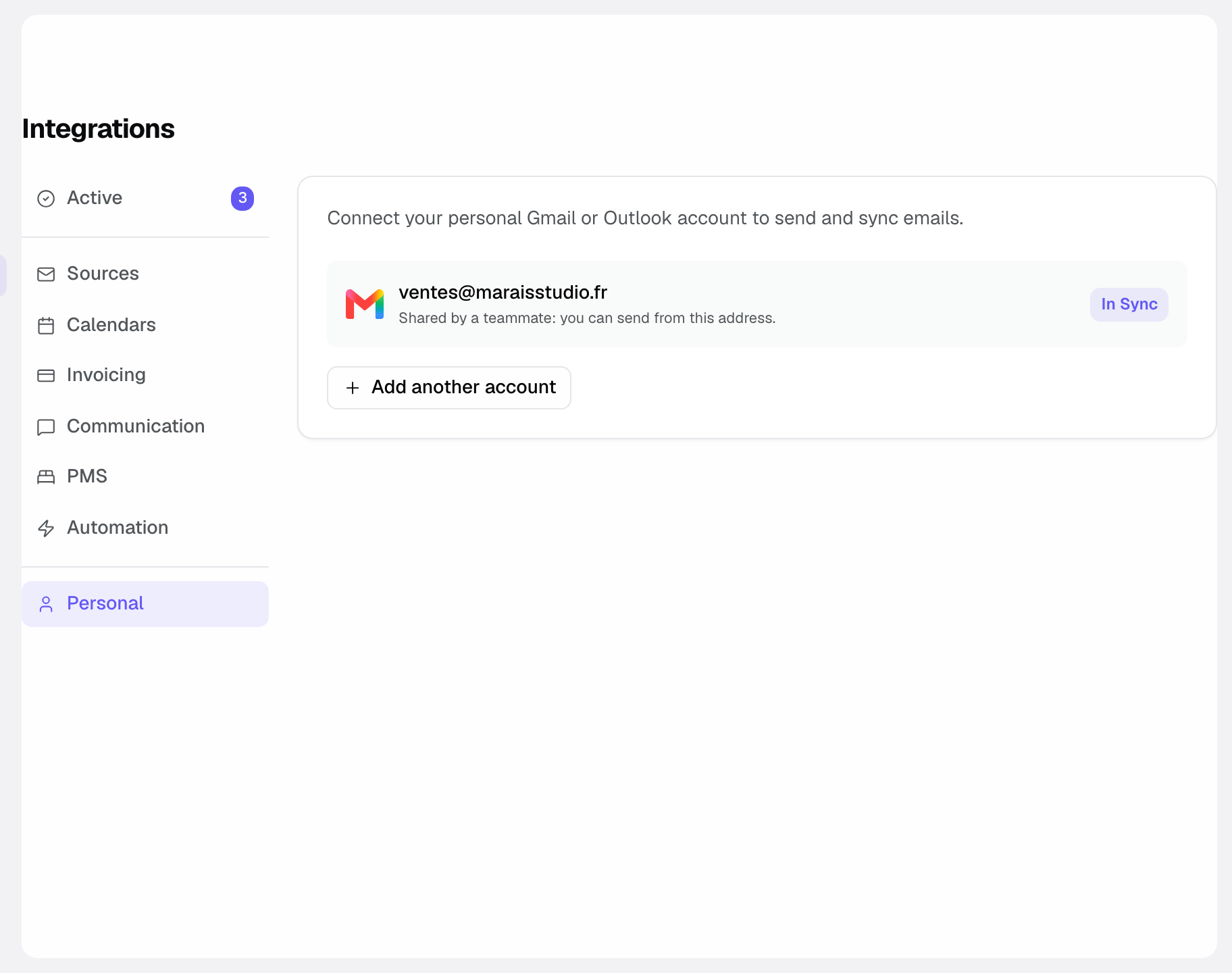
Once these steps are done, the connection becomes active and the first sync starts in the background. There is nothing else to configure: your next conversations with clients are filed on their events.
On the mailbox card, the ⋮ menu offers Sync Now and Disconnect. Below it, Share with the team lets every workspace member send emails from this address; you remain the only one who can disconnect it. Email signature sets the signature added to what you send: you can paste it from Gmail with its formatting.
Reference: what syncs and what you authorize
This section recaps, factually, the scope of the connection as described above. It helps you understand exactly what Joinways sees and does with your Gmail inbox.
The automatic contact import
- On connection: Joinways creates your contacts and companies from the people you wrote to over the last 12 months. Only the addresses are read: the content of those messages is not kept.
What comes through to Joinways
- Emails exchanged with a client are attached to their event and shown in the Conversations tab. This inbox does not create new inquiries: that is the job of the Your business email card, in the Sources tab.
- You can reply directly from the event file, without reopening Gmail.
- Threads are automatically attached to the right contact, keeping the history clean.
How access is secured
The connection is built on OAuth2, Google's authorization standard. In practice, this means you grant access from the Google window, and your credentials are never stored by Joinways. You can revoke that access at any time, either on Google's side or by disconnecting the account in Joinways.
How it works
Once connected, Gmail notifies Joinways of every new email. Joinways looks for the matching event (contact, thread, platform references) and files the email there, inbound and outbound alike.
You find the conversation in the event's Conversations tab and reply from Joinways: the message goes out from your Gmail address, with your signature. When a client answers an inquiry you left waiting for information, the inquiry goes back to unread in Inquiries.
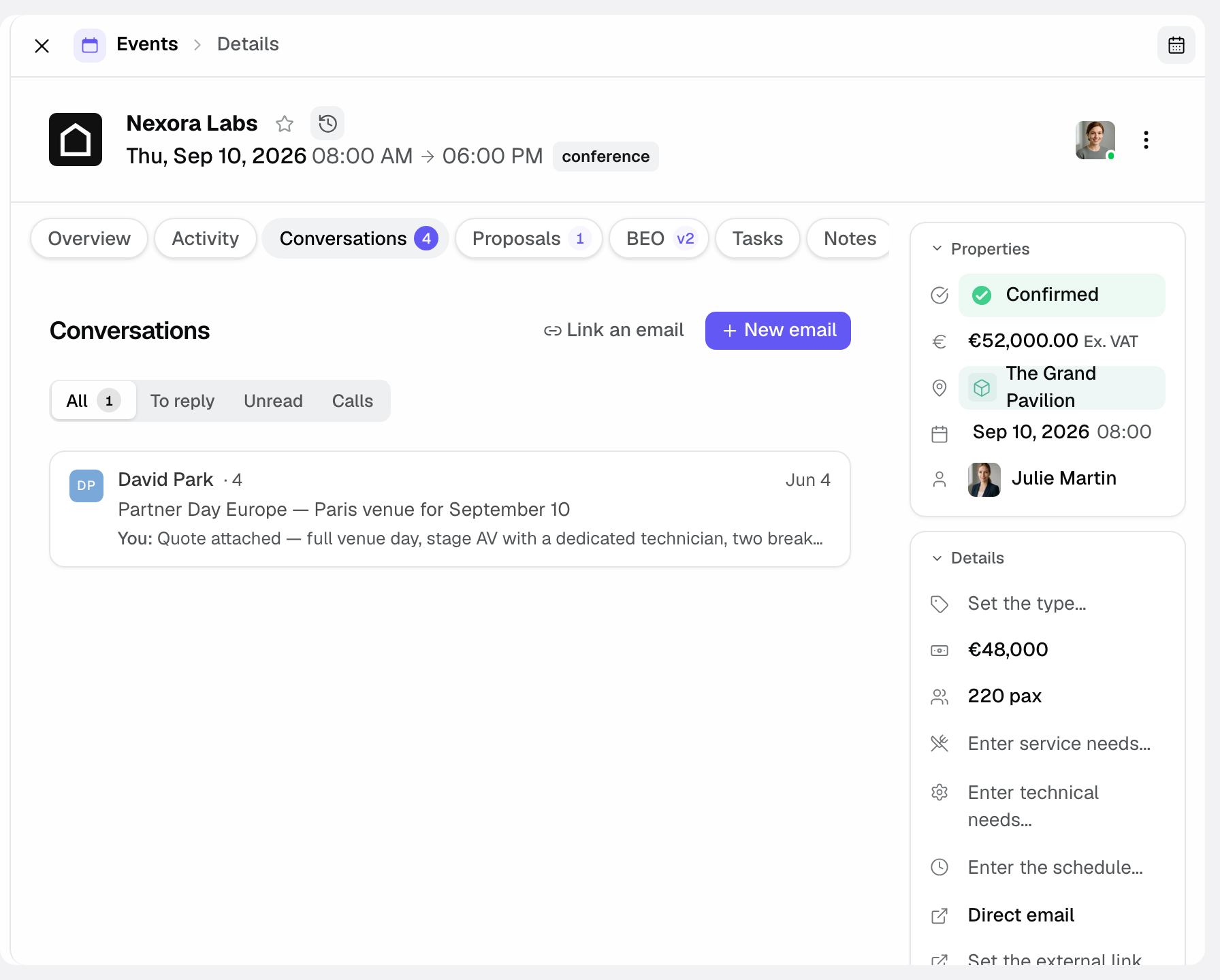
Syncing is continuous: you do not need to refresh manually. The first sync may take a few minutes while Joinways processes the first messages.
Edge cases
- Several inboxes: you can link several Gmail or Outlook addresses. Each has its own card in the Personal tab; add them with Add another account.
- Managed Workspace account: if your organization restricts third-party apps, authorization may require an administrator to act before the Google window grants access.
- Google password change: changing your password can revoke the access you granted. In that case you need to reconnect the account.
- Address that receives your inquiries (contact@, info@…): connect it in the Sources tab, Your business email card. Joinways offers to connect it directly (Connect Gmail directly) or through forwarding. That is the path that brings inquiries into Inquiries: see Connect your business email.
Best practices
- Connect the inbox you actually use to write to your clients, rather than a rarely used address.
- After connecting, wait a few minutes then open an ongoing event: its recent emails should appear in the Conversations tab.
- Always reply from the event file to keep the whole conversation centralized and attached to the right contact.
Troubleshooting
My emails don't show on the event
Problem: you connected Gmail but an event's Conversations tab stays empty.
Cause: the first sync has not finished, the card shows Disconnected, or the email was exchanged with an address Joinways does not link to any event.
Solution: in Settings then Integrations, Personal tab, check the In Sync badge and run Sync Now from the card's ⋮ menu. Also check that the client's email is among the event's contacts.
Sync delay
Problem: your conversations take a while to appear on events after connecting.
Cause: the first sync processes messages in the background and can take a few minutes depending on volume.
Solution: let the sync finish, then reopen the event. New emails then come through continuously.
Connection lost or permissions revoked
Problem: emails stop coming through to your events.
Cause: a Google password change or an access revocation on Google's side can cut the connection.
Solution: the mailbox card shows the Disconnected badge and a Reconnect button. Click it and re-authorize Joinways in the Google window: the right account is preselected.
Real-world example
At Tilleuls Estate, the sales manager writes to clients from marie@tilleuls-estate.com, a Google Workspace address. She opens Settings then Integrations, Personal tab, clicks Connect an account, picks her account in the Google window and authorizes Joinways.
Her contacts and companies are built from her sent emails, and her conversations with each couple are filed on the wedding event. She replies from the Conversations tab, never reopening Gmail. Inquiries sent to contact@ arrive through the Your business email card.
Another example
In an urban event space, two sales reps share the clients. Each connects their own Gmail inbox from Settings then Integrations, Personal tab.
The result: both reps' conversations with the same client end up on the same event. When one of them changes their Google password a month later, their card switches to Disconnected; they click Reconnect and syncing resumes.
FAQ
Can I connect several inboxes?
Yes. Click Add another account and repeat the connection for each inbox.
Are my Gmail credentials stored by Joinways?
No. The connection uses OAuth2: your credentials are never stored by Joinways. You grant access via the Google window.
Are my past emails imported?
Your contacts and companies are created once, right after connecting, from the people you wrote to over the last 12 months. After that, each new email is filed on the matching event. This inbox does not create inquiries: connect your receiving address in the Sources tab for that.
How long before I see my conversations?
The first sync usually takes a few minutes. After that, new emails come through continuously.
Why did my connection stop?
Most often, a Google password change revokes access. Reconnect the account from Settings then Integrations, Personal tab, to restore syncing.
Can I reply to inquiries without opening Gmail?
Yes. You reply directly from the event file in Joinways, and the thread stays attached to the right contact.
What if my account is managed by an organization?
On a managed Google Workspace account, you need rights to authorize an app. If access is restricted, ask your administrator.
See also
- Email connections
- Manage an event's emails
- Understand unified Inquiries
- Connect your business email
Bring every event inquiry into one queue.