Connect Stripe for payments
Collect deposits and balances straight from your quotes and invoices with the Stripe connection.
Updated
Asking for a deposit to hold a date, collecting the balance before the event: the Stripe connection lets your clients pay online, straight from the public link. No more chasing a bank transfer or emailing your bank details: the client clicks, pays, and the status updates on its own in Joinways.
This article shows you how to link your Stripe account to Joinways, how to generate a Stripe invoice (deposit, balance or full amount) from a quote, and how to track payments received. It all runs on Stripe's secure environment: Joinways stores no bank data.
Prerequisites
Before you start, gather the following so the connection and your first payments go smoothly.
- A Stripe account (or create one during the connection).
- An owner or admin role in Joinways: the Invoicing tab of Integrations is only visible to these roles.
- At least one signed or accepted quote so you can generate a first invoice.
What you'll learn
- Connect your Stripe account to Joinways.
- Generate a Stripe invoice (deposit, balance or full amount).
- Track payments received directly in Joinways.
Connect Stripe
The connection takes three steps through Stripe's secure authentication (OAuth). You have no technical key to copy: Stripe simply asks you to authorize Joinways.
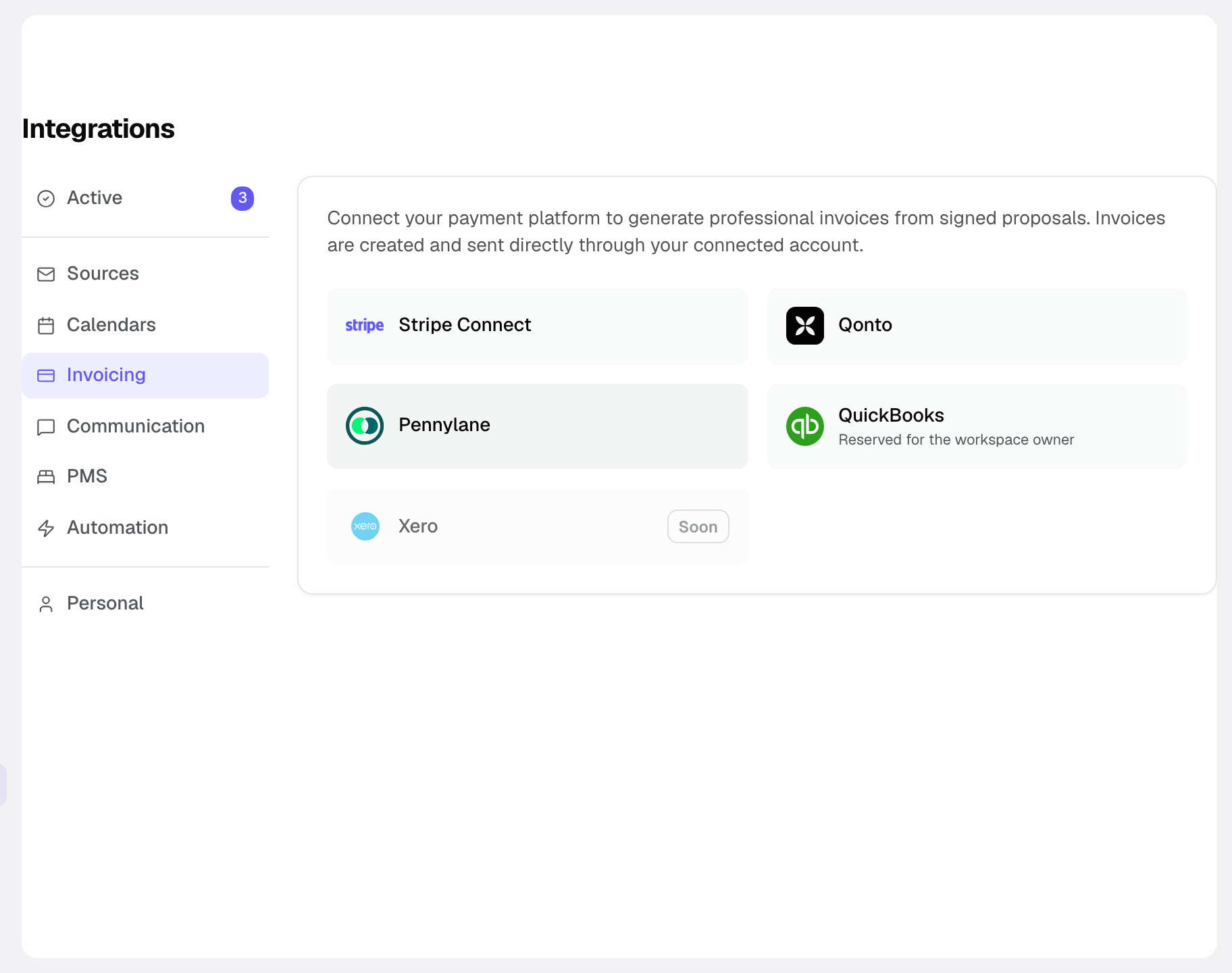
- Go to Settings then Integrations, Invoicing tab. This is where the payment and invoicing options live.
- Click the Stripe Connect card and authorize the connection. You are redirected to Stripe: sign in to your existing account or create one on the fly.
- Once connected, the card shows Active. The gear opens Stripe Settings: Payments enabled when the account can collect, Setup required until you finish your account at Stripe, and Open Stripe Dashboard.
Collect a payment
Once Stripe is connected, collecting a payment comes down to three moves: generate the invoice, let the client pay, track the status. Here is the flow.
- At the top of a signed or accepted quote, click Invoice, then Create deposit or Invoice the full amount. Once the deposit is issued, the button becomes Create balance.
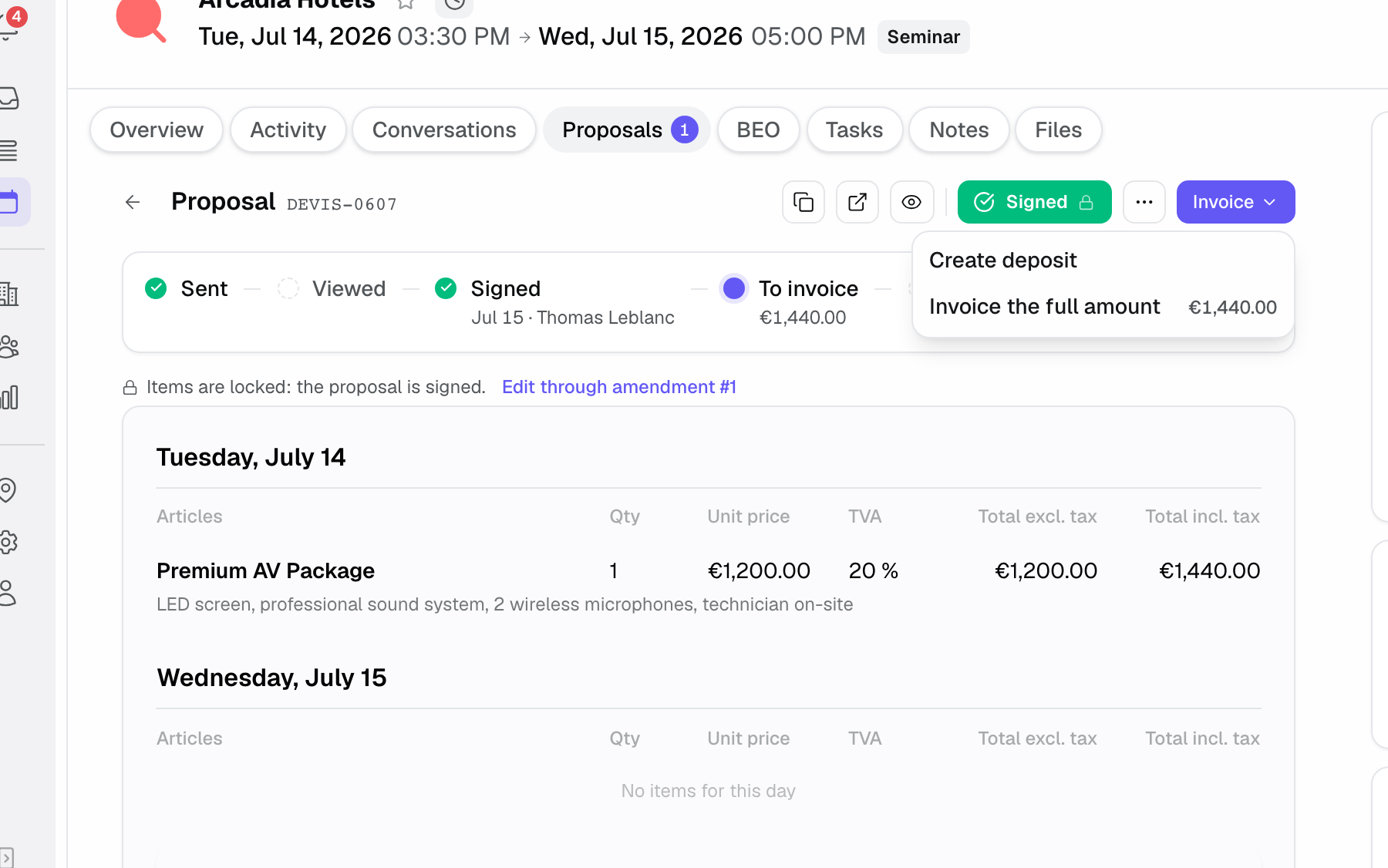
- In the window that opens, pick Stripe under Issue via if other channels are available (invoice issued by Joinways, Qonto, QuickBooks). The balance is always issued on the same channel as the deposit. Generate & send has Stripe email the invoice to the client; Generate only creates it without sending.
- The client pays online via the Pay now button, on the event's public link. They don't need a Joinways account: the link is enough.
- The payment status updates automatically in Joinways. You see in real time what's paid and what's still due.
Reference: invoice types
When you generate a Stripe invoice from a quote, you choose the amount to collect. Three options are available.
Deposit
A portion of the total, collected first to hold the date. This is the typical option at quote signature.
Balance
The remaining amount after a deposit. It's usually collected before the event, once the deposit has already been paid.
Full amount
The total in one go, when you don't need to split the payment.
How it works
The connection relies on Stripe's OAuth authentication: you authorize Joinways once and the link stays active. Joinways never holds your Stripe credentials or your clients' card data.
When you generate an invoice from a quote, Joinways creates it on the Stripe side and shows it on the event's public link. That's where the client finds the Pay now button.
As soon as the payment succeeds on Stripe, the payment status flows back automatically into Joinways. You track payments received without going to check in Stripe.
Edge cases
Two-step payment: you can collect a deposit at signature, then generate a second invoice for the balance before the event.
Unsigned quote: the invoice is generated from a signed or accepted quote. As long as the quote isn't at that status, have it accepted or signed first.
Stripe not connected: without an active connection, no Stripe invoice can be issued and the Pay now button doesn't appear for the client.
Invoice to correct: on the issued invoice, Void invoice cancels it in Stripe as long as it is unpaid; Create credit note issues a partial or full credit note on an issued or paid invoice.
Best practices
- Before sending an invoice, check that Stripe Settings (the card's gear icon) shows Payments enabled.
- Collect a deposit as soon as the quote is signed to hold the date.
- Ask for the balance early enough before the event to give the payment time to succeed.
- Rely on automatic payment tracking rather than checking manually in Stripe.
Troubleshooting
The Pay button doesn't appear
Cause: no Stripe invoice has been generated, or Stripe isn't connected. Solution: the client can only pay once a Stripe invoice has been generated. Check that Stripe is connected and the invoice has been issued.
The Stripe account status doesn't show
Cause: the OAuth authorization wasn't completed. Solution: go back to Settings then Integrations, Invoicing tab, click the Stripe Connect card again and fully authorize the connection.
The payment doesn't show as received
Cause: the client didn't finalize the payment on Stripe. Solution: the status updates automatically once the payment succeeds; check that the client confirmed via the Pay now button on the public link.
Real-world example
A client signs a quote for a wedding. You immediately generate a Stripe deposit invoice; they click Pay now from the public link and pay. The status automatically turns to paid in Joinways. The date is held, with no transfer to reconcile by hand.
Another example
A week before a seminar, you generate a balance invoice from the already accepted quote. The client pays online, the status updates, and you go into the event with the full amount collected: deposit then balance, both tracked in Joinways.
FAQ
Can I ask for a partial deposit?
Yes, you can collect a deposit then the balance later, by generating two successive invoices.
Do I need a Stripe account already?
No, you can create one during the connection. If you already have one, simply connect it through Stripe OAuth.
Does Joinways keep bank data?
No. Joinways does not store bank data; everything goes through Stripe's secure environment.
What do I generate the invoice from?
From a signed or accepted quote: click Invoice at the top of the quote, then Create deposit or Invoice the full amount. The balance is invoiced later with Create balance.
How does the client pay?
Online, via the Pay now button on the event's public link. They need no Joinways account.
Does the payment status update on its own?
Yes, the payment status updates automatically in Joinways once the payment succeeds on Stripe.
Why can't the client see the Pay now button?
Because the client can only pay once a Stripe invoice has been generated. Check that Stripe is connected and the invoice has been issued.
See also
- Invoicing
- Billing settings
- E-signature
Bring every event inquiry into one queue.